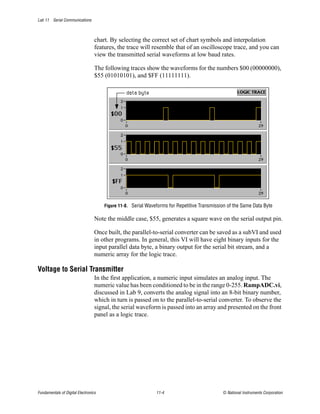
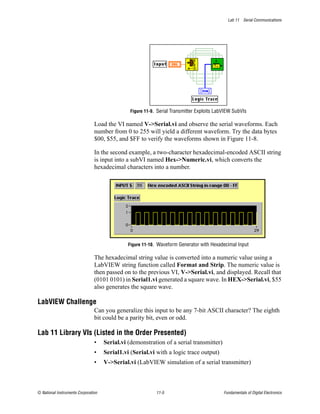
Fundamentals of
                                                Digital Electronics
                                                by Professor Barry Paton
                                                Dalhousie University


March 1998 Edition
Part Number 321948A-01


Fundamentals of Digital Electronics


Copyright
Copyright © 1998 by National Instruments Corporation, 6504 Bridge Point Parkway, Austin, Texas 78730-5039.
Universities, colleges, and other educational institutions may reproduce all or part of this publication for educational use. For all
other uses, this publication may not be reproduced or transmitted in any form, electronic or mechanical, including photocopying,
recording, storing in an information retrieval system, or translating, in whole or in part, without the prior written consent of
National Instruments Corporation.

Trademarks
LabVIEW™ and The Software is the Instrument™ are trademarks of National Instruments Corporation.
Product and company names listed are trademarks or trade names of their respective companies.
For More Information
If you have any questions or comments regarding this course manual, please see the following
web site: http://sensor.phys.dal.ca/Digital Electronics/.


International Offices
Australia 03 9879 5166, Austria 0662 45 79 90 0, Belgium 02 757 00 20, Brazil 011 288 3336, Canada (Ontario) 905 785 0085,
Canada (Québec) 514 694 8521, Denmark 45 76 26 00, Finland 09 725 725 11, France 01 48 14 24 24, Germany 089 741 31 30,
Hong Kong 2645 3186, Israel 03 6120092, Italy 02 413091, Japan 03 5472 2970, Korea 02 596 7456, Mexico 5 520 2635,
Netherlands 0348 433466, Norway 32 84 84 00, Singapore 2265886, Spain 91 640 0085, Sweden 08 730 49 70,
Switzerland 056 200 51 51, Taiwan 02 377 1200, United Kingdom 01635 523545

National Instruments Corporate Headquarters
6504 Bridge Point Parkway Austin, Texas 78730-5039      Tel: 512 794 0100
Contents

Introduction

Lab 1
Gates
                     The AND Gate...............................................................................................1-1
                     The OR and XOR Gates ................................................................................1-2
                     Negation.........................................................................................................1-2
                     The NAND, NOR, and NXOR Gates............................................................1-2
                     Building Gates from Other Gates ..................................................................1-3
                     Gates with More than Two Inputs .................................................................1-4
                     Masking .........................................................................................................1-5
                     Application: Data Selector.............................................................................1-6
                     Name that Gate ..............................................................................................1-6
                     Lab 1 Library VIs ..........................................................................................1-6

Lab 2
Encoders and Decoders
                     The Die ..........................................................................................................2-2
                     Modulo 6 Counter..........................................................................................2-3
                     Encode ...........................................................................................................2-4
                     Virtual Dice ...................................................................................................2-5
                     Lab 2 Library VIs ..........................................................................................2-6

Lab 3
Binary Addition
                     Adder Expansion (Half Adder, Full Adders).................................................3-3
                     Binary Coded Decimal (BCD).......................................................................3-5
                     LabVIEW Challenge .....................................................................................3-6
                     Lab 3 Library VIs ..........................................................................................3-6


© National Instruments Corporation                                    iii                                    Fundamentals of Digital Electronics
Contents


Lab 4
Memory: The D-Latch
                      Shift Registers................................................................................................4-2
                      LabVIEW Challenge: The Bucket Brigade ...................................................4-4
                      Ring Counters ................................................................................................4-4
                      Lab 4 Library VIs ..........................................................................................4-5

Lab 5
Pseudo-Random Number Generators
                      A 6-Bit Pseudo-Random Number Generator.................................................5-1
                      An 8-Bit Pseudo-Random Sequencer ............................................................5-2
                      8-Bit Pseudo-Random Number Generator.....................................................5-5
                      Encryption of Digital Data.............................................................................5-6
                      Lab 5 Library VIs ..........................................................................................5-7

Lab 6
JK Master-Slave Flip-Flop
                      Binary Counters (1-Bit, 2-Bit, and 4-Bit) ......................................................6-3
                      8-Bit Binary Counter (with and without Reset).............................................6-5
                      Summary ........................................................................................................6-5
                      Lab 6 Library VIs ..........................................................................................6-6

Lab 7
Digital-to-Analog Converter
                      What is a DAC? .............................................................................................7-1
                      ALU Simulator ..............................................................................................7-3
                      Simulating a Real DAC Chip.........................................................................7-4
                      Waveform Generators....................................................................................7-5
                      Special DACs.................................................................................................7-6
                      Lissajous Figures ...........................................................................................7-7
                      Lab 7 Library VIs ..........................................................................................7-8
Lab 8
Analog-to-Digital Converters, Part I
                      Purpose of the Analog-to-Digital Converter..................................................8-1
                      The Ramp ADC .............................................................................................8-2
                      Tracking ADC................................................................................................8-4
                      Lab 8 Library VIs ..........................................................................................8-6

Lab 9
Analog-to-Digital Converters, Part II
                      SAR Simulation .............................................................................................9-3
                      Summary ........................................................................................................9-4
                      Lab 9 Library VIs ..........................................................................................9-4


Fundamentals of Digital Electronics                                   iv                                   © National Instruments Corporation
Contents


Lab 10
Seven-Segment Digital Displays
                     Seven-Segment Display .................................................................................10-1
                     Lab 10 Library VIs ........................................................................................10-5

Lab 11
Serial Communications
                     Serial Transmitter ..........................................................................................11-2
                     Voltage to Serial Transmitter.........................................................................11-4
                     Lab 11 Library VIs ........................................................................................11-5

Lab 12
Central Processing Unit
                     Operation of the Arithmetic and Logic Unit..................................................12-2
                     The Accumulator ...........................................................................................12-3
                     Addition .........................................................................................................12-4
                     Binary Counter...............................................................................................12-5
                     Lab 12 Library VIs ........................................................................................12-6


© National Instruments Corporation                                    v                                     Fundamentals of Digital Electronics
Introduction

                                Digital electronics is one of the fundamental courses found in all electrical
                                engineering and most science programs. The great variety of LabVIEW
                                Boolean and numeric controls/indicators, together with the wealth of
                                programming structures and functions, make LabVIEW an excellent tool to
                                visualize and demonstrate many of the fundamental concepts of digital
                                electronics. The inherent modularity of LabVIEW is exploited in the same
                                way that complex digital integrated circuits are built from circuits of less
                                complexity, which in turn are built from fundamental gates. This manual
                                is designed as a teaching resource to be used in the classroom as
                                demonstrations, in tutorial sessions as collaborative studies, or in the
                                laboratory as interactive exercises.
                                The order of the labs follows most electronic textbooks. The first six labs
                                cover the fundamental circuits of gates, encoders, binary addition,
                                D-latches, ring counters, and JK flip-flops. Many of the VIs are suitable for
                                both classroom demonstration and laboratory exploration.
                                The second set of six labs cover advanced topics such as DACs, ADCs,
                                seven-segment displays, serial communication, and the CPU. These are best
                                done in the context of a digital electronics lab, comparing the LabVIEW
                                simulations with real integrated circuits. In each case, you can enhance
                                simulations presented in the text by using a National Instruments DAQ
                                board to interact with the real world through LabVIEW digital I/O, analog
                                out, analog in, and serial VIs.
                                Labs 2, 5, and 12 are application oriented and are designed to demonstrate
                                encoding schemes, digital encryption, and the operation of a CPU. These
                                labs could be presented as challenging problems in a tutorial setting or in a
                                workshop environment.
                                The labs can also be grouped to demonstrate special relationships of
                                advanced devices on certain basic gates. For example, the CPU operation is
                                dependent on the concept of registers and two input operations.
                                This manual includes a complete set of LabVIEW VIs. The text is also
                                included on the CD so that you can customize the material.


© National Instruments Corporation                        I-1                        Fundamentals of Digital Electronics
Lab 1
Gates

                                Gates are the fundamental building blocks of digital logic circuitry. These
                                devices function by “opening” or “closing” to admit or reject the passage of
                                a logical signal. From only a handful of basic gate types (AND, OR, XOR,
                                and NOT), a vast array of gating functions can be created.

The AND Gate
                                A basic AND gate consists of two inputs and an output. If the two inputs
                                are A and B, the output (often called Q) is “on” only if both A and B are
                                also “on.”

                                In digital electronics, the on state is often represented by a 1 and the off state
                                by a 0. The relationship between the input signals and the output signals is
                                often summarized in a truth table, which is a tabulation of all possible inputs
                                and the resulting outputs. For the AND gate, there are four possible
                                combinations of input states: A=0, B=0; A=0, B=1; A=1, B=0; and A=1, B=1.
                                In the following truth table, these are listed in the left and middle columns.
                                The AND gate output is listed in the right column.

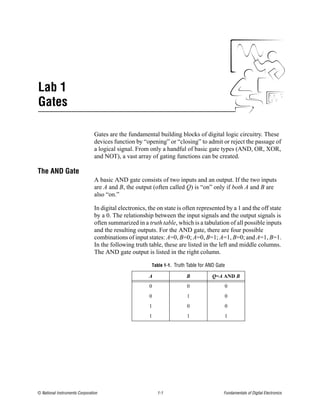
                                                         Table 1-1. Truth Table for AND Gate

                                                       A                 B           Q=A AND B
                                                        0                0                 0
                                                        0                1                 0
                                                        1                0                 0
                                                        1                1                 1


© National Instruments Corporation                          1-1                            Fundamentals of Digital Electronics
Lab 1 Gates


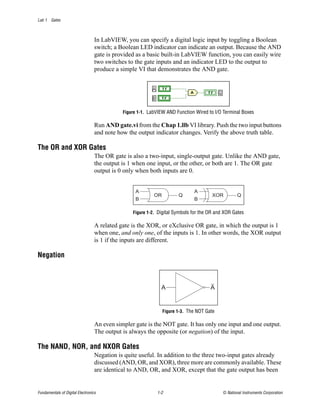
                                  In LabVIEW, you can specify a digital logic input by toggling a Boolean
                                  switch; a Boolean LED indicator can indicate an output. Because the AND
                                  gate is provided as a basic built-in LabVIEW function, you can easily wire
                                  two switches to the gate inputs and an indicator LED to the output to
                                  produce a simple VI that demonstrates the AND gate.


                                             Figure 1-1. LabVIEW AND Function Wired to I/O Terminal Boxes

                                  Run AND gate.vi from the Chap 1.llb VI library. Push the two input buttons
                                  and note how the output indicator changes. Verify the above truth table.

The OR and XOR Gates
                                  The OR gate is also a two-input, single-output gate. Unlike the AND gate,
                                  the output is 1 when one input, or the other, or both are 1. The OR gate
                                  output is 0 only when both inputs are 0.


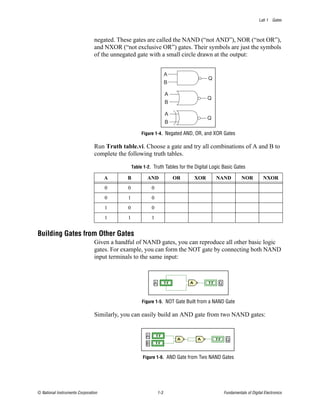
                                                  A                           A
                                                           OR          Q              XOR          Q
                                                  B                           B

                                                 Figure 1-2. Digital Symbols for the OR and XOR Gates

                                  A related gate is the XOR, or eXclusive OR gate, in which the output is 1
                                  when one, and only one, of the inputs is 1. In other words, the XOR output
                                  is 1 if the inputs are different.

Negation


                                                              A                       A


                                                                Figure 1-3. The NOT Gate

                                  An even simpler gate is the NOT gate. It has only one input and one output.
                                  The output is always the opposite (or negation) of the input.

The NAND, NOR, and NXOR Gates
                                  Negation is quite useful. In addition to the three two-input gates already
                                  discussed (AND, OR, and XOR), three more are commonly available. These
                                  are identical to AND, OR, and XOR, except that the gate output has been


Fundamentals of Digital Electronics                         1-2                            © National Instruments Corporation
Lab 1 Gates


                                negated. These gates are called the NAND (“not AND”), NOR (“not OR”),
                                and NXOR (“not exclusive OR”) gates. Their symbols are just the symbols
                                of the unnegated gate with a small circle drawn at the output:


                                                                     A
                                                                                       Q
                                                                     B

                                                                     A
                                                                                       Q
                                                                     B

                                                                     A
                                                                                       Q
                                                                     B

                                                      Figure 1-4. Negated AND, OR, and XOR Gates

                                Run Truth table.vi. Choose a gate and try all combinations of A and B to
                                complete the following truth tables.

                                                 Table 1-2. Truth Tables for the Digital Logic Basic Gates

                                     A       B           AND             OR     XOR        NAND          NOR          NXOR
                                     0       0             0
                                     0       1             0
                                     1       0             0
                                     1       1             1


Building Gates from Other Gates
                                Given a handful of NAND gates, you can reproduce all other basic logic
                                gates. For example, you can form the NOT gate by connecting both NAND
                                input terminals to the same input:


                                                      Figure 1-5. NOT Gate Built from a NAND Gate

                                Similarly, you can easily build an AND gate from two NAND gates:


                                                      Figure 1-6. AND Gate from Two NAND Gates


© National Instruments Corporation                             1-3                             Fundamentals of Digital Electronics
Lab 1 Gates


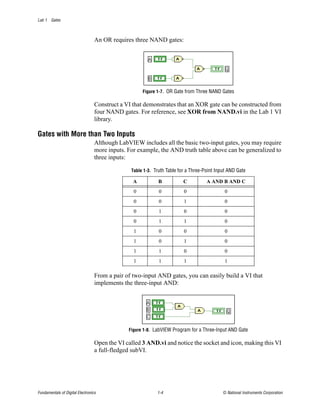
                                  An OR requires three NAND gates:


                                                     Figure 1-7. OR Gate from Three NAND Gates

                                  Construct a VI that demonstrates that an XOR gate can be constructed from
                                  four NAND gates. For reference, see XOR from NAND.vi in the Lab 1 VI
                                  library.

Gates with More than Two Inputs
                                  Although LabVIEW includes all the basic two-input gates, you may require
                                  more inputs. For example, the AND truth table above can be generalized to
                                  three inputs:

                                                Table 1-3. Truth Table for a Three-Point Input AND Gate

                                                 A           B           C          A AND B AND C
                                                 0           0           0                   0
                                                 0           0           1                   0
                                                 0           1           0                   0
                                                 0           1           1                   0
                                                 1           0           0                   0
                                                 1           0           1                   0
                                                 1           1           0                   0
                                                 1           1           1                   1

                                  From a pair of two-input AND gates, you can easily build a VI that
                                  implements the three-input AND:


                                               Figure 1-8. LabVIEW Program for a Three-Input AND Gate

                                  Open the VI called 3 AND.vi and notice the socket and icon, making this VI
                                  a full-fledged subVI.


Fundamentals of Digital Electronics                         1-4                             © National Instruments Corporation
Lab 1 Gates


Masking
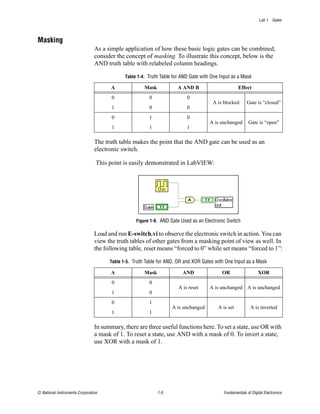
                                As a simple application of how these basic logic gates can be combined,
                                consider the concept of masking. To illustrate this concept, below is the
                                AND truth table with relabeled column headings.

                                             Table 1-4. Truth Table for AND Gate with One Input as a Mask

                                       A              Mask           A AND B                        Effect
                                       0                0                 0
                                                                                      A is blocked      Gate is “closed”
                                       1                0                 0
                                       0                1                 0
                                                                                     A is unchanged      Gate is “open”
                                       1                1                 1

                                The truth table makes the point that the AND gate can be used as an
                                electronic switch.

                                 This point is easily demonstrated in LabVIEW:


                                                  Figure 1-9. AND Gate Used as an Electronic Switch

                                Load and run E-switch.vi to observe the electronic switch in action. You can
                                view the truth tables of other gates from a masking point of view as well. In
                                the following table, reset means “forced to 0” while set means “forced to 1”:

                                      Table 1-5. Truth Table for AND, OR and XOR Gates with One Input as a Mask

                                       A              Mask              AND                OR                  XOR
                                       0                0
                                                                      A is reset     A is unchanged A is unchanged
                                       1                0
                                       0                1
                                                                   A is unchanged        A is set          A is inverted
                                       1                1

                                In summary, there are three useful functions here. To set a state, use OR with
                                a mask of 1. To reset a state, use AND with a mask of 0. To invert a state,
                                use XOR with a mask of 1.


© National Instruments Corporation                           1-5                           Fundamentals of Digital Electronics
Lab 1 Gates


Application: Data Selector
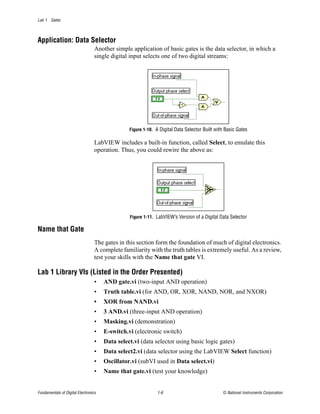
                                  Another simple application of basic gates is the data selector, in which a
                                  single digital input selects one of two digital streams:


                                                Figure 1-10. A Digital Data Selector Built with Basic Gates

                                  LabVIEW includes a built-in function, called Select, to emulate this
                                  operation. Thus, you could rewire the above as:


                                                Figure 1-11. LabVIEW’s Version of a Digital Data Selector

Name that Gate
                                  The gates in this section form the foundation of much of digital electronics.
                                  A complete familiarity with the truth tables is extremely useful. As a review,
                                  test your skills with the Name that gate VI.

Lab 1 Library VIs (Listed in the Order Presented)
                                  •   AND gate.vi (two-input AND operation)
                                  •   Truth table.vi (for AND, OR, XOR, NAND, NOR, and NXOR)
                                  •   XOR from NAND.vi
                                  •   3 AND.vi (three-input AND operation)
                                  •   Masking.vi (demonstration)
                                  •   E-switch.vi (electronic switch)
                                  •   Data select.vi (data selector using basic logic gates)
                                  •   Data select2.vi (data selector using the LabVIEW Select function)
                                  •   Oscillator.vi (subVI used in Data select.vi)
                                  •   Name that gate.vi (test your knowledge)


Fundamentals of Digital Electronics                          1-6                              © National Instruments Corporation
Lab 2
Encoders and Decoders

                                An encoder converts an input device state into a binary representation of
                                ones or zeros. Consider a rotary switch with 10 positions used to input the
                                numbers 0 through 9. Each switch position is to be encoded by a unique
                                binary sequence. For example, switch position 7 might be encoded as 0111.
                                A decoder performs the opposite conversion, from binary codes into output
                                codes.

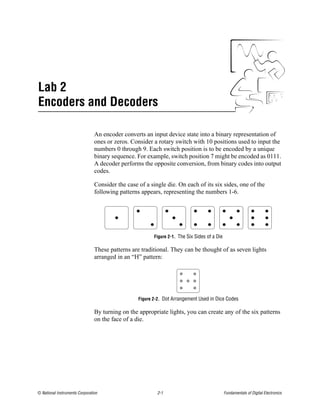
                                Consider the case of a single die. On each of its six sides, one of the
                                following patterns appears, representing the numbers 1-6.


                                                         Figure 2-1. The Six Sides of a Die

                                These patterns are traditional. They can be thought of as seven lights
                                arranged in an “H” pattern:


                                                  Figure 2-2. Dot Arrangement Used in Dice Codes

                                By turning on the appropriate lights, you can create any of the six patterns
                                on the face of a die.


© National Instruments Corporation                        2-1                                 Fundamentals of Digital Electronics
Lab 2 Encoders and Decoders


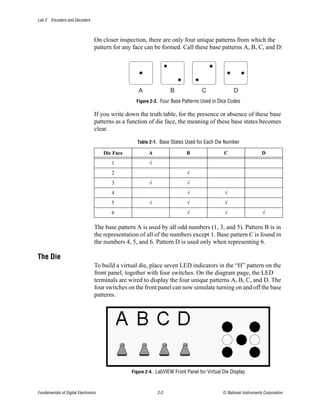
                                  On closer inspection, there are only four unique patterns from which the
                                  pattern for any face can be formed. Call these base patterns A, B, C, and D:


                                                    A              B               C               D
                                                   Figure 2-3. Four Base Patterns Used in Dice Codes

                                  If you write down the truth table, for the presence or absence of these base
                                  patterns as a function of die face, the meaning of these base states becomes
                                  clear.

                                                   Table 2-1. Base States Used for Each Die Number

                                      Die Face           A                 B                 C                     D
                                         1               √
                                         2                                 √
                                         3               √                 √
                                         4                                 √                  √
                                         5               √                 √                  √
                                         6                                 √                  √                    √

                                  The base pattern A is used by all odd numbers (1, 3, and 5). Pattern B is in
                                  the representation of all of the numbers except 1. Base pattern C is found in
                                  the numbers 4, 5, and 6. Pattern D is used only when representing 6.

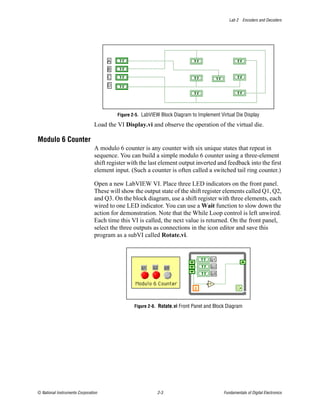
The Die
                                  To build a virtual die, place seven LED indicators in the “H” pattern on the
                                  front panel, together with four switches. On the diagram page, the LED
                                  terminals are wired to display the four unique patterns A, B, C, and D. The
                                  four switches on the front panel can now simulate turning on and off the base
                                  patterns.


                                                 Figure 2-4. LabVIEW Front Panel for Virtual Die Display


Fundamentals of Digital Electronics                          2-2                             © National Instruments Corporation
Lab 2 Encoders and Decoders


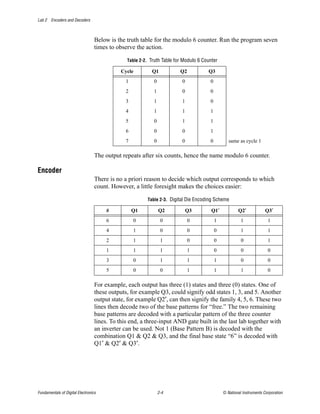
                                         Figure 2-5. LabVIEW Block Diagram to Implement Virtual Die Display

                                Load the VI Display.vi and observe the operation of the virtual die.

Modulo 6 Counter
                                A modulo 6 counter is any counter with six unique states that repeat in
                                sequence. You can build a simple modulo 6 counter using a three-element
                                shift register with the last element output inverted and feedback into the first
                                element input. (Such a counter is often called a switched tail ring counter.)

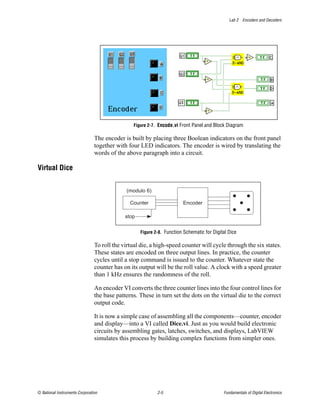
                                Open a new LabVIEW VI. Place three LED indicators on the front panel.
                                These will show the output state of the shift register elements called Q1, Q2,
                                and Q3. On the block diagram, use a shift register with three elements, each
                                wired to one LED indicator. You can use a Wait function to slow down the
                                action for demonstration. Note that the While Loop control is left unwired.
                                Each time this VI is called, the next value is returned. On the front panel,
                                select the three outputs as connections in the icon editor and save this
                                program as a subVI called Rotate.vi.


                                                 Figure 2-6. Rotate.vi Front Panel and Block Diagram


© National Instruments Corporation                         2-3                             Fundamentals of Digital Electronics
Lab 2 Encoders and Decoders


                                  Below is the truth table for the modulo 6 counter. Run the program seven
                                  times to observe the action.

                                               Table 2-2. Truth Table for Modulo 6 Counter

                                             Cycle        Q1            Q2           Q3
                                               1           0             0            0
                                               2           1             0            0
                                               3           1             1            0
                                               4           1             1            1
                                               5           0             1            1
                                               6           0             0            1
                                               7           0             0            0          same as cycle 1

                                  The output repeats after six counts, hence the name modulo 6 counter.

Encoder
                                  There is no a priori reason to decide which output corresponds to which
                                  count. However, a little foresight makes the choices easier:

                                                        Table 2-3. Digital Die Encoding Scheme

                                       #           Q1          Q2            Q3        Q1′            Q2′             Q3′
                                       6           0            0            0            1             1              1
                                       4           1            0            0            0             1              1
                                       2           1            1            0            0             0              1
                                       1           1            1            1            0             0              0
                                       3           0            1            1            1             0              0
                                       5           0            0            1            1             1              0

                                  For example, each output has three (1) states and three (0) states. One of
                                  these outputs, for example Q3, could signify odd states 1, 3, and 5. Another
                                  output state, for example Q2′, can then signify the family 4, 5, 6. These two
                                  lines then decode two of the base patterns for “free.” The two remaining
                                  base patterns are decoded with a particular pattern of the three counter
                                  lines. To this end, a three-input AND gate built in the last lab together with
                                  an inverter can be used. Not 1 (Base Pattern B) is decoded with the
                                  combination Q1 & Q2 & Q3, and the final base state “6” is decoded with
                                  Q1′ & Q2′ & Q3′.


Fundamentals of Digital Electronics                            2-4                            © National Instruments Corporation
Lab 2 Encoders and Decoders


                                                Figure 2-7. Encode.vi Front Panel and Block Diagram

                                The encoder is built by placing three Boolean indicators on the front panel
                                together with four LED indicators. The encoder is wired by translating the
                                words of the above paragraph into a circuit.

Virtual Dice


                                             (modulo 6)

                                               Counter                  Encoder

                                             stop


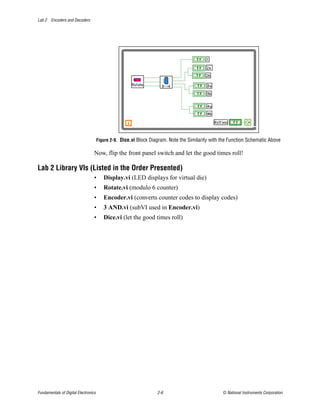
                                                    Figure 2-8. Function Schematic for Digital Dice

                                To roll the virtual die, a high-speed counter will cycle through the six states.
                                These states are encoded on three output lines. In practice, the counter
                                cycles until a stop command is issued to the counter. Whatever state the
                                counter has on its output will be the roll value. A clock with a speed greater
                                than 1 kHz ensures the randomness of the roll.

                                An encoder VI converts the three counter lines into the four control lines for
                                the base patterns. These in turn set the dots on the virtual die to the correct
                                output code.

                                It is now a simple case of assembling all the components—counter, encoder
                                and display—into a VI called Dice.vi. Just as you would build electronic
                                circuits by assembling gates, latches, switches, and displays, LabVIEW
                                simulates this process by building complex functions from simpler ones.


© National Instruments Corporation                          2-5                             Fundamentals of Digital Electronics
Lab 2 Encoders and Decoders


                                      Figure 2-9. Dice.vi Block Diagram. Note the Similarity with the Function Schematic Above

                                  Now, flip the front panel switch and let the good times roll!

Lab 2 Library VIs (Listed in the Order Presented)
                                  •      Display.vi (LED displays for virtual die)
                                  •      Rotate.vi (modulo 6 counter)
                                  •      Encoder.vi (converts counter codes to display codes)
                                  •      3 AND.vi (subVI used in Encoder.vi)
                                  •      Dice.vi (let the good times roll)


Fundamentals of Digital Electronics                                2-6                            © National Instruments Corporation
Lab 3
Binary Addition

                                Before proceeding with this lab, it is helpful to review some details of binary
                                addition. Just as in decimal addition, adding 0 to any value leaves
                                that number unchanged: 0 + 0 = 0, while 1 + 0 = 1. However, when you add
                                1 + 1 in binary addition, the result is not “2” (a symbol which does not exist
                                in the binary number system), but “10”; a “1” in the “twos place” and a zero
                                in the “ones place.” If you write this addition vertically, you would recite,
                                “One and one are two; write down the zero, carry the one”:
                                                                        1
                                                                       +1
                                                                       10
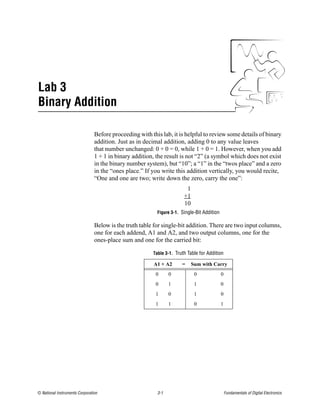
                                                          Figure 3-1. Single-Bit Addition

                                Below is the truth table for single-bit addition. There are two input columns,
                                one for each addend, A1 and A2, and two output columns, one for the
                                ones-place sum and one for the carried bit:

                                                        Table 3-1. Truth Table for Addition

                                                         A1 + A2      =     Sum with Carry
                                                         0      0            0              0
                                                         0      1            1              0
                                                         1      0            1              0
                                                         1      1            0              1


© National Instruments Corporation                        3-1                                   Fundamentals of Digital Electronics
Lab 3 Binary Addition


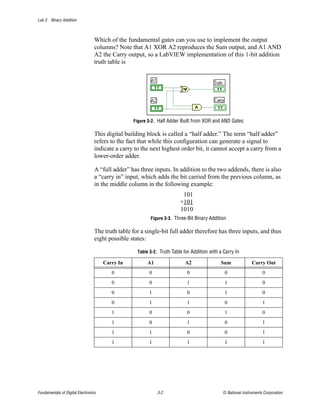
                                  Which of the fundamental gates can you use to implement the output
                                  columns? Note that A1 XOR A2 reproduces the Sum output, and A1 AND
                                  A2 the Carry output, so a LabVIEW implementation of this 1-bit addition
                                  truth table is


                                                  Figure 3-2. Half Adder Built from XOR and AND Gates

                                  This digital building block is called a “half adder.” The term “half adder”
                                  refers to the fact that while this configuration can generate a signal to
                                  indicate a carry to the next highest order bit, it cannot accept a carry from a
                                  lower-order adder.

                                  A “full adder” has three inputs. In addition to the two addends, there is also
                                  a “carry in” input, which adds the bit carried from the previous column, as
                                  in the middle column in the following example:
                                                                          101
                                                                         +101
                                                                         1010
                                                          Figure 3-3. Three-Bit Binary Addition

                                  The truth table for a single-bit full adder therefore has three inputs, and thus
                                  eight possible states:

                                                    Table 3-2. Truth Table for Addition with a Carry In

                                      Carry In           A1                A2                Sum              Carry Out
                                         0               0                  0                  0                    0
                                         0               0                  1                  1                    0
                                         0               1                  0                  1                    0
                                         0               1                  1                  0                    1
                                         1               0                  0                  1                    0
                                         1               0                  1                  0                    1
                                         1               1                  0                  0                    1
                                         1               1                  1                  1                    1


Fundamentals of Digital Electronics                           3-2                             © National Instruments Corporation
Lab 3 Binary Addition


                                Note that all three inputs are essentially equivalent; the full adder simply
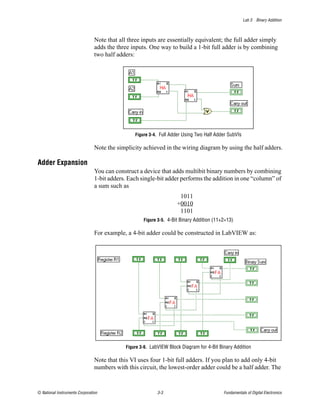
                                adds the three inputs. One way to build a 1-bit full adder is by combining
                                two half adders:


                                                 Figure 3-4. Full Adder Using Two Half Adder SubVIs

                                Note the simplicity achieved in the wiring diagram by using the half adders.

Adder Expansion
                                You can construct a device that adds multibit binary numbers by combining
                                1-bit adders. Each single-bit adder performs the addition in one “column” of
                                a sum such as
                                                                      1011
                                                                     +0010
                                                                      1101
                                                     Figure 3-5. 4-Bit Binary Addition (11+2=13)

                                For example, a 4-bit adder could be constructed in LabVIEW as:


                                             Figure 3-6. LabVIEW Block Diagram for 4-Bit Binary Addition

                                Note that this VI uses four 1-bit full adders. If you plan to add only 4-bit
                                numbers with this circuit, the lowest-order adder could be a half adder. The


© National Instruments Corporation                         3-3                             Fundamentals of Digital Electronics
Lab 3 Binary Addition


                                  use of all full adders allows the 4-bit adder to have a carry-in input, as well
                                  as the two 4-bit addend inputs. Load Four-bit Adder1.vi and observe the
                                  addition of two 4-bit numbers. It uses two subVIs, Full Adder.vi, shown in
                                  Figure 3-4, and Half Adder.vi, shown in Figure 3-2.

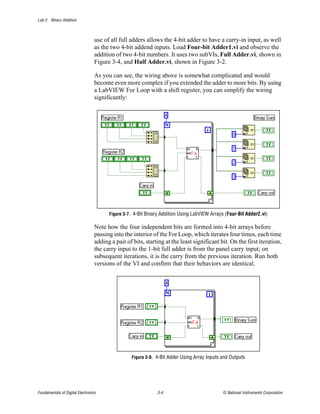
                                  As you can see, the wiring above is somewhat complicated and would
                                  become even more complex if you extended the adder to more bits. By using
                                  a LabVIEW For Loop with a shift register, you can simplify the wiring
                                  significantly:


                                        Figure 3-7. 4-Bit Binary Addition Using LabVIEW Arrays (Four-Bit Adder2.vi)

                                  Note how the four independent bits are formed into 4-bit arrays before
                                  passing into the interior of the For Loop, which iterates four times, each time
                                  adding a pair of bits, starting at the least significant bit. On the first iteration,
                                  the carry input to the 1-bit full adder is from the panel carry input; on
                                  subsequent iterations, it is the carry from the previous iteration. Run both
                                  versions of the VI and confirm that their behaviors are identical.


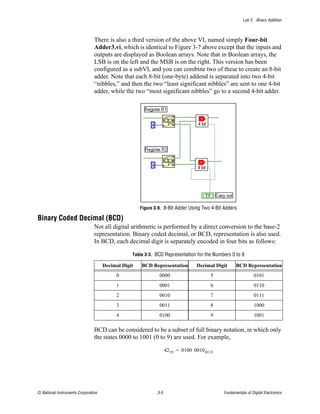
                                                   Figure 3-8. 4-Bit Adder Using Array Inputs and Outputs


Fundamentals of Digital Electronics                            3-4                            © National Instruments Corporation
Lab 3 Binary Addition


                                There is also a third version of the above VI, named simply Four-bit
                                Adder3.vi, which is identical to Figure 3-7 above except that the inputs and
                                outputs are displayed as Boolean arrays. Note that in Boolean arrays, the
                                LSB is on the left and the MSB is on the right. This version has been
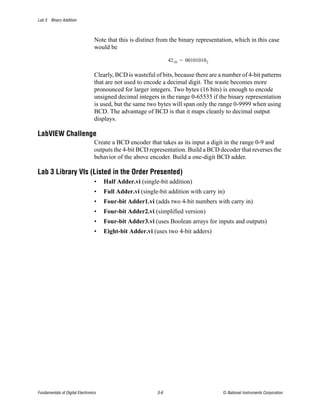
                                configured as a subVI, and you can combine two of these to create an 8-bit
                                adder. Note that each 8-bit (one-byte) addend is separated into two 4-bit
                                “nibbles,” and then the two “least significant nibbles” are sent to one 4-bit
                                adder, while the two “most significant nibbles” go to a second 4-bit adder.


                                                     Figure 3-9. 8-Bit Adder Using Two 4-Bit Adders

Binary Coded Decimal (BCD)
                                Not all digital arithmetic is performed by a direct conversion to the base-2
                                representation. Binary coded decimal, or BCD, representation is also used.
                                In BCD, each decimal digit is separately encoded in four bits as follows:

                                                 Table 3-3. BCD Representation for the Numbers 0 to 9

                                     Decimal Digit   BCD Representation          Decimal Digit     BCD Representation
                                          0                   0000                     5                      0101
                                          1                   0001                     6                      0110
                                          2                   0010                     7                      0111
                                          3                   0011                     8                      1000
                                          4                   0100                     9                      1001

                                BCD can be considered to be a subset of full binary notation, in which only
                                the states 0000 to 1001 (0 to 9) are used. For example,

                                                                   42 10 = 0100 0010 BCD


© National Instruments Corporation                           3-5                            Fundamentals of Digital Electronics
Lab 3 Binary Addition


                                  Note that this is distinct from the binary representation, which in this case
                                  would be

                                                                  42 10 = 00101010 2

                                  Clearly, BCD is wasteful of bits, because there are a number of 4-bit patterns
                                  that are not used to encode a decimal digit. The waste becomes more
                                  pronounced for larger integers. Two bytes (16 bits) is enough to encode
                                  unsigned decimal integers in the range 0-65535 if the binary representation
                                  is used, but the same two bytes will span only the range 0-9999 when using
                                  BCD. The advantage of BCD is that it maps cleanly to decimal output
                                  displays.

LabVIEW Challenge
                                  Create a BCD encoder that takes as its input a digit in the range 0-9 and
                                  outputs the 4-bit BCD representation. Build a BCD decoder that reverses the
                                  behavior of the above encoder. Build a one-digit BCD adder.

Lab 3 Library VIs (Listed in the Order Presented)
                                  •   Half Adder.vi (single-bit addition)
                                  •   Full Adder.vi (single-bit addition with carry in)
                                  •   Four-bit Adder1.vi (adds two 4-bit numbers with carry in)
                                  •   Four-bit Adder2.vi (simplified version)
                                  •   Four-bit Adder3.vi (uses Boolean arrays for inputs and outputs)
                                  •   Eight-bit Adder.vi (uses two 4-bit adders)


Fundamentals of Digital Electronics                         3-6                        © National Instruments Corporation
Lab 4
Memory: The D-Latch

                                In the first three labs in this series, all your work has been with
                                combinational circuits in which the input states completely determine the
                                output states. In the circuits thus far, there is no dependence on past history
                                or how you arrived at the current state. This means that “remembering”
                                cannot be built into the circuits. Most digital operations are sequential, in
                                that event B must occur after event A. Furthermore, in a digital computer,
                                events are not only sequential but also synchronous with some external
                                clock. Clocked logic devices are devices whose output changes only when
                                a clock signal is asserted. In the next few labs, you will see how the addition
                                of clocked logic devices brings memory into digital circuits, making it
                                possible to construct many interesting digital circuits.

                                One simple memory circuit is called the data latch, or D-latch. This is a
                                device which, when “told” to do so via the clock input, notes the state of its
                                input and holds that state at its output. The output state remains unchanged
                                even if the input state changes, until another update request is received.
                                Traditionally, the input of the D-latch is designated by D and the latched
                                output by Q. The update command is provided by asserting the clock input
                                in the form of a transition (from HI to LO) or (from LO to HI), so-called
                                edge-triggered devices or level triggered devices, where the output follows
                                the input whenever the clock is HI.


© National Instruments Corporation                        4-1                         Fundamentals of Digital Electronics
Lab 4 Memory: The D-Latch


                                                  PreSet
                                                                          D   Q Q             Set Clr      Q Q
                                                                          0    0 1             0       0   disallowed
                                              D            Q
                                                                          1    1 0             0       1   1     0
                                                                                               1       0   0     1
                                      Clock                Q           clocked logic           1       1   clocked

                                                   Clr

                                                         Figure 4-1. D-Latch Symbol and Truth Tables

                                  Data present on the input D is passed to the outputs Q and Q when the clock
                                  is asserted. The truth table for an edge-triggered D-latch is shown to the
                                  right of the schematic symbol. Some D-latches also have Preset and Clear
                                  inputs that allow the output to be set HI or LO independent of the clock
                                  signal. In normal operation, these two inputs are pulled high so as not to
                                  interfere with the clocked logic. However, the outputs Q and Q can be
                                  initialized to a known state, using the Preset and Clear inputs when the
                                  clocked logic is not active.


                                                         Figure 4-2. LabVIEW Simulation of a D-Latch

                                  In LabVIEW, you can simulate the D-latch with a shift register added to a
                                  While Loop. The up-arrow block is the D input, and the down-arrow block
                                  is the output Q. The complement is formed with an inverter tied to the Q
                                  output. The clock input is analogous with the loop index [i]. You can use a
                                  Boolean constant outside the loop to preset or clear the output. D Latch.vi,
                                  shown above, uses an unwired conditional terminal to ensure that the
                                  D-latch executes only once when it is called.

Shift Registers
                                  In digital electronics, a shift register is a cascade of 1-bit memories in which
                                  each bit is updated on a clock transition by copying the state of its neighbor.


Fundamentals of Digital Electronics                             4-2                           © National Instruments Corporation
Lab 4 Memory: The D-Latch


                                              Q1                       Q2                  Q3                         Q4


         HI or LO         D          Q              D        Q              D         Q            D          Q


                                     Q                       Q                        Q                       Q

         Clock


                                                   Figure 4-3. 4-Bit Shift Register

                                The bits at the ends have only one neighbor. The input bit D is “fed” from
                                an external source (HI or LO), and the output Q4 spills off the other end of
                                the shift register. Here is an example of a 4-bit shift register whose initial
                                output state is [0000] and input is [1]:

                                     Clock Cycle            Q1                  Q2               Q3                    Q4
                                          n                  0                  0                 0                     0
                                         n+1                 1                  0                 0                     0
                                         n+2                 1                  1                 0                     0
                                         n+3                 1                  1                 1                     0
                                         n+4                 1                  1                 1                     1

                                To “cascade” D-latches as above in LabVIEW, additional elements are
                                added to the D-latch shift register. For example, here is the 4-bit register.
                                Shift.vi executes the above sequence.


                                                      Figure 4-4. Block Diagram for an 8-Bit Shift Register

                                It is a simple matter to add additional elements to simulate larger width shift
                                registers. The following VI, Bucket.vi, simulates a “bucket brigade” where
                                a single bit is introduced on the input D and propagates down the line, where
                                it spills out and is lost after passing Q8.


© National Instruments Corporation                               4-3                             Fundamentals of Digital Electronics
Lab 4 Memory: The D-Latch


                                                    Figure 4-5. Front Panel of an 8-Bit Shift Register Simulation


LabVIEW Challenge
                                  Design a VI in which after the “bucket” passes the last bit, a new bucket is
                                  added at the input D, and the process continues forever.

Ring Counters
                                  If the output of a shift register is “fed” back into the input, after n clock
                                  cycles, the parallel output eventually will repeat and the shift register now
                                  becomes a counter. The name ring counter comes from looping the last
                                  output bit back into the input. A simple 4-bit ring counter takes the last
                                  output, Q4, and loops it back directly to the input of the shift register, D.


                                               Q1                        Q2                  Q3                          Q4


                           D           Q              D       Q               D       Q                D         Q


                                       Q                      Q                       Q                          Q

          Clock


                                      Figure 4-6. 4-Bit Ring Counter Using Integrated Circuit Chips

                                  In the above case, the outputs have been preset to [0110]. Load and run
                                  Rotate.vi. Observe how the outputs cycle from [0110] to [0011] to [1001]
                                  to [1100] and back to [0110]. It takes four clock cycles, hence this counter
                                  is a modulo 4 ring counter. In a special case where these four outputs are
                                  passed to the current drivers of a stepping motor, each change in output
                                  pattern results in the stepping motor advancing one step. A stepping motor
                                  with a 400-step resolution would then rotate 0.9 degrees each time the
                                  counter is called. A slight variation of the ring counter is the switched tail
                                  ring counter. In this case, the complement output Q of the last stage is fed
                                  back into the input. Modify Rotate.vi to make this change and save it as
                                  Switch Tail Ring Counter.vi.


Fundamentals of Digital Electronics                                4-4                                © National Instruments Corporation
Lab 4 Memory: The D-Latch


                                What is the modulus of the switch tail ring counter?

                                Ring counters are often used in situations where events must be repeated at
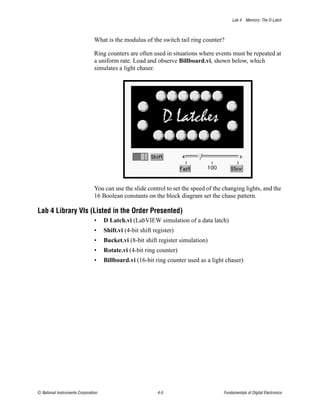
                                a uniform rate. Load and observe Billboard.vi, shown below, which
                                simulates a light chaser.


                                You can use the slide control to set the speed of the changing lights, and the
                                16 Boolean constants on the block diagram set the chase pattern.

Lab 4 Library VIs (Listed in the Order Presented)
                                •    D Latch.vi (LabVIEW simulation of a data latch)
                                •    Shift.vi (4-bit shift register)
                                •    Bucket.vi (8-bit shift register simulation)
                                •    Rotate.vi (4-bit ring counter)
                                •    Billboard.vi (16-bit ring counter used as a light chaser)


© National Instruments Corporation                          4-5                       Fundamentals of Digital Electronics
Lab 4 Memory: The D-Latch


Notes


Fundamentals of Digital Electronics   4-6   © National Instruments Corporation
Lab 5
Pseudo-Random Number
Generators

                                In the last lab, simple ring counters were introduced as a means of building
                                modulo-n counters. In this lab, feedback from a combination of advanced
                                stages is combined and routed back into the input gate. If the correct
                                combination is chosen, the output is of maximal length (that is, the modulus
                                of the counter is 2N-1). For an 8-bit counter, N = 8 and (2N-1) = 255. These
                                circuits, often called pseudo-random number generators (PRNG), have
                                some interesting features. The sequences formed appear to be random over
                                the short range, but in fact the sequence repeats after (2N-1) cycles.
                                Furthermore, each pattern occurs only once during each sequence of (2N-1)
                                numbers.

                                Pseudo-random sequence and number generators have wide applications in
                                computer security, cryptography, audio systems testing, bit error testing, and
                                secure communications.

A 6-Bit Pseudo-Random Number Generator
                                In the following circuit, the outputs of the fifth and sixth D-latches have
                                been exclusive NORed together to become the input to the shift register. It
                                is assumed that initially, all outputs are zero.


                 D        Q          D       Q    D        Q         D       Q    D        Q          D          Q
                      1                  2             3                 4             5                    6
                  C                  C             C                 C             C                    C

                                                                                                                Clock

                               Figure 5-1. 6-Bit PRNG Built from Six D-Latches and an XOR Gate


© National Instruments Corporation                             5-1                             Fundamentals of Digital Electronics
Lab 5 Pseudo-Random Number Generators


                                  When Q5 and Q6 are 0, the output of the NXOR (see Lab 1) is 1. This HI
                                  value is loaded into the shift register at the input D1. On command from the
                                  clock, all bits shift to the right. The initial value of (000000) goes to
                                  (100000). It is easy to work through a few cycles to see the outputs Q1...Q6
                                  follow the sequence:
                                      (000000)
                                      (100000)
                                      (110000)
                                      (111000)
                                      ----------

                                  After 63 cycles, the sequence returns to the initial state (000000).

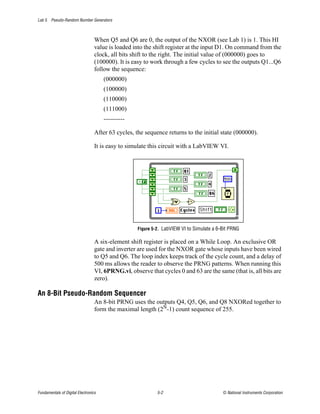
                                  It is easy to simulate this circuit with a LabVIEW VI.


                                                    Figure 5-2. LabVIEW VI to Simulate a 6-Bit PRNG

                                  A six-element shift register is placed on a While Loop. An exclusive OR
                                  gate and inverter are used for the NXOR gate whose inputs have been wired
                                  to Q5 and Q6. The loop index keeps track of the cycle count, and a delay of
                                  500 ms allows the reader to observe the PRNG patterns. When running this
                                  VI, 6PRNG.vi, observe that cycles 0 and 63 are the same (that is, all bits are
                                  zero).

An 8-Bit Pseudo-Random Sequencer
                                  An 8-bit PRNG uses the outputs Q4, Q5, Q6, and Q8 NXORed together to
                                  form the maximal length (2N-1) count sequence of 255.


Fundamentals of Digital Electronics                          5-2                           © National Instruments Corporation
Lab 5 Pseudo-Random Number Generators


                                                 Figure 5-3. LabVIEW Simulation of an 8-Bit PRNG

                                As in the previous example, the parallel output can be observed on eight
                                LED indicators. In addition, a pseudo-random sequence of ones and zeros is
                                produced at Serial Out.

                                Many digital circuits need to be tested with all combinations of ones and
                                zeros. A “random” Boolean sequence of ones and zeros at [Serial Out]
                                provides this feature. In this configuration, the circuit is called a
                                pseudo-random bit sequencer, PRBS. On the front panel of the above VI,
                                PRBS0.vi, you can view the Boolean sequence [Serial Out] on an LED
                                indicator.


                                                     Figure 5-4. Front Panel of the 8-Bit PRBS


© National Instruments Corporation                        5-3                             Fundamentals of Digital Electronics
Lab 5 Pseudo-Random Number Generators


                                  A better way to view the bit sequence is as a bit trace. The Boolean bits are
                                  converted into a numeric value of either 1 or 0 and then plotted on a
                                  LabVIEW chart. Here, the first 50 bits from PRBS.vi are displayed as a
                                  logic trace.


                                             Figure 5-5. Serial Output from the Pseudo-Random Bit Sequencer

                                  Communication lasers are tested using PRBS waveforms. Sometimes a laser
                                  may lock up from a particular sequence of ones and zeros, or a bit level may
                                  be outside specifications. The laser output is detected by a photodiode,
                                  converted into a digital signal, and passed to one side of a digital
                                  comparator. At the same time, the PRBS driving sequence is passed to the
                                  other input of the comparator. Any errors in transmission or lockup can be
                                  flagged.

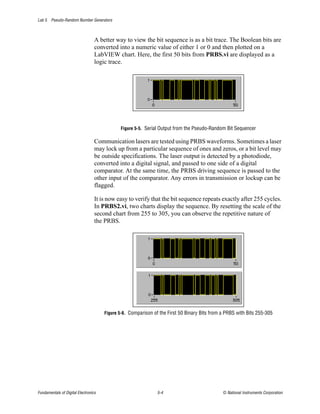
                                  It is now easy to verify that the bit sequence repeats exactly after 255 cycles.
                                  In PRBS2.vi, two charts display the sequence. By resetting the scale of the
                                  second chart from 255 to 305, you can observe the repetitive nature of
                                  the PRBS.


                                      Figure 5-6. Comparison of the First 50 Binary Bits from a PRBS with Bits 255-305


Fundamentals of Digital Electronics                            5-4                            © National Instruments Corporation
Lab 5 Pseudo-Random Number Generators


8-Bit Pseudo-Random Number Generator
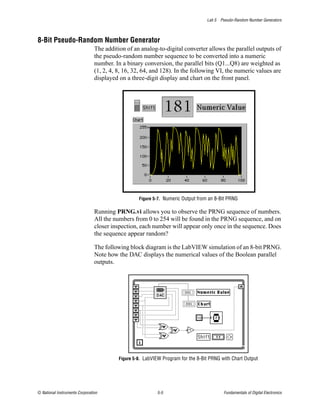
                                The addition of an analog-to-digital converter allows the parallel outputs of
                                the pseudo-random number sequence to be converted into a numeric
                                number. In a binary conversion, the parallel bits (Q1...Q8) are weighted as
                                (1, 2, 4, 8, 16, 32, 64, and 128). In the following VI, the numeric values are
                                displayed on a three-digit display and chart on the front panel.


                                                   Figure 5-7. Numeric Output from an 8-Bit PRNG

                                Running PRNG.vi allows you to observe the PRNG sequence of numbers.
                                All the numbers from 0 to 254 will be found in the PRNG sequence, and on
                                closer inspection, each number will appear only once in the sequence. Does
                                the sequence appear random?

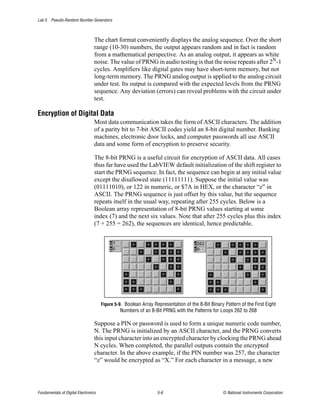
                                The following block diagram is the LabVIEW simulation of an 8-bit PRNG.
                                Note how the DAC displays the numerical values of the Boolean parallel
                                outputs.


                                          Figure 5-8. LabVIEW Program for the 8-Bit PRNG with Chart Output


© National Instruments Corporation                         5-5                            Fundamentals of Digital Electronics
Lab 5 Pseudo-Random Number Generators


                                  The chart format conveniently displays the analog sequence. Over the short
                                  range (10-30) numbers, the output appears random and in fact is random
                                  from a mathematical perspective. As an analog output, it appears as white
                                  noise. The value of PRNG in audio testing is that the noise repeats after 2N-1
                                  cycles. Amplifiers like digital gates may have short-term memory, but not
                                  long-term memory. The PRNG analog output is applied to the analog circuit
                                  under test. Its output is compared with the expected levels from the PRNG
                                  sequence. Any deviation (errors) can reveal problems with the circuit under
                                  test.

Encryption of Digital Data
                                  Most data communication takes the form of ASCII characters. The addition
                                  of a parity bit to 7-bit ASCII codes yield an 8-bit digital number. Banking
                                  machines, electronic door locks, and computer passwords all use ASCII
                                  data and some form of encryption to preserve security.

                                  The 8-bit PRNG is a useful circuit for encryption of ASCII data. All cases
                                  thus far have used the LabVIEW default initialization of the shift register to
                                  start the PRNG sequence. In fact, the sequence can begin at any initial value
                                  except the disallowed state (11111111). Suppose the initial value was
                                  (01111010), or 122 in numeric, or $7A in HEX, or the character “z” in
                                  ASCII. The PRNG sequence is just offset by this value, but the sequence
                                  repeats itself in the usual way, repeating after 255 cycles. Below is a
                                  Boolean array representation of 8-bit PRNG values starting at some
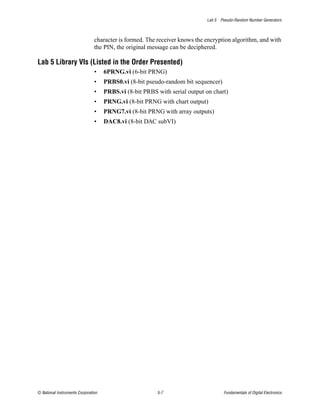
                                  index (7) and the next six values. Note that after 255 cycles plus this index
                                  (7 + 255 = 262), the sequences are identical, hence predictable.


                                      Figure 5-9. Boolean Array Representation of the 8-Bit Binary Pattern of the First Eight
                                               Numbers of an 8-Bit PRNG with the Patterns for Loops 262 to 268

                                  Suppose a PIN or password is used to form a unique numeric code number,
                                  N. The PRNG is initialized by an ASCII character, and the PRNG converts
                                  this input character into an encrypted character by clocking the PRNG ahead
                                  N cycles. When completed, the parallel outputs contain the encrypted
                                  character. In the above example, if the PIN number was 257, the character
                                  “z” would be encrypted as “X.” For each character in a message, a new


Fundamentals of Digital Electronics                               5-6                             © National Instruments Corporation
Lab 5 Pseudo-Random Number Generators


                                character is formed. The receiver knows the encryption algorithm, and with
                                the PIN, the original message can be deciphered.

Lab 5 Library VIs (Listed in the Order Presented)
                                •    6PRNG.vi (6-bit PRNG)
                                •    PRBS0.vi (8-bit pseudo-random bit sequencer)
                                •    PRBS.vi (8-bit PRBS with serial output on chart)
                                •    PRNG.vi (8-bit PRNG with chart output)
                                •    PRNG7.vi (8-bit PRNG with array outputs)
                                •    DAC8.vi (8-bit DAC subVI)


© National Instruments Corporation                       5-7                        Fundamentals of Digital Electronics
Lab 5 Pseudo-Random Number Generators


Notes


Fundamentals of Digital Electronics     5-8   © National Instruments Corporation
Lab 6
JK Master-Slave Flip-Flop

                                One of the most important clocked logic devices is the master-slave JK
                                flip-flop. Unlike the D-latch, which has memory only until another clock
                                pulse comes along, the JK flip-flop has true memory. When the J and K
                                inputs are low, the state of the outputs Q and Q are unchanged on clocking.
                                Thus, information can be placed onto the output bit and held until requested
                                at a future time. The output Q can be clocked low or high by setting the (J,K)
                                inputs to (0,1) or (1,0), respectively. In fact, placing an inverter between J
                                and K inputs results in a D-latch circuit. The schematic diagram for the JK
                                flip-flop and its truth table is shown below. Note that the JK flip-flop can
                                also be Set or Reset with direct logic inputs.

                              Set
                                              clock     J     K         Q Q         Set Clr      Q Q
                                                        0     0         no change    0    0      disallowed
                        J            Q
                                                        0     1         0   1        0    1      1      0
                        clk
                                                        1     0         1   0        1    0      0      1
                        K            Q                  1     1         toggle       1    1      clocked

                                                            clocked logic                direct logic
                              Clr

                                     Figure 6-1. JK Flip-Flop Logic Symbol and Truth Tables

                                The first entry of the clocked truth table is the memory state, while the next
                                two combinations are the latched states. What is new with the JK flip-flop
                                is the fourth combination (1,1), which produces a toggle state. On clocking,
                                the output changes from [1-->0] if 1 or [0-->1] if 0. This complement
                                function is often referred to as bit toggling, and the resulting flip-flop (J and
                                K inputs pulled HI) is called a T flip-flop. Because only one toggle occurs
                                per output cycle, it takes two clock cycles to return the output state to its
                                initial state. Load Binary1.vi and observe the operation of the T-flip-flop on
                                clocking.


© National Instruments Corporation                                6-1                          Fundamentals of Digital Electronics
Lab 6 JK Master-Slave Flip-Flop


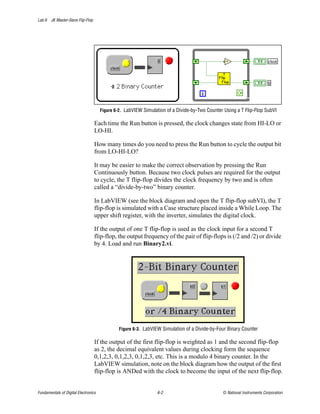
                                      Figure 6-2. LabVIEW Simulation of a Divide-by-Two Counter Using a T Flip-Flop SubVI

                                  Each time the Run button is pressed, the clock changes state from HI-LO or
                                  LO-HI.

                                  How many times do you need to press the Run button to cycle the output bit
                                  from LO-HI-LO?

                                  It may be easier to make the correct observation by pressing the Run
                                  Continuously button. Because two clock pulses are required for the output
                                  to cycle, the T flip-flop divides the clock frequency by two and is often
                                  called a “divide-by-two” binary counter.

                                  In LabVIEW (see the block diagram and open the T flip-flop subVI), the T
                                  flip-flop is simulated with a Case structure placed inside a While Loop. The
                                  upper shift register, with the inverter, simulates the digital clock.

                                  If the output of one T flip-flop is used as the clock input for a second T
                                  flip-flop, the output frequency of the pair of flip-flops is (/2 and /2) or divide
                                  by 4. Load and run Binary2.vi.


                                              Figure 6-3. LabVIEW Simulation of a Divide-by-Four Binary Counter

                                  If the output of the first flip-flop is weighted as 1 and the second flip-flop
                                  as 2, the decimal equivalent values during clocking form the sequence
                                  0,1,2,3, 0,1,2,3, 0,1,2,3, etc. This is a modulo 4 binary counter. In the
                                  LabVIEW simulation, note on the block diagram how the output of the first
                                  flip-flop is ANDed with the clock to become the input of the next flip-flop.


Fundamentals of Digital Electronics                             6-2                            © National Instruments Corporation
Lab 6 JK Master-Slave Flip-Flop


Binary Counters
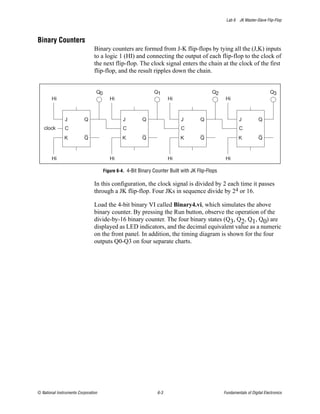
                                Binary counters are formed from J-K flip-flops by tying all the (J,K) inputs
                                to a logic 1 (HI) and connecting the output of each flip-flop to the clock of
                                the next flip-flop. The clock signal enters the chain at the clock of the first
                                flip-flop, and the result ripples down the chain.


                                 Q0                            Q1                           Q2                                Q3
        Hi                               Hi                            Hi                          Hi


               J          Q                    J         Q                  J         Q                    J          Q
   clock       C                               C                            C                              C
               K          Q                    K         Q                  K         Q                   K           Q


        Hi                               Hi                            Hi                          Hi

                                      Figure 6-4. 4-Bit Binary Counter Built with JK Flip-Flops

                                In this configuration, the clock signal is divided by 2 each time it passes
                                through a JK flip-flop. Four JKs in sequence divide by 24 or 16.

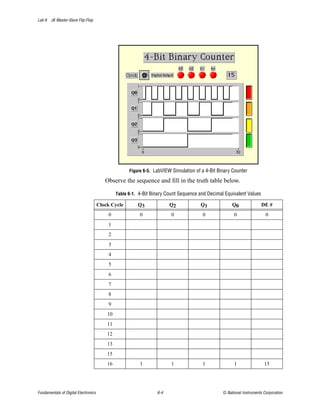
                                Load the 4-bit binary VI called Binary4.vi, which simulates the above
                                binary counter. By pressing the Run button, observe the operation of the
                                divide-by-16 binary counter. The four binary states (Q3, Q2, Q1, Q0) are
                                displayed as LED indicators, and the decimal equivalent value as a numeric
                                on the front panel. In addition, the timing diagram is shown for the four
                                outputs Q0-Q3 on four separate charts.


© National Instruments Corporation                               6-3                              Fundamentals of Digital Electronics
Lab 6 JK Master-Slave Flip-Flop


                                                     Figure 6-5. LabVIEW Simulation of a 4-Bit Binary Counter

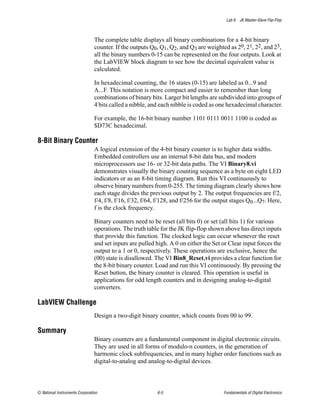
                                         Observe the sequence and fill in the truth table below.

                                               Table 6-1. 4-Bit Binary Count Sequence and Decimal Equivalent Values

                                      Clock Cycle        Q3             Q2            Q1              Q0              DE #
                                          0               0              0             0               0                 0
                                          1
                                          2
                                          3
                                          4
                                          5
                                          6
                                          7
                                          8
                                          9
                                          10
                                          11
                                          12
                                          13
                                          15
                                          16              1              1             1               1                15


Fundamentals of Digital Electronics                               6-4                            © National Instruments Corporation
Lab 6 JK Master-Slave Flip-Flop


                                The complete table displays all binary combinations for a 4-bit binary
                                counter. If the outputs Q0, Q1, Q2, and Q3 are weighted as 20, 21, 22, and 23,
                                all the binary numbers 0-15 can be represented on the four outputs. Look at
                                the LabVIEW block diagram to see how the decimal equivalent value is
                                calculated.

                                In hexadecimal counting, the 16 states (0-15) are labeled as 0...9 and
                                A...F. This notation is more compact and easier to remember than long
                                combinations of binary bits. Larger bit lengths are subdivided into groups of
                                4 bits called a nibble, and each nibble is coded as one hexadecimal character.

                                For example, the 16-bit binary number 1101 0111 0011 1100 is coded as
                                $D73C hexadecimal.

8-Bit Binary Counter
                                A logical extension of the 4-bit binary counter is to higher data widths.
                                Embedded controllers use an internal 8-bit data bus, and modern
                                microprocessors use 16- or 32-bit data paths. The VI Binary8.vi
                                demonstrates visually the binary counting sequence as a byte on eight LED
                                indicators or as an 8-bit timing diagram. Run this VI continuously to
                                observe binary numbers from 0-255. The timing diagram clearly shows how
                                each stage divides the previous output by 2. The output frequencies are f/2,
                                f/4, f/8, f/16, f/32, f/64, f/128, and f/256 for the output stages Q0...Q7. Here,
                                f is the clock frequency.

                                Binary counters need to be reset (all bits 0) or set (all bits 1) for various
                                operations. The truth table for the JK flip-flop shown above has direct inputs
                                that provide this function. The clocked logic can occur whenever the reset
                                and set inputs are pulled high. A 0 on either the Set or Clear input forces the
                                output to a 1 or 0, respectively. These operations are exclusive, hence the
                                (00) state is disallowed. The VI Bin8_Reset.vi provides a clear function for
                                the 8-bit binary counter. Load and run this VI continuously. By pressing the
                                Reset button, the binary counter is cleared. This operation is useful in
                                applications for odd length counters and in designing analog-to-digital
                                converters.

LabVIEW Challenge
                                Design a two-digit binary counter, which counts from 00 to 99.

Summary
                                Binary counters are a fundamental component in digital electronic circuits.
                                They are used in all forms of modulo-n counters, in the generation of
                                harmonic clock subfrequencies, and in many higher order functions such as
                                digital-to-analog and analog-to-digital devices.


© National Instruments Corporation                         6-5                          Fundamentals of Digital Electronics
Lab 6 JK Master-Slave Flip-Flop


Lab 6 Library VIs (Listed in the Order Presented)
                                  •   Binary1.vi (Divide by 2 binary counter)
                                  •   Binary2.vi (Divide by 4 binary counter)
                                  •   Binary4.vi (Divide by 16 binary counter with logic traces)
                                  •   Binary8.vi (Divide by 256 binary counter with logic traces)
                                  •   Bin8_Reset.vi (8-bit binary counter with external reset button)
                                  •   FlipFlop.vi (T flip-flop subVI used in above programs)


Fundamentals of Digital Electronics                        6-6                       © National Instruments Corporation
Lab 7
Digital-to-Analog Converter

                                The digital-to-analog converter, known as the D/A converter (read as D-to-A
                                converter) or the DAC, is a major interface circuit that forms the bridge
                                between the analog and digital worlds. DACs are the core of many circuits
                                and instruments, including digital voltmeters, plotters, oscilloscope
                                displays, and many computer-controlled devices. This chapter examines the
                                digital-to-analog converter, several variations, and how it is used for
                                waveform generation.

What is a DAC?
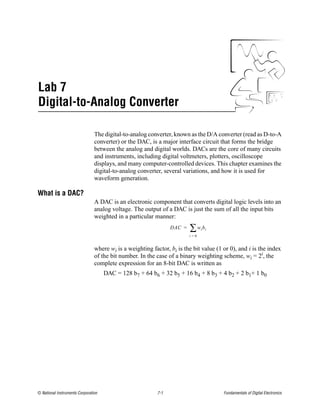
                                A DAC is an electronic component that converts digital logic levels into an
                                analog voltage. The output of a DAC is just the sum of all the input bits
                                weighted in a particular manner:
                                                                 DAC =   ∑w b  i i
                                                                         i=0


                                where wi is a weighting factor, bi is the bit value (1 or 0), and i is the index
                                of the bit number. In the case of a binary weighting scheme, wi = 2i, the
                                complete expression for an 8-bit DAC is written as
                                     DAC = 128 b7 + 64 b6 + 32 b5 + 16 b4 + 8 b3 + 4 b2 + 2 b1+ 1 b0


© National Instruments Corporation                         7-1                         Fundamentals of Digital Electronics
Lab 7 Digital-to-Analog Converter


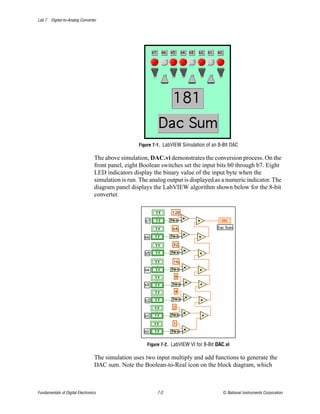
                                                    Figure 7-1. LabVIEW Simulation of an 8-Bit DAC

                                  The above simulation, DAC.vi demonstrates the conversion process. On the
                                  front panel, eight Boolean switches set the input bits b0 through b7. Eight
                                  LED indicators display the binary value of the input byte when the
                                  simulation is run. The analog output is displayed as a numeric indicator. The
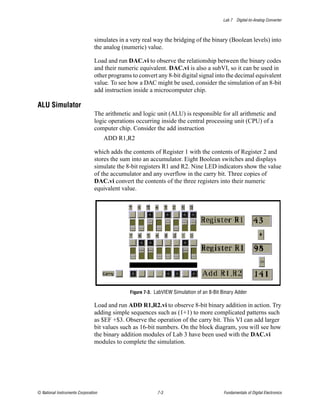
                                  diagram panel displays the LabVIEW algorithm shown below for the 8-bit
                                  converter.


                                                       Figure 7-2. LabVIEW VI for 8-Bit DAC.vi

                                  The simulation uses two input multiply and add functions to generate the
                                  DAC sum. Note the Boolean-to-Real icon on the block diagram, which


Fundamentals of Digital Electronics                         7-2                            © National Instruments Corporation
Lab 7 Digital-to-Analog Converter


                                simulates in a very real way the bridging of the binary (Boolean levels) into
                                the analog (numeric) value.

                                Load and run DAC.vi to observe the relationship between the binary codes
                                and their numeric equivalent. DAC.vi is also a subVI, so it can be used in
                                other programs to convert any 8-bit digital signal into the decimal equivalent
                                value. To see how a DAC might be used, consider the simulation of an 8-bit
                                add instruction inside a microcomputer chip.

ALU Simulator
                                The arithmetic and logic unit (ALU) is responsible for all arithmetic and
                                logic operations occurring inside the central processing unit (CPU) of a
                                computer chip. Consider the add instruction
                                     ADD R1,R2

                                which adds the contents of Register 1 with the contents of Register 2 and
                                stores the sum into an accumulator. Eight Boolean switches and displays
                                simulate the 8-bit registers R1 and R2. Nine LED indicators show the value
                                of the accumulator and any overflow in the carry bit. Three copies of
                                DAC.vi convert the contents of the three registers into their numeric
                                equivalent value.


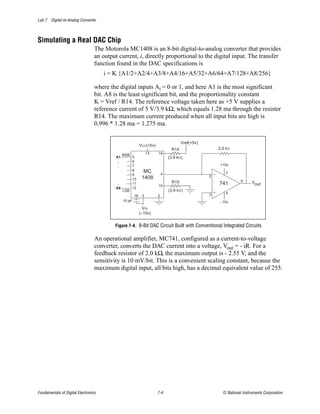
                                              Figure 7-3. LabVIEW Simulation of an 8-Bit Binary Adder

                                Load and run ADD R1,R2.vi to observe 8-bit binary addition in action. Try
                                adding simple sequences such as (1+1) to more complicated patterns such
                                as $EF +$3. Observe the operation of the carry bit. This VI can add larger
                                bit values such as 16-bit numbers. On the block diagram, you will see how
                                the binary addition modules of Lab 3 have been used with the DAC.vi
                                modules to complete the simulation.


© National Instruments Corporation                        7-3                             Fundamentals of Digital Electronics
Lab 7 Digital-to-Analog Converter


Simulating a Real DAC Chip
                                  The Motorola MC1408 is an 8-bit digital-to-analog converter that provides
                                  an output current, i, directly proportional to the digital input. The transfer
                                  function found in the DAC specifications is
                                      i = K {A1/2+A2/4+A3/8+A4/16+A5/32+A6/64+A7/128+A8/256}

                                  where the digital inputs Ai = 0 or 1, and here A1 is the most significant
                                  bit. A8 is the least significant bit, and the proportionality constant
                                  K = Vref / R14. The reference voltage taken here as +5 V supplies a
                                  reference current of 5 V/3.9 kΩ, which equals 1.28 ma through the resister
                                  R14. The maximum current produced when all input bits are high is
                                  0.996 * 1.28 ma = 1.275 ma.

                                                                                        Vref(+5v)
                                                             VCC(+5v)
                                                                                 R14                        2.0 kW
                                                MSB               13    14
                                           A1           5                       (3.9 kW)
                                            .           6
                                            .           7                                                    +15v
                                                        8      MC
                                                        9                   4                           –      7
                                                              1408                                  2
                                                        10
                                                                                  R15                                   6     Vout
                                            .           11
                                                                        15
                                                                                                            741
                                           A8           12
                                                LSB                             (3.9 kW)                +
                                                                                                    3          4
                                                        16    3         2
                                                15 pF                                                        –15v
                                                               VEE
                                                             (–15v)


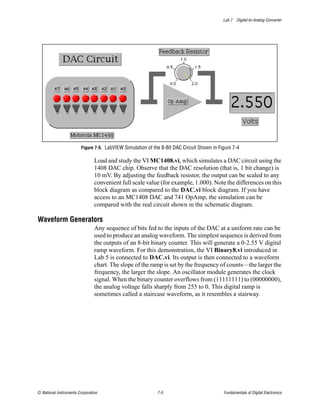
                                          Figure 7-4. 8-Bit DAC Circuit Built with Conventional Integrated Circuits

                                  An operational amplifier, MC741, configured as a current-to-voltage
                                  converter, converts the DAC current into a voltage, Vout = - iR. For a
                                  feedback resistor of 2.0 kΩ, the maximum output is - 2.55 V, and the
                                  sensitivity is 10 mV/bit. This is a convenient scaling constant, because the
                                  maximum digital input, all bits high, has a decimal equivalent value of 255.


Fundamentals of Digital Electronics                                     7-4                                   © National Instruments Corporation
Lab 7 Digital-to-Analog Converter


                        Figure 7-5. LabVIEW Simulation of the 8-Bit DAC Circuit Shown in Figure 7-4

                                Load and study the VI MC1408.vi, which simulates a DAC circuit using the
                                1408 DAC chip. Observe that the DAC resolution (that is, 1 bit change) is
                                10 mV. By adjusting the feedback resistor, the output can be scaled to any
                                convenient full scale value (for example, 1.000). Note the differences on this
                                block diagram as compared to the DAC.vi block diagram. If you have
                                access to an MC1408 DAC and 741 OpAmp, the simulation can be
                                compared with the real circuit shown in the schematic diagram.

Waveform Generators
                                Any sequence of bits fed to the inputs of the DAC at a uniform rate can be
                                used to produce an analog waveform. The simplest sequence is derived from
                                the outputs of an 8-bit binary counter. This will generate a 0-2.55 V digital
                                ramp waveform. For this demonstration, the VI Binary8.vi introduced in
                                Lab 5 is connected to DAC.vi. Its output is then connected to a waveform
                                chart. The slope of the ramp is set by the frequency of counts—the larger the
                                frequency, the larger the slope. An oscillator module generates the clock
                                signal. When the binary counter overflows from (11111111) to (00000000),
                                the analog voltage falls sharply from 255 to 0. This digital ramp is
                                sometimes called a staircase waveform, as it resembles a stairway.


© National Instruments Corporation                          7-5                            Fundamentals of Digital Electronics
Lab 7 Digital-to-Analog Converter


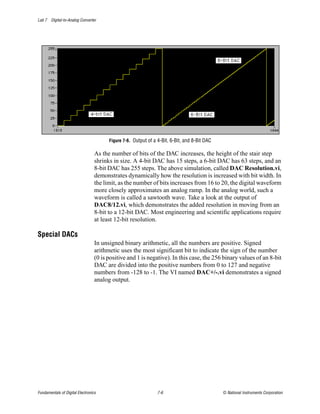
                                        Figure 7-6. Output of a 4-Bit, 6-Bit, and 8-Bit DAC

                                  As the number of bits of the DAC increases, the height of the stair step
                                  shrinks in size. A 4-bit DAC has 15 steps, a 6-bit DAC has 63 steps, and an
                                  8-bit DAC has 255 steps. The above simulation, called DAC Resolution.vi,
                                  demonstrates dynamically how the resolution is increased with bit width. In
                                  the limit, as the number of bits increases from 16 to 20, the digital waveform
                                  more closely approximates an analog ramp. In the analog world, such a
                                  waveform is called a sawtooth wave. Take a look at the output of
                                  DAC8/12.vi, which demonstrates the added resolution in moving from an
                                  8-bit to a 12-bit DAC. Most engineering and scientific applications require
                                  at least 12-bit resolution.

Special DACs
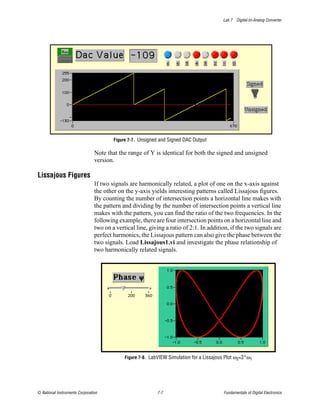
                                  In unsigned binary arithmetic, all the numbers are positive. Signed
                                  arithmetic uses the most significant bit to indicate the sign of the number
                                  (0 is positive and 1 is negative). In this case, the 256 binary values of an 8-bit
                                  DAC are divided into the positive numbers from 0 to 127 and negative
                                  numbers from -128 to -1. The VI named DAC+/-.vi demonstrates a signed
                                  analog output.


Fundamentals of Digital Electronics                             7-6                           © National Instruments Corporation
Lab 7 Digital-to-Analog Converter


                                        Figure 7-7. Unsigned and Signed DAC Output

                                Note that the range of Y is identical for both the signed and unsigned
                                version.

Lissajous Figures
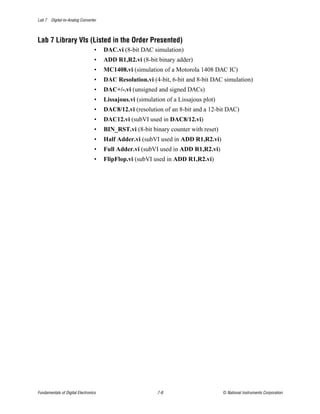
                                If two signals are harmonically related, a plot of one on the x-axis against
                                the other on the y-axis yields interesting patterns called Lissajous figures.
                                By counting the number of intersection points a horizontal line makes with
                                the pattern and dividing by the number of intersection points a vertical line
                                makes with the pattern, you can find the ratio of the two frequencies. In the
                                following example, there are four intersection points on a horizontal line and
                                two on a vertical line, giving a ratio of 2:1. In addition, if the two signals are
                                perfect harmonics, the Lissajous pattern can also give the phase between the
                                two signals. Load Lissajous1.vi and investigate the phase relationship of
                                two harmonically related signals.


                                             Figure 7-8. LabVIEW Simulation for a Lissajous Plot ω2=2*ω1


© National Instruments Corporation                          7-7                           Fundamentals of Digital Electronics
Lab 7 Digital-to-Analog Converter


Lab 7 Library VIs (Listed in the Order Presented)
                                  •   DAC.vi (8-bit DAC simulation)
                                  •   ADD R1,R2.vi (8-bit binary adder)
                                  •   MC1408.vi (simulation of a Motorola 1408 DAC IC)
                                  •   DAC Resolution.vi (4-bit, 6-bit and 8-bit DAC simulation)
                                  •   DAC+/-.vi (unsigned and signed DACs)
                                  •   Lissajous.vi (simulation of a Lissajous plot)
                                  •   DAC8/12.vi (resolution of an 8-bit and a 12-bit DAC)
                                  •   DAC12.vi (subVI used in DAC8/12.vi)
                                  •   BIN_RST.vi (8-bit binary counter with reset)
                                  •   Half Adder.vi (subVI used in ADD R1,R2.vi)
                                  •   Full Adder.vi (subVI used in ADD R1,R2.vi)
                                  •   FlipFlop.vi (subVI used in ADD R1,R2.vi)


Fundamentals of Digital Electronics                        7-8                        © National Instruments Corporation
Lab 8
Analog-to-Digital Converters,
Part I

                                The analog-to-digital converter, known as the A/D converter (read as A-to-D
                                converter) or the ADC, is the second key component to bridging the analog
                                and digital worlds. The ADC is the basis of digital voltmeters, digital
                                multimeters, multichannel analyzers, oscilloscopes, and many other
                                instruments. There are many different ADC designs, of which the ramp,
                                tracking, and successive approximation converters are common. This lab
                                looks at the ramp and tracking A/D converters.

Purpose of the Analog-to-Digital Converter
                                The purpose of an ADC converter is to produce a digital binary number that
                                is proportional to an analog input signal. The fundamental conversion
                                process is shown in the following diagram.


                                                        Input Voltage             +
                                                                                       C
                                                                                  –
                                                              Test Voltage


                                                                         DAC

                                                                   b7             b0
                                                                                           Reset
                                                                        Counter


                                          Figure 8-1. Symbolic Design for an 8-Bit Analog-to-Digital Converter

                                A counter creates a test binary sequence, and its digital output is converted
                                into an analog voltage using a digital-to-analog converter. The DAC is a
                                basic element of many ADC circuits and was discussed in Lab 7. (This is a
                                good time to review its operation if you are not familiar with the DAC.) The
                                test voltage is then compared with the input signal. If the input signal is
                                larger than the test signal, the counter is increased to bring the test signal
                                closer to the input level. If the input signal is smaller than the test signal, the
                                counter is decreased to bring the test signal closer to the input level. The


© National Instruments Corporation                           8-1                                   Fundamentals of Digital Electronics
Lab 8 Analog-to-Digital Converters, Part I


                                  process continues until the comparator changes sign, at which time the test
                                  level will be within one count of the input level. Increasing the number of
                                  bits of the counter and DAC increases the conversion resolution.

The Ramp ADC
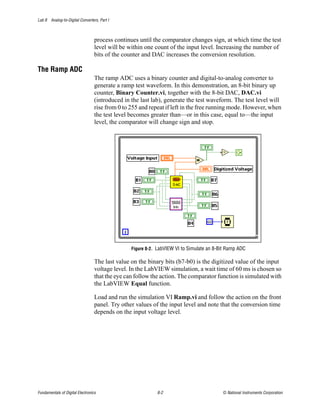
                                  The ramp ADC uses a binary counter and digital-to-analog converter to
                                  generate a ramp test waveform. In this demonstration, an 8-bit binary up
                                  counter, Binary Counter.vi, together with the 8-bit DAC, DAC.vi
                                  (introduced in the last lab), generate the test waveform. The test level will
                                  rise from 0 to 255 and repeat if left in the free running mode. However, when
                                  the test level becomes greater than—or in this case, equal to—the input
                                  level, the comparator will change sign and stop.


                                                 Figure 8-2. LabVIEW VI to Simulate an 8-Bit Ramp ADC

                                  The last value on the binary bits (b7-b0) is the digitized value of the input
                                  voltage level. In the LabVIEW simulation, a wait time of 60 ms is chosen so
                                  that the eye can follow the action. The comparator function is simulated with
                                  the LabVIEW Equal function.

                                  Load and run the simulation VI Ramp.vi and follow the action on the front
                                  panel. Try other values of the input level and note that the conversion time
                                  depends on the input voltage level.


Fundamentals of Digital Electronics                         8-2                           © National Instruments Corporation
Lab 8 Analog-to-Digital Converters, Part I


                                     Figure 8-3. LabVIEW Front Panel of 8-Bit ADC Converter. The Comparator LED Indicator
                                       Changes State When the Test Waveform Numeric Value Exceeds the Voltage Input

                                In the next simulation, Ramp4.vi, the binary counter is allowed to free run.
                                Whenever the test signal is greater than the input level, the comparator
                                changes sign. This intersection of the ramp waveform with the input level
                                can be seen on a chart display. The binary value of the counter at the
                                intersection point is the digitized signal. The transition of the comparator
                                indicates this event.

                                If the changing state of the comparator resets the binary counter, a true ramp
                                ADC is simulated. In this case, the binary counter is replaced with the binary
                                counter with reset, featured in Lab 6. Load the VI Ramp2.vi and observe
                                the action. Note that as soon as the test level reaches the input level, the
                                binary counter resets, and the ramp cycle starts all over again. In the display
                                below, the input level was changed three times.


                                                    Figure 8-4. Chart Display of the Ramp ADC in Operation

                                An interesting feature, unique to the ramp ADC, is that the conversion time
                                depends on the magnitude of the input signal. Small input levels are
                                digitized faster than large input levels. The conversion time is thus
                                dependent on the input signal magnitude and the clock circuitry speed. For
                                an 8-bit DAC, variable conversion times may not be a problem when the
                                clock is running at megahertz frequencies, but for 12-bit DACs, this
                                property is a disadvantage.


© National Instruments Corporation                              8-3                             Fundamentals of Digital Electronics
Lab 8 Analog-to-Digital Converters, Part I


                                  The ramp ADC works equally well with a down counter that runs from
                                  255-0. The change of state of the comparator again signals the binary count
                                  that generates a test level equal to the input level.

LabVIEW Challenge
                                  Design a ramp ADC that uses a down counter to generate the test waveform.

                                  Could you use an up/down counter to track the input level?

                                  Yes, such a conversion technique is called a tracking ADC, and it has the
                                  fastest conversion time.

Tracking ADC
                                  The first task for the tracking ADC is to use some technique such as a ramp
                                  waveform to catch up to the input level. At that point, shown by the
                                  intersection of the ramp waveform with the input level, the tracking
                                  algorithm takes over.


                                           Figure 8-5. Tracking ADC Ramps Up to the Input Level Before Tracking Begins

                                  The tracking algorithm is simply,
                                      if
                                          test level is greater than the signal level, decrease the count by one
                                      else if
                                          test level is less than the signal level, increase the count by one

                                  and repeat forever.

                                  In the following example, a positive ramp ADC technique is used to initially
                                  catch up to the input level of 150.2. Once the input level is reached, the
                                  tracking algorithm takes over.


Fundamentals of Digital Electronics                              8-4                            © National Instruments Corporation
Lab 8 Analog-to-Digital Converters, Part I


                                By expanding the vertical scale, you can see the tracking algorithm in
                                action.


                                                Figure 8-6. Tracking ADC Output when Input is Constant

                                However, if the input level changes, the ADC must revert to a ramp
                                waveform to catch up to the input level. Provided the clock is fast enough,
                                the tracking can keep pace. But if the signal changes too quickly, the
                                digitized signal is lost until the test level catches up again. In practice, it is
                                the slewing speed of the DAC that limits the maximum input frequency that
                                the tracking ADC can follow.


                                                Figure 8-7. A Sudden Change in the Input Level Causes
                                                      the Test Level to Ramp Up to the New Level

                                Because the tracking ADC uses an up/down counter, the algorithm has the
                                same problem when the input signal suddenly falls below the test level. The
                                tracking ADC reverts to a down ramp (Figure 8-8) until the test level reaches
                                the input signal level.


© National Instruments Corporation                          8-5                             Fundamentals of Digital Electronics
Lab 8 Analog-to-Digital Converters, Part I


                                                 Figure 8-8. A Negative Change in the Input Level Causes
                                                     the Test Level to Ramp Down to the New Level

                                  The VI called Tracking ADC.vi is used to demonstrate this technique and
                                  to generate all the above charts. The algorithm shown on the block diagram
                                  is quite simple. A LabVIEW Select function and the shift register on the
                                  While Loop implements the algorithm.


                                                      Figure 8-9. LabVIEW VI for the Tracking ADC

                                  The Wait function is set to 0.10 second so that the user can observe the
                                  action on the front panel. You can also use the Operating tool to redefine the
                                  vertical axis scale to zoom in on the action as the simulation is in progress.
                                  To observe the tracker catching up to a varying input, reduce the input
                                  constant for the Wait function in Figure 8-9 to 1 ms.

Lab 8 Library VIs (Listed in the Order Presented)
                                  •   Ramp.vi (8-bit ramp ADC, conversion slowed for easy viewing)
                                  •   Ramp4.vi (ramp ADC with no feedback from comparator)
                                  •   Ramp2.vi (8-bit ramp ADC with chart output)
                                  •   Tracking ADC1.vi
                                  •   Binary Counter.vi (subVI 8-bit binary counter)
                                  •   BIN_RST.vi (subVI 8-bit binary counter with external reset)
                                  •   DAC.vi (subVI 8-bit DAC)
                                  •   FlipFlop.vi (subVI)


Fundamentals of Digital Electronics                          8-6                             © National Instruments Corporation
Lab 9
Analog-to-Digital Converters,
Part II

                                In the last lab, binary counters in the form of up and up/down counters were
                                used to create test waveforms for ramp and tracking ADCs. Another popular
                                ADC is based on a test waveform created from a successive approximation
                                register (SAR). These ADCs are substantially faster than the ramp ADCs
                                and have a constant and known conversion time. SARs make use of the
                                binary weighting scheme by outputting each bit in succession from the most
                                significant bit (MSB) to the least significant bit (LSB).

                                The SAR algorithm is as follows:
                                     1. Reset the SAR register and set the DAC to zero.
                                     2. Set MSB of SAR:
                                        if VDAC is greater than Vin, then turn that bit off.
                                        else if VDAC is less than Vin, leave the bit on.
                                     3. Repeat step 2 for the next MSB, until all n bits of the SAR have been
                                        set and tested.
                                     4. After n cycles, the digital output of the SAR will contain the
                                        digitized value of the input signal.

                                This algorithm can best be seen with the aid of a graph of the input signal
                                level and the DAC waveform produced by the SAR. Suppose a value of 153
                                is input into the ADC circuit. The number 153 is 128 + 16 + 8 + 1. In binary,
                                reading right to left, the number is
                                     15310 = (10011001)2

                                The SAR algorithm states that the MSB, having the value of 128, is to be
                                tested first. Because 128 is less than 153, the MSB is to be kept. The best
                                estimate after the first cycle is (1000 0000). On the next cycle, the next
                                MSB, having value 64, is added to the best estimate (that is, 128 + 64 = 192).
                                Because 192 is greater than 153, this bit is not kept, and the best estimate
                                remains (1000 0000). In the following cycle, the next bit value of 32 yields
                                a test value of 128 + 32 = 160. Again, the test value is greater than the input


© National Instruments Corporation                         9-1                         Fundamentals of Digital Electronics
Lab 9 Analog-to-Digital Converters, Part II


                                  level, so this bit is not kept, and the best estimate remains at (1000 0000). In
                                  the following cycle, the next test value of 16 yields 128 + 16 = 144. This
                                  value is less than 153, so this bit is kept. After 4 cycles, the best estimate is
                                  (1001 0000). The remaining cycles can be seen on the LabVIEW simulation
                                  for a successive approximation analog-to-digital converter.

                                  In the panel below, the timing diagram shows precisely this process. The
                                  solid line is the test value for each cycle, and the dashed line is the input level
                                  of 153. Continuing for the next four cycles yields the final binary value
                                  displayed on eight LED indicators.


                                         Figure 9-1. Successive Approximation Waveform Used to Digitize Input Voltage

                                  Load the VI named SAR.vi and run the VI in the continuous mode. You
                                  can use the Operating tool to change the input level, and the SAR test
                                  waveform will dutifully follow, digitizing the input level in all cases in the
                                  same 8 cycles. The DAC output MSB settling time sets the fundamental
                                  speed limitation. Most ADCs based on SARs have conversion times of less
                                  than 100 ms.


                                              Figure 9-2. Digitized Value of an SAR ADC Displayed as a Boolean Array


Fundamentals of Digital Electronics                               9-2                            © National Instruments Corporation
Lab 9 Analog-to-Digital Converters, Part II


                                A second VI, SAR0.vi, slows the action so you can watch each cycle. The
                                input level is set to 153. The test level is the DAC output, with each bit value
                                added to the previous best estimate as discussed above. The digitized value
                                is the best estimate of the input level after 8 cycles. The Boolean array of
                                indicators shows the binary value of the best estimate as it is developed, and
                                after the 8 cycles, the array contains the digitized value.

SAR Simulation
                                The LabVIEW simulation is somewhat complex, as is a real SAR chip. As
                                a result, the SAR0.vi block diagram will be discussed in two parts—first,
                                the SAR algorithm, and then the binary representation using a Boolean
                                array.

                                The test bit is formed by taking the number 256 and successively dividing it
                                by two in a shift register eight times. The sequence at the Bit Value will read
                                (128, 64, 32,16, 8, 4, 2, and 1) as the loop counter cycles from 0 to 7. The
                                ninth loop is needed to load the initial values into the shift registers. The test
                                value is formed by adding the new bit value to the previous best estimate.
                                The compare function decides whether the current bit should be included in
                                the new best value. After the 8 cycles of the SAR, the best value is the
                                digitized level.


                                       Figure 9-3. LabVIEW Simulation of the SAR Algorithm Using Shift Registers

                                To generate a binary representation of the best estimate, a Boolean
                                accumulator in the form of a Boolean shift register is used. The Test Bit,
                                either a high or low, is passed in the array after each cycle using the
                                LabVIEW Replace Array Element function. The Boolean True or False is
                                loaded into the Boolean array at the index specified by the loop counter.
                                Initially, the eight-element array is set to Boolean False states to ensure that
                                all LED indicators in the Boolean array are off.


© National Instruments Corporation                          9-3                              Fundamentals of Digital Electronics
Lab 9 Analog-to-Digital Converters, Part II


                                                  Figure 9-4. LabVIEW Simulation of SAR Using Arrays

                                  As the best estimate is built, the digitized binary value shows up on the front
                                  panel. After the 8 cycles, the binary value is complete, and its decimal
                                  equivalent is identical to the digitized value shown in the numeric display.

                                  The LabVIEW string function Format and Strip formats any string input
                                  into a number according to the selected conversion code. In SAR_Hex.vi, a
                                  two-character string representing a hexadecimal number from $00 to $FF is
                                  converted into a numeric from 0 to 255 and digitized using the SAR
                                  algorithm with arrays. Try running this VI.

Summary
                                  In the last two labs, three types of analog-to-digital converters were
                                  introduced and demonstrated. The ramp ADC is conceptually the simplest,
                                  but suffers from a variable conversion time proportional to the input signal
                                  magnitude. The tracking ADC is the fastest converter, as long as no rapid
                                  changes in the input signal level occur. The overall best choice is the
                                  successive approximation ADC, with a constant and known conversion
                                  time.

Lab 9 Library VIs (Listed in the Order Presented)
                                  •    SAR.vi (successive approximation register ADC)
                                  •    SAR0.vi (SAR ADC slow version for observing the conversion process)
                                  •    SAR_Hex.vi (SAR ADC with a hexadecimal input)


Fundamentals of Digital Electronics                         9-4                           © National Instruments Corporation
Lab 10
Seven-Segment Digital
Displays

                                Digital displays link the digital world of ones and zeros with numerics of the
                                human world. You have seen how parallel combinations of ones and zeros
                                can represent binary, hexadecimal, or digital numbers. For most simple
                                instruments, digital displays use the numbers 0-9 and are represented by
                                seven segmented displays. Each segment is controlled by a single bit, and
                                combinations of segments turned ON or OFF can display all the numbers
                                0-9 and a few characters, such as A, b, c, d, E, and F.

Seven-Segment Display
                                The LED seven-segment display uses seven individual light emitting diodes,
                                configured as the number 8 in the pattern shown below:


                                                                             a
                                                                 f
                                                                                      b


                                                                         g
                                                         e
                                                                                 c
                                                                     d


                                              Figure 10-1. Seven-Segment Display Uses Seven LED Bars

                                The individual segments are coded a, b, c, d, e, f, and g and are ordered
                                clockwise, with the last segment (g) as the central bar. When an LED is
                                forward biased, light is emitted. By shaping the LED as a horizontal or
                                vertical bar, a segment can be formed. Many output devices such as
                                computer parallel ports are 8 bits wide. An eighth diode in the shape of a dot
                                is available on some seven-segment displays to indicate a decimal point.


© National Instruments Corporation                        10-1                            Fundamentals of Digital Electronics
Lab 10 Seven-Segment Digital Displays


                                  Run the VI 7 Segment.vi, which is a LabVIEW simulation for a
                                  seven-segment display. Try different combinations of the switches.

                                  How many characters in the alphabet can you display?


                                               Figure 10-2. LabVIEW Simulation of a Seven-Segment Display

                                  The input bits 0-7 are represented by eight Boolean switches. The
                                  corresponding segments in the seven-segment display are traditionally
                                  labeled a to g and dp (decimal place). The least significant bit 0 is wired to
                                  segment a, the next bit 1 is wired to segment b, etc. The most significant port
                                  bit, bit 7, is often wired to an eighth LED and used as a decimal point. By
                                  operating the switches, you can display all the numbers and a few
                                  characters. After experimenting with the display, try outputting the message
                                  “help call 911” one character at a time.

                                  Most seven-segment displays are driven with an encoder that converts a
                                  binary encoded nibble into a numeric number, which in turn selects the
                                  appropriate seven-segment code. The first step in a LabVIEW simulation is
                                  to convert the 4-bit binary nibble into a number from 0 to 15. The VI named
                                  Bin->Digit.vi simulates this task.


                                          Figure 10-3. Front Panel of the 4-Bit Binary-to-Digit Conversion Program


Fundamentals of Digital Electronics                           10-2                            © National Instruments Corporation
Lab 10 Seven-Segment Digital Displays


                                On the block diagram, a 4-bit digital-to-analog converter completes the
                                operation.


                                           Figure 10-4. LabVIEW VI for a 4-Bit Digital-to Analog Converter

                                The next step is to convert the digit(s) 0 to 15 into the appropriate
                                seven-segment display. For the numbers 10 to 15, a single hexadecimal
                                character [A to F] is used. In Encoder Hex.vi, multiple case statements are
                                used to provide the encoder function. The Case terminal ? is wired to a
                                numeric control formatted to select a single integer character. The number 0
                                outputs the seven-segment code for zero, number 1 outputs the code for 1,
                                etc., all the way to F. The Boolean constants inside each Case statement are
                                initialized to generate the correct seven-segment code.


                                           Figure 10-5. LabVIEW VI for Numeric-to-Seven-Segment Display

                                The hexadecimal number inside the square box is the hexadecimal
                                representation for the 8-bit pattern necessary to represent the number, #n.

                                Each port has a unique address that must be selected before data can be
                                written to or read from the real world. The correct address must be entered


© National Instruments Corporation                        10-3                             Fundamentals of Digital Electronics
Lab 10 Seven-Segment Digital Displays


                                  on the front panel to access the port. In this simulation, the address operates
                                  the run command.


                                         Figure 10-6. Hexadecimal-to-Seven-Segment Display Encoder and Indicator

                                  Select the port address 1 and run Encoder.vi. With the Operating tool, click
                                  on the slider and drag it along the range of numbers, 0 to 15. You can see all
                                  numbers encoded as a seven-segment hexadecimal character.

                                  These two VIs, Bin->Digit.vi and Encoder.vi, can be combined to form a
                                  binary-to-seven-segment encoder and display.


                                                                             16      7
                                                         4      16
                                                                             segment
                                        binary              line
                                                                             encoder
                                                          encoder
                                                                              driver


                                        Figure 10-7. Symbolic Diagram of a Binary-to-Seven-Segment Display Circuit

                                  In general, the input would be a 4-bit binary number and the output would
                                  be the seven-segment code for the binary bit pattern. First, the 4-bit binary
                                  nibble is converted to one of 16 outputs. These outputs then select the
                                  appropriate seven-segment code. Finally, these outputs are passed to a
                                  seven-segment display. Load and run the VI Display7.vi, which emulates
                                  this operation.


Fundamentals of Digital Electronics                           10-4                           © National Instruments Corporation
Lab 10 Seven-Segment Digital Displays


                                                  Figure 10-8. Binary-to-Seven-Segment Front Panel


LabVIEW Challenge
                                Design a two-digit counter that counts from 0 to 99. Use the 8-bit binary
                                counter from Lab 6 modified to count in decimal.

Lab 10 Library VIs (Listed in the Order Presented)
                                •    7Segment.vi (LabVIEW simulation of a seven-segment display)
                                •    Bin->Digit.vi (4-bit digital-to-analog converter)
                                •    Encoder Hex.vi (seven-segment display, hexadecimal version)
                                •    Display7.vi (hexadecimal encoded binary-to-seven-segment display)


© National Instruments Corporation                         10-5                           Fundamentals of Digital Electronics
Lab 10 Seven-Segment Digital Displays


Notes


Fundamentals of Digital Electronics     10-6   © National Instruments Corporation
Lab 11
Serial Communications

                                Many instruments, controllers, and computers are equipped with a serial
                                interface. The ability to communicate to these devices over a serial interface
                                opens a whole new world of measurement and control. The standard bit
                                serial format, RS-232, defines the bit order and waveform shape in both time
                                and amplitude. At a minimum, only three communication lines are needed
                                for communication between a computer and an external device: transmit,
                                receive, and a reference ground.

                                                                                            Transmit Line
                                                                                            Receive Line
                                                                                            Ground Line


                                                      Figure 11-1. Serial Communication Lines

                                In serial communications, a high level is called a Mark state, while the low
                                level is called the Space state. In normal operation, the output line is in a
                                high state, often denoted as a 1, or in LabVIEW as a Boolean True. The
                                transmitter signals the receiver that it is about to send data by pulling the
                                transmit line low to the space state (0). This falling edge or negative
                                transition is the signal for the receiver to get ready for incoming data. In
                                RS-232 communication, all data bits are sent and held for a constant period
                                of time. This timing period is the reciprocal of the Baud rate, the frequency
                                of data transmission measured in bits per second. For example, a 300 Baud
                                data rate has a timing period of 1/300 of a second or 3.33 ms. At the start of
                                each timing period, the output line is pulled high or low and then held in that
                                state for the timing period. Together, these transitions and levels form a
                                serial waveform.

                                Consider an 8-bit data byte $3A (or in binary, (0011 1010)). For serial
                                communication, the protocol demands that the least significant bit, b0, be
                                transmitted first and the most significant bit, b7, last. By convention, time is
                                represented as moving from left to right, hence the above data byte would
                                be transmitted as (01011100), in reverse order.


© National Instruments Corporation                        11-1                           Fundamentals of Digital Electronics
Lab 11 Serial Communications


                                                                           b0                                                        b7
                                                      8-bit data
                                                         $3A               0        1       0       1       1       1        0       0

                                                  Figure 11-2. Serial Transmitter Sends the LSB (b0) First

                                  The protocol also requires that the data byte be framed by two special bits,
                                  the start bit (Space state) and the Stop bit (Mark state).

                                                    Start       b0                                                  b7           Stop
                                                     0          0      1       0        1       1       1       0       0         1
                                                     bit                    data byte $3A                                         bit

                                             Figure 11-3. Handshaking Bits Start and Stop Frame the Data Byte

                                  The addition of these framing bits requires 10 timing periods to send one
                                  data byte. If each byte represents one ASCII character, 10 serial bits are sent
                                  for each character. For example, a 9600 Baud modem is capable of sending
                                  960 characters per second. In terms of a timing diagram, the RS-232 serial
                                  waveform for the $3A data byte looks like the following.

                                                                b0                                                      b7
                                                  Start     0   0      1        0       1       1       1       0       0        1        Stop


                                                     Figure 11-4. Serial Waveform for a $3A Data Byte

Serial Transmitter
                                  In LabVIEW, a serial transmitter can be designed using a 10-bit shift register
                                  and a delay loop that simulates the Baud rate. Launch the VI Serial.vi.


                                                 Figure 11-5. LabVIEW Simulation of a Serial Transmitter

                                  On the front panel, you can load the date byte into the shift register by
                                  operating the eight input switches. Note that the bit order in hexadecimal
                                  places the most significant bit on the left. Hence, $33 is entered as (0011
                                  0011). However, the data comes out in the reverse order, with the least


Fundamentals of Digital Electronics                             11-2                                                         © National Instruments Corporation
Lab 11 Serial Communications


                                significant bit first. The serial output is displayed on the large square LED
                                indicator. Initially, it is in the Mark state. All data bits and framing bits are
                                shown as zeros before execution. As soon as the run button is pressed, $33
                                is loaded into the shift register, the stop bit becomes a 1, and the start bit
                                becomes a 0. The output bit immediately falls to the off state, signaling the
                                start of transmission. After a delay (1/Baud Rate), the next bit is output.
                                The diagram panel displays the transmitter algorithm.


                                        Figure 11-6. LabVIEW Diagram Panel for the Serial Transmitter Simulation
                                The first bit to be output (Start) is initialized to the Space state (0), a Boolean
                                False. The following eight elements are the data byte in sequence, least
                                significant bit to most significant bit. The last element on the shift register
                                (Stop bit) is initialized to a Mark state (1), a Boolean True. The VI, when
                                called, executes the loop 10 times. Each loop outputs one serial bit. A wait
                                structure simulates the “basic timing period” or 1/Baud Rate.
                                As the data is shifted out the serial line, the shift register is filled with ones.
                                This ensures the output will be in the Mark state at the end of transmission,
                                after 10 cycles.


                                        Figure 11-7. Transmitter Buffer After Data Byte Has Been Sent to the Port

                                It becomes easier to view the serial waveforms by writing the serial output
                                to an oscilloscope or a strip chart recorder. In the second VI, Serial1.vi, the
                                serial output is converted into a numeric and then written to a LabVIEW


© National Instruments Corporation                          11-3                             Fundamentals of Digital Electronics
Lab 11 Serial Communications


                                  chart. By selecting the correct set of chart symbols and interpolation
                                  features, the trace will resemble that of an oscilloscope trace, and you can
                                  view the transmitted serial waveforms at low baud rates.

                                  The following traces show the waveforms for the numbers $00 (00000000),
                                  $55 (01010101), and $FF (11111111).


                                      Figure 11-8. Serial Waveforms for Repetitive Transmission of the Same Data Byte

                                  Note the middle case, $55, generates a square wave on the serial output pin.

                                  Once built, the parallel-to-serial converter can be saved as a subVI and used
                                  in other programs. In general, this VI will have eight binary inputs for the
                                  input parallel data byte, a binary output for the serial bit stream, and a
                                  numeric array for the logic trace.

Voltage to Serial Transmitter
                                  In the first application, a numeric input simulates an analog input. The
                                  numeric value has been conditioned to be in the range 0-255. RampADC.vi,
                                  discussed in Lab 9, converts the analog signal into an 8-bit binary number,
                                  which in turn is passed on to the parallel-to-serial converter. To observe the
                                  signal, the serial waveform is passed into an array and presented on the front
                                  panel as a logic trace.


Fundamentals of Digital Electronics                           11-4                           © National Instruments Corporation
Lab 11 Serial Communications


                                                Figure 11-9. Serial Transmitter Exploits LabVIEW SubVIs

                                Load the VI named V->Serial.vi and observe the serial waveforms. Each
                                number from 0 to 255 will yield a different waveform. Try the data bytes
                                $00, $55, and $FF to verify the waveforms shown in Figure 11-8.

                                In the second example, a two-character hexadecimal-encoded ASCII string
                                is input into a subVI named Hex->Numeric.vi, which converts the
                                hexadecimal characters into a number.


                                               Figure 11-10. Waveform Generator with Hexadecimal Input

                                The hexadecimal string value is converted into a numeric value using a
                                LabVIEW string function called Format and Strip. The numeric value is
                                then passed on to the previous VI, V->Serial.vi, and displayed. Recall that
                                (0101 0101) in Serial1.vi generated a square wave. In HEX->Serial.vi, $55
                                also generates the square wave.

LabVIEW Challenge
                                Can you generalize this input to be any 7-bit ASCII character? The eighth
                                bit could be a parity bit, even or odd.

Lab 11 Library VIs (Listed in the Order Presented)
                                •    Serial.vi (demonstration of a serial transmitter)
                                •    Serial1.vi (Serial.vi with a logic trace output)
                                •    V->Serial.vi (LabVIEW simulation of a serial transmitter)


© National Instruments Corporation                          11-5                            Fundamentals of Digital Electronics
Lab 11 Serial Communications


                                  •   Hex->Serial.vi (LabVIEW simulation of a serial transmitter with hex
                                      input)
                                  •   RampADC.vi (subVI 8-bit ADC)
                                  •   Binary Counter.vi (subVI 8-bit binary counter)
                                  •   DAC.vi (subVI 8-bit DAC)
                                  •   FlipFlop.vi (subVI T flip-flop)
                                  •   Hex->Numeric.vi (subVI that converts hexadecimal number into a
                                      numeric)
                                  •   Serial2.vi (subVI Serial1.vi with numeric array output)


Fundamentals of Digital Electronics                       11-6                      © National Instruments Corporation
Lab 12
Central Processing Unit

                                The heart of any computer is the central processing unit (CPU). The CPU
                                communicates with the memory over a bidirectional data bus. In memory
                                reside program instructions, data constants, and variables, all placed in an
                                ordered sequence. The CPU reaches out to this sequence by controlling and
                                manipulating the address bus. Special memory locations called input/output
                                (I/O) ports pass binary information to or from the real world in the form of
                                parallel or serial data bytes. The system clock oversees the whole network
                                of gates, latches, and registers, ensuring that all bits arrive on time at the
                                right place and that no data trains collide. Of the four parts of a computer
                                (CPU, memory, I/O, and clock), the most important part is the CPU.

                                The CPU consists of several subgroups, including the arithmetic and logic
                                unit (ALU), the instruction decoder, the program counter, and a bank of
                                internal memory cells called registers. In a typical CPU sequence, the
                                program counter reaches out to the memory via the address bus to retrieve
                                the next instruction. This instruction is passed over the data bus to the
                                internal registers. The first part of the instruction is passed to the instruction
                                decoder. It decides which data paths must be opened and closed to execute
                                the instruction. In some cases, all the information needed to complete the
                                operation is embedded within the instruction. An example of this type of
                                instruction is “clear the accumulator.” In other cases, the instruction needs
                                additional information, and it returns to memory for the added data. An
                                example of this type of instruction might be “load Register 2 with the data
                                constant 5.” Once all the information is in place, the instruction is executed
                                by opening and closing various gates to allow execution of the instruction.

                                Typical instructions available to all CPUs include simple instructions with
                                data already inside the CPU, such as clear, complement, or increment the
                                accumulator. More complex instructions use two internal registers or data
                                coming from memory. This lab illustrates how the CPU executes simple and
                                a few complex operations using basic logic functions.


© National Instruments Corporation                         12-1                         Fundamentals of Digital Electronics
Lab 12 Central Processing Unit


Operation of the Arithmetic and Logic Unit
                                  The arithmetic and logic unit (ALU) is a set of programmable two-input
                                  logic gates that operate on parallel bit data of width 4, 8, 16, or 32 bits. This
                                  lab will focus on 8-bit CPUs. The input registers will be called Register 1
                                  and Register 2, and for simplicity the results of an operation will be placed
                                  in a third register called Output. The type of instruction (AND, OR, or XOR)
                                  is selected from the instruction mnemonic such as AND R1,R2.


                                             Figure 12-1. LabVIEW Simulation of an Arithmetic and Logic Unit

                                  In the LabVIEW simulation, ALU0.vi, the registers R1 and R2 are
                                  represented by 1D arrays having Boolean controls for inputs. The output
                                  register is a Boolean array of indicators. The function (AND, OR, or XOR)
                                  is selected with the slide bar control. Data is entered into the input registers
                                  by clicking on the bar below each bit. Running the program executes the
                                  selected logic function.

                                  The following are some elementary CPU operations.

                                  What operation does          AND R1[$00], R2[$XX]
                                                               OR     R1[$FF], R2[$XX]
                                                      or       XOR R1[$55], R2[$FF] represent?

                                  In each case, the data to be entered is included inside the [ ] brackets as a
                                  hexadecimal number such as $F3. Here, X is used to indicate any
                                  hexadecimal character. Investigate the above operations using ALU0.vi.

                                  The AND operation resets the output register to all zeroes, hence this
                                  operation is equivalent to CLEAR OUTPUT. The OR operation sets all bits
                                  high in the output register, hence this operation is equivalent to SET
                                  OUTPUT. The third operation inverts the bits in R1, hence this operation is
                                  equivalent to COMPLEMENT Register 1.


Fundamentals of Digital Electronics                          12-2                           © National Instruments Corporation
Lab 12 Central Processing Unit


                                Consider the operation “Load the Output Register with the contents
                                contained in R1.” In a text-based programming language, this operation
                                might read “Output = Register 1.” Set R1 in ALU0.vi to some known value
                                and execute the operation AND R1,R2[$FF].

                                Another interesting combination, XOR R1,R1, provides another common
                                task, CLEAR R1. It should now be clear from these few examples that many
                                CPU operations that have specific meaning within a software context are
                                executed within the CPU using the basic gates introduced in Lab 1.

The Accumulator
                                In ALU0.vi, CPU operations are executed by stripping off one bit at a time
                                using the Index Array function, then executing the ALU operation on that
                                bit. The result is passed on to the output array at the same index with
                                Replace Array Element. After eight loops, each bit (0...7) has passed
                                through the ALU, and the CPU operation is complete.


                                          Figure 12-2. LabVIEW VI to Simulate the Operation of an 8-Bit ALU

                                In LabVIEW, it is not necessary to strip off each bit, as this task can be done
                                automatically by disabling indexing at the For Loop tunnels. Array data
                                paths are thick lines, but become thin lines for a single data path inside the
                                loop. Study carefully the following example, which uses this LabVIEW
                                feature.

                                In many CPUs, the second input register, R2, is connected to the output
                                register so that the output becomes the input for the next operation. This
                                structure provides a much-simplified CPU structure, but more importantly,
                                the output register automatically becomes an accumulator.


© National Instruments Corporation                         12-3                            Fundamentals of Digital Electronics
Lab 12 Central Processing Unit


                                        Figure 12-3. ALU Simulation Uses the Auto Indexing at the For Loop Tunnels

                                  In ALU1.vi, the previous accumulator value is input on the left, and the next
                                  accumulator value is output on the right. This programming style allows
                                  individual CPU instructions to be executed in sequence. Look at the
                                  following example, Load A with 5 then Complement A.


                                              Figure 12-4. LabVIEW VI to Load A with 5 Then Complement A

                                  The first instruction, Load A with 5, is accomplished with the AND function
                                  and a mask of (1111 1111). The binary value for 5 (0000 0101) is placed into
                                  the initialization register, and the mask $FF into R1. ANDing these registers
                                  loads R1 with 5 and places its value into the accumulator. Complement is
                                  the XOR function with a mask of $FF. Load and run the VI, Prgm1.vi,
                                  to see the operations. The complement of A appears in the label
                                  Accumulator*.

Addition
                                  The ALU not only executes logic operations, but also the arithmetic
                                  operations. Recall from Lab 3 that binary addition adds the individual bits
                                  using the XOR function and calculates any carry with an AND function.
                                  Together, these two functions can be wired as a half adder (that is, bit 1 + bit
                                  2 = a sum + a carry (if any)). To propagate bit addition to the next bit place,
                                  a full adder is used, which sums the two input bits plus any carry from the
                                  previous bit place. The VI named ADD_c.vi adds addition to the ALU
                                  operations. The full adder shown below adds the two input bits plus a
                                  previous carry using the Boolean shift register. A new instruction,


Fundamentals of Digital Electronics                          12-4                            © National Instruments Corporation
Lab 12 Central Processing Unit


                                {ADD +1,A}, can now be added to the list of operations and added to the
                                Case structure.


                                                    Figure 12-5. ALU Operation: ADD with Carry


Binary Counter
                                Consider a software program to generate the binary patterns of an 8-bit
                                binary counter. It might be coded as “after clearing the accumulator, add one
                                to the accumulator again and again” for n times.

                                In a linear programming language, the program might read

                                Start    CLEAR A                 : reset all bits in the accumulator to zero
                                Loop     INCA                    : add +1 to accumulator
                                         REPEAT Loop N           : repeat last instruction n times

                                ANDing a register with $00 will reset that register, CLEAR A. In the CPU
                                list of instructions, the AND operation is case number 1. INC A is the ADD
                                +1,A instruction, CPU operation number 3. The simulation VI is shown
                                below.


                                                 Figure 12-6. LabVIEW VI of an 8-Bit Binary Counter

                                Note that the carry has not been wired. The INCREMENT instruction does
                                not affect the carry. By wiring the carry, the instruction would correctly be


© National Instruments Corporation                        12-5                            Fundamentals of Digital Electronics
Lab 12 Central Processing Unit


                                  written as ADD +1,A. Load and run the simulation VI, Prgm2.vi, and watch
                                  yet again the binary counter. A Wait loop has been added so that the user can
                                  easily see the action as the VI is run.


                                        Figure 12-7. Front Panel for a LabVIEW Simulation of an 8-Bit Binary Counter


LabVIEW Challenge
                                  Design a LabVIEW program to simulate the addition of two 16-bit numbers.

Lab 12 Library VIs (Listed in the Order Presented)
                                  •   ALU0.vi (LabVIEW simulation arithmetic and logic unit, AND, OR,
                                      and XOR)
                                  •   ALU1.vi (ALU simulation with concise programming format)
                                  •   ADD_c.vi (ALU simulation with AND,OR, XOR, and ADD
                                      operations)
                                  •   Prgm1.vi (LabVIEW CPU simulation: load A with 5, complement A)
                                  •   Prgm2.vi (LabVIEW CPU simulation of a binary counter: clear A,
                                      ADD 1 to A)
                                  •   Half Adder.vi (subVI used in CPU add operation)
                                  •   Full Adder.vi (subVI used in CPU add operation)


Fundamentals of Digital Electronics                           12-6                            © National Instruments Corporation
Documentation Comment Form
National Instruments encourages you to comment on the documentation supplied with our products. This information
helps us provide quality products to meet your needs.
Title:            Principles of Digital Electronics
Edition Date:     March 1998
Part Number:      321948A-01

Please comment on the completeness, clarity, and organization of the manual.
____________________________________________________________________________________________
____________________________________________________________________________________________
____________________________________________________________________________________________
____________________________________________________________________________________________
____________________________________________________________________________________________
____________________________________________________________________________________________
____________________________________________________________________________________________
____________________________________________________________________________________________


If you find errors in the manual, please record the page numbers and describe the errors.
____________________________________________________________________________________________
____________________________________________________________________________________________
____________________________________________________________________________________________
____________________________________________________________________________________________
____________________________________________________________________________________________
____________________________________________________________________________________________
____________________________________________________________________________________________
____________________________________________________________________________________________

Thank you for your help.
Name _______________________________________________________________________________________
Title ________________________________________________________________________________________
Company ____________________________________________________________________________________
Address _____________________________________________________________________________________
____________________________________________________________________________________________
E-mail Address _______________________________________________________________________________
Phone ( ___ )____________________________________ Fax ( ___ ) ___________________________________


Mail to: Technical Publications                                Fax to:    Technical Publications
          National Instruments Corporation                                National Instruments Corporation
          6504 Bridge Point Parkway                                       512 795 6837
          Austin, Texas 78730-5039
Digital ece

Digital ece

  • 1.
    Fundamentals of Digital Electronics by Professor Barry Paton Dalhousie University March 1998 Edition Part Number 321948A-01 Fundamentals of Digital Electronics Copyright Copyright © 1998 by National Instruments Corporation, 6504 Bridge Point Parkway, Austin, Texas 78730-5039. Universities, colleges, and other educational institutions may reproduce all or part of this publication for educational use. For all other uses, this publication may not be reproduced or transmitted in any form, electronic or mechanical, including photocopying, recording, storing in an information retrieval system, or translating, in whole or in part, without the prior written consent of National Instruments Corporation. Trademarks LabVIEW™ and The Software is the Instrument™ are trademarks of National Instruments Corporation. Product and company names listed are trademarks or trade names of their respective companies.
  • 2.
    For More Information Ifyou have any questions or comments regarding this course manual, please see the following web site: http://sensor.phys.dal.ca/Digital Electronics/. International Offices Australia 03 9879 5166, Austria 0662 45 79 90 0, Belgium 02 757 00 20, Brazil 011 288 3336, Canada (Ontario) 905 785 0085, Canada (Québec) 514 694 8521, Denmark 45 76 26 00, Finland 09 725 725 11, France 01 48 14 24 24, Germany 089 741 31 30, Hong Kong 2645 3186, Israel 03 6120092, Italy 02 413091, Japan 03 5472 2970, Korea 02 596 7456, Mexico 5 520 2635, Netherlands 0348 433466, Norway 32 84 84 00, Singapore 2265886, Spain 91 640 0085, Sweden 08 730 49 70, Switzerland 056 200 51 51, Taiwan 02 377 1200, United Kingdom 01635 523545 National Instruments Corporate Headquarters 6504 Bridge Point Parkway Austin, Texas 78730-5039 Tel: 512 794 0100
  • 3.
    Contents Introduction Lab 1 Gates The AND Gate...............................................................................................1-1 The OR and XOR Gates ................................................................................1-2 Negation.........................................................................................................1-2 The NAND, NOR, and NXOR Gates............................................................1-2 Building Gates from Other Gates ..................................................................1-3 Gates with More than Two Inputs .................................................................1-4 Masking .........................................................................................................1-5 Application: Data Selector.............................................................................1-6 Name that Gate ..............................................................................................1-6 Lab 1 Library VIs ..........................................................................................1-6 Lab 2 Encoders and Decoders The Die ..........................................................................................................2-2 Modulo 6 Counter..........................................................................................2-3 Encode ...........................................................................................................2-4 Virtual Dice ...................................................................................................2-5 Lab 2 Library VIs ..........................................................................................2-6 Lab 3 Binary Addition Adder Expansion (Half Adder, Full Adders).................................................3-3 Binary Coded Decimal (BCD).......................................................................3-5 LabVIEW Challenge .....................................................................................3-6 Lab 3 Library VIs ..........................................................................................3-6 © National Instruments Corporation iii Fundamentals of Digital Electronics
  • 4.
    Contents Lab 4 Memory: TheD-Latch Shift Registers................................................................................................4-2 LabVIEW Challenge: The Bucket Brigade ...................................................4-4 Ring Counters ................................................................................................4-4 Lab 4 Library VIs ..........................................................................................4-5 Lab 5 Pseudo-Random Number Generators A 6-Bit Pseudo-Random Number Generator.................................................5-1 An 8-Bit Pseudo-Random Sequencer ............................................................5-2 8-Bit Pseudo-Random Number Generator.....................................................5-5 Encryption of Digital Data.............................................................................5-6 Lab 5 Library VIs ..........................................................................................5-7 Lab 6 JK Master-Slave Flip-Flop Binary Counters (1-Bit, 2-Bit, and 4-Bit) ......................................................6-3 8-Bit Binary Counter (with and without Reset).............................................6-5 Summary ........................................................................................................6-5 Lab 6 Library VIs ..........................................................................................6-6 Lab 7 Digital-to-Analog Converter What is a DAC? .............................................................................................7-1 ALU Simulator ..............................................................................................7-3 Simulating a Real DAC Chip.........................................................................7-4 Waveform Generators....................................................................................7-5 Special DACs.................................................................................................7-6 Lissajous Figures ...........................................................................................7-7 Lab 7 Library VIs ..........................................................................................7-8 Lab 8 Analog-to-Digital Converters, Part I Purpose of the Analog-to-Digital Converter..................................................8-1 The Ramp ADC .............................................................................................8-2 Tracking ADC................................................................................................8-4 Lab 8 Library VIs ..........................................................................................8-6 Lab 9 Analog-to-Digital Converters, Part II SAR Simulation .............................................................................................9-3 Summary ........................................................................................................9-4 Lab 9 Library VIs ..........................................................................................9-4 Fundamentals of Digital Electronics iv © National Instruments Corporation
  • 5.
    Contents Lab 10 Seven-Segment DigitalDisplays Seven-Segment Display .................................................................................10-1 Lab 10 Library VIs ........................................................................................10-5 Lab 11 Serial Communications Serial Transmitter ..........................................................................................11-2 Voltage to Serial Transmitter.........................................................................11-4 Lab 11 Library VIs ........................................................................................11-5 Lab 12 Central Processing Unit Operation of the Arithmetic and Logic Unit..................................................12-2 The Accumulator ...........................................................................................12-3 Addition .........................................................................................................12-4 Binary Counter...............................................................................................12-5 Lab 12 Library VIs ........................................................................................12-6 © National Instruments Corporation v Fundamentals of Digital Electronics
  • 6.
    Introduction Digital electronics is one of the fundamental courses found in all electrical engineering and most science programs. The great variety of LabVIEW Boolean and numeric controls/indicators, together with the wealth of programming structures and functions, make LabVIEW an excellent tool to visualize and demonstrate many of the fundamental concepts of digital electronics. The inherent modularity of LabVIEW is exploited in the same way that complex digital integrated circuits are built from circuits of less complexity, which in turn are built from fundamental gates. This manual is designed as a teaching resource to be used in the classroom as demonstrations, in tutorial sessions as collaborative studies, or in the laboratory as interactive exercises. The order of the labs follows most electronic textbooks. The first six labs cover the fundamental circuits of gates, encoders, binary addition, D-latches, ring counters, and JK flip-flops. Many of the VIs are suitable for both classroom demonstration and laboratory exploration. The second set of six labs cover advanced topics such as DACs, ADCs, seven-segment displays, serial communication, and the CPU. These are best done in the context of a digital electronics lab, comparing the LabVIEW simulations with real integrated circuits. In each case, you can enhance simulations presented in the text by using a National Instruments DAQ board to interact with the real world through LabVIEW digital I/O, analog out, analog in, and serial VIs. Labs 2, 5, and 12 are application oriented and are designed to demonstrate encoding schemes, digital encryption, and the operation of a CPU. These labs could be presented as challenging problems in a tutorial setting or in a workshop environment. The labs can also be grouped to demonstrate special relationships of advanced devices on certain basic gates. For example, the CPU operation is dependent on the concept of registers and two input operations. This manual includes a complete set of LabVIEW VIs. The text is also included on the CD so that you can customize the material. © National Instruments Corporation I-1 Fundamentals of Digital Electronics
  • 7.
    Lab 1 Gates Gates are the fundamental building blocks of digital logic circuitry. These devices function by “opening” or “closing” to admit or reject the passage of a logical signal. From only a handful of basic gate types (AND, OR, XOR, and NOT), a vast array of gating functions can be created. The AND Gate A basic AND gate consists of two inputs and an output. If the two inputs are A and B, the output (often called Q) is “on” only if both A and B are also “on.” In digital electronics, the on state is often represented by a 1 and the off state by a 0. The relationship between the input signals and the output signals is often summarized in a truth table, which is a tabulation of all possible inputs and the resulting outputs. For the AND gate, there are four possible combinations of input states: A=0, B=0; A=0, B=1; A=1, B=0; and A=1, B=1. In the following truth table, these are listed in the left and middle columns. The AND gate output is listed in the right column. Table 1-1. Truth Table for AND Gate A B Q=A AND B 0 0 0 0 1 0 1 0 0 1 1 1 © National Instruments Corporation 1-1 Fundamentals of Digital Electronics
  • 8.
    Lab 1 Gates In LabVIEW, you can specify a digital logic input by toggling a Boolean switch; a Boolean LED indicator can indicate an output. Because the AND gate is provided as a basic built-in LabVIEW function, you can easily wire two switches to the gate inputs and an indicator LED to the output to produce a simple VI that demonstrates the AND gate. Figure 1-1. LabVIEW AND Function Wired to I/O Terminal Boxes Run AND gate.vi from the Chap 1.llb VI library. Push the two input buttons and note how the output indicator changes. Verify the above truth table. The OR and XOR Gates The OR gate is also a two-input, single-output gate. Unlike the AND gate, the output is 1 when one input, or the other, or both are 1. The OR gate output is 0 only when both inputs are 0. A A OR Q XOR Q B B Figure 1-2. Digital Symbols for the OR and XOR Gates A related gate is the XOR, or eXclusive OR gate, in which the output is 1 when one, and only one, of the inputs is 1. In other words, the XOR output is 1 if the inputs are different. Negation A A Figure 1-3. The NOT Gate An even simpler gate is the NOT gate. It has only one input and one output. The output is always the opposite (or negation) of the input. The NAND, NOR, and NXOR Gates Negation is quite useful. In addition to the three two-input gates already discussed (AND, OR, and XOR), three more are commonly available. These are identical to AND, OR, and XOR, except that the gate output has been Fundamentals of Digital Electronics 1-2 © National Instruments Corporation
  • 9.
    Lab 1 Gates negated. These gates are called the NAND (“not AND”), NOR (“not OR”), and NXOR (“not exclusive OR”) gates. Their symbols are just the symbols of the unnegated gate with a small circle drawn at the output: A Q B A Q B A Q B Figure 1-4. Negated AND, OR, and XOR Gates Run Truth table.vi. Choose a gate and try all combinations of A and B to complete the following truth tables. Table 1-2. Truth Tables for the Digital Logic Basic Gates A B AND OR XOR NAND NOR NXOR 0 0 0 0 1 0 1 0 0 1 1 1 Building Gates from Other Gates Given a handful of NAND gates, you can reproduce all other basic logic gates. For example, you can form the NOT gate by connecting both NAND input terminals to the same input: Figure 1-5. NOT Gate Built from a NAND Gate Similarly, you can easily build an AND gate from two NAND gates: Figure 1-6. AND Gate from Two NAND Gates © National Instruments Corporation 1-3 Fundamentals of Digital Electronics
  • 10.
    Lab 1 Gates An OR requires three NAND gates: Figure 1-7. OR Gate from Three NAND Gates Construct a VI that demonstrates that an XOR gate can be constructed from four NAND gates. For reference, see XOR from NAND.vi in the Lab 1 VI library. Gates with More than Two Inputs Although LabVIEW includes all the basic two-input gates, you may require more inputs. For example, the AND truth table above can be generalized to three inputs: Table 1-3. Truth Table for a Three-Point Input AND Gate A B C A AND B AND C 0 0 0 0 0 0 1 0 0 1 0 0 0 1 1 0 1 0 0 0 1 0 1 0 1 1 0 0 1 1 1 1 From a pair of two-input AND gates, you can easily build a VI that implements the three-input AND: Figure 1-8. LabVIEW Program for a Three-Input AND Gate Open the VI called 3 AND.vi and notice the socket and icon, making this VI a full-fledged subVI. Fundamentals of Digital Electronics 1-4 © National Instruments Corporation
  • 11.
    Lab 1 Gates Masking As a simple application of how these basic logic gates can be combined, consider the concept of masking. To illustrate this concept, below is the AND truth table with relabeled column headings. Table 1-4. Truth Table for AND Gate with One Input as a Mask A Mask A AND B Effect 0 0 0 A is blocked Gate is “closed” 1 0 0 0 1 0 A is unchanged Gate is “open” 1 1 1 The truth table makes the point that the AND gate can be used as an electronic switch. This point is easily demonstrated in LabVIEW: Figure 1-9. AND Gate Used as an Electronic Switch Load and run E-switch.vi to observe the electronic switch in action. You can view the truth tables of other gates from a masking point of view as well. In the following table, reset means “forced to 0” while set means “forced to 1”: Table 1-5. Truth Table for AND, OR and XOR Gates with One Input as a Mask A Mask AND OR XOR 0 0 A is reset A is unchanged A is unchanged 1 0 0 1 A is unchanged A is set A is inverted 1 1 In summary, there are three useful functions here. To set a state, use OR with a mask of 1. To reset a state, use AND with a mask of 0. To invert a state, use XOR with a mask of 1. © National Instruments Corporation 1-5 Fundamentals of Digital Electronics
  • 12.
    Lab 1 Gates Application:Data Selector Another simple application of basic gates is the data selector, in which a single digital input selects one of two digital streams: Figure 1-10. A Digital Data Selector Built with Basic Gates LabVIEW includes a built-in function, called Select, to emulate this operation. Thus, you could rewire the above as: Figure 1-11. LabVIEW’s Version of a Digital Data Selector Name that Gate The gates in this section form the foundation of much of digital electronics. A complete familiarity with the truth tables is extremely useful. As a review, test your skills with the Name that gate VI. Lab 1 Library VIs (Listed in the Order Presented) • AND gate.vi (two-input AND operation) • Truth table.vi (for AND, OR, XOR, NAND, NOR, and NXOR) • XOR from NAND.vi • 3 AND.vi (three-input AND operation) • Masking.vi (demonstration) • E-switch.vi (electronic switch) • Data select.vi (data selector using basic logic gates) • Data select2.vi (data selector using the LabVIEW Select function) • Oscillator.vi (subVI used in Data select.vi) • Name that gate.vi (test your knowledge) Fundamentals of Digital Electronics 1-6 © National Instruments Corporation
  • 13.
    Lab 2 Encoders andDecoders An encoder converts an input device state into a binary representation of ones or zeros. Consider a rotary switch with 10 positions used to input the numbers 0 through 9. Each switch position is to be encoded by a unique binary sequence. For example, switch position 7 might be encoded as 0111. A decoder performs the opposite conversion, from binary codes into output codes. Consider the case of a single die. On each of its six sides, one of the following patterns appears, representing the numbers 1-6. Figure 2-1. The Six Sides of a Die These patterns are traditional. They can be thought of as seven lights arranged in an “H” pattern: Figure 2-2. Dot Arrangement Used in Dice Codes By turning on the appropriate lights, you can create any of the six patterns on the face of a die. © National Instruments Corporation 2-1 Fundamentals of Digital Electronics
  • 14.
    Lab 2 Encodersand Decoders On closer inspection, there are only four unique patterns from which the pattern for any face can be formed. Call these base patterns A, B, C, and D: A B C D Figure 2-3. Four Base Patterns Used in Dice Codes If you write down the truth table, for the presence or absence of these base patterns as a function of die face, the meaning of these base states becomes clear. Table 2-1. Base States Used for Each Die Number Die Face A B C D 1 √ 2 √ 3 √ √ 4 √ √ 5 √ √ √ 6 √ √ √ The base pattern A is used by all odd numbers (1, 3, and 5). Pattern B is in the representation of all of the numbers except 1. Base pattern C is found in the numbers 4, 5, and 6. Pattern D is used only when representing 6. The Die To build a virtual die, place seven LED indicators in the “H” pattern on the front panel, together with four switches. On the diagram page, the LED terminals are wired to display the four unique patterns A, B, C, and D. The four switches on the front panel can now simulate turning on and off the base patterns. Figure 2-4. LabVIEW Front Panel for Virtual Die Display Fundamentals of Digital Electronics 2-2 © National Instruments Corporation
  • 15.
    Lab 2 Encodersand Decoders Figure 2-5. LabVIEW Block Diagram to Implement Virtual Die Display Load the VI Display.vi and observe the operation of the virtual die. Modulo 6 Counter A modulo 6 counter is any counter with six unique states that repeat in sequence. You can build a simple modulo 6 counter using a three-element shift register with the last element output inverted and feedback into the first element input. (Such a counter is often called a switched tail ring counter.) Open a new LabVIEW VI. Place three LED indicators on the front panel. These will show the output state of the shift register elements called Q1, Q2, and Q3. On the block diagram, use a shift register with three elements, each wired to one LED indicator. You can use a Wait function to slow down the action for demonstration. Note that the While Loop control is left unwired. Each time this VI is called, the next value is returned. On the front panel, select the three outputs as connections in the icon editor and save this program as a subVI called Rotate.vi. Figure 2-6. Rotate.vi Front Panel and Block Diagram © National Instruments Corporation 2-3 Fundamentals of Digital Electronics
  • 16.
    Lab 2 Encodersand Decoders Below is the truth table for the modulo 6 counter. Run the program seven times to observe the action. Table 2-2. Truth Table for Modulo 6 Counter Cycle Q1 Q2 Q3 1 0 0 0 2 1 0 0 3 1 1 0 4 1 1 1 5 0 1 1 6 0 0 1 7 0 0 0 same as cycle 1 The output repeats after six counts, hence the name modulo 6 counter. Encoder There is no a priori reason to decide which output corresponds to which count. However, a little foresight makes the choices easier: Table 2-3. Digital Die Encoding Scheme # Q1 Q2 Q3 Q1′ Q2′ Q3′ 6 0 0 0 1 1 1 4 1 0 0 0 1 1 2 1 1 0 0 0 1 1 1 1 1 0 0 0 3 0 1 1 1 0 0 5 0 0 1 1 1 0 For example, each output has three (1) states and three (0) states. One of these outputs, for example Q3, could signify odd states 1, 3, and 5. Another output state, for example Q2′, can then signify the family 4, 5, 6. These two lines then decode two of the base patterns for “free.” The two remaining base patterns are decoded with a particular pattern of the three counter lines. To this end, a three-input AND gate built in the last lab together with an inverter can be used. Not 1 (Base Pattern B) is decoded with the combination Q1 & Q2 & Q3, and the final base state “6” is decoded with Q1′ & Q2′ & Q3′. Fundamentals of Digital Electronics 2-4 © National Instruments Corporation
  • 17.
    Lab 2 Encodersand Decoders Figure 2-7. Encode.vi Front Panel and Block Diagram The encoder is built by placing three Boolean indicators on the front panel together with four LED indicators. The encoder is wired by translating the words of the above paragraph into a circuit. Virtual Dice (modulo 6) Counter Encoder stop Figure 2-8. Function Schematic for Digital Dice To roll the virtual die, a high-speed counter will cycle through the six states. These states are encoded on three output lines. In practice, the counter cycles until a stop command is issued to the counter. Whatever state the counter has on its output will be the roll value. A clock with a speed greater than 1 kHz ensures the randomness of the roll. An encoder VI converts the three counter lines into the four control lines for the base patterns. These in turn set the dots on the virtual die to the correct output code. It is now a simple case of assembling all the components—counter, encoder and display—into a VI called Dice.vi. Just as you would build electronic circuits by assembling gates, latches, switches, and displays, LabVIEW simulates this process by building complex functions from simpler ones. © National Instruments Corporation 2-5 Fundamentals of Digital Electronics
  • 18.
    Lab 2 Encodersand Decoders Figure 2-9. Dice.vi Block Diagram. Note the Similarity with the Function Schematic Above Now, flip the front panel switch and let the good times roll! Lab 2 Library VIs (Listed in the Order Presented) • Display.vi (LED displays for virtual die) • Rotate.vi (modulo 6 counter) • Encoder.vi (converts counter codes to display codes) • 3 AND.vi (subVI used in Encoder.vi) • Dice.vi (let the good times roll) Fundamentals of Digital Electronics 2-6 © National Instruments Corporation
  • 19.
    Lab 3 Binary Addition Before proceeding with this lab, it is helpful to review some details of binary addition. Just as in decimal addition, adding 0 to any value leaves that number unchanged: 0 + 0 = 0, while 1 + 0 = 1. However, when you add 1 + 1 in binary addition, the result is not “2” (a symbol which does not exist in the binary number system), but “10”; a “1” in the “twos place” and a zero in the “ones place.” If you write this addition vertically, you would recite, “One and one are two; write down the zero, carry the one”: 1 +1 10 Figure 3-1. Single-Bit Addition Below is the truth table for single-bit addition. There are two input columns, one for each addend, A1 and A2, and two output columns, one for the ones-place sum and one for the carried bit: Table 3-1. Truth Table for Addition A1 + A2 = Sum with Carry 0 0 0 0 0 1 1 0 1 0 1 0 1 1 0 1 © National Instruments Corporation 3-1 Fundamentals of Digital Electronics
  • 20.
    Lab 3 BinaryAddition Which of the fundamental gates can you use to implement the output columns? Note that A1 XOR A2 reproduces the Sum output, and A1 AND A2 the Carry output, so a LabVIEW implementation of this 1-bit addition truth table is Figure 3-2. Half Adder Built from XOR and AND Gates This digital building block is called a “half adder.” The term “half adder” refers to the fact that while this configuration can generate a signal to indicate a carry to the next highest order bit, it cannot accept a carry from a lower-order adder. A “full adder” has three inputs. In addition to the two addends, there is also a “carry in” input, which adds the bit carried from the previous column, as in the middle column in the following example: 101 +101 1010 Figure 3-3. Three-Bit Binary Addition The truth table for a single-bit full adder therefore has three inputs, and thus eight possible states: Table 3-2. Truth Table for Addition with a Carry In Carry In A1 A2 Sum Carry Out 0 0 0 0 0 0 0 1 1 0 0 1 0 1 0 0 1 1 0 1 1 0 0 1 0 1 0 1 0 1 1 1 0 0 1 1 1 1 1 1 Fundamentals of Digital Electronics 3-2 © National Instruments Corporation
  • 21.
    Lab 3 BinaryAddition Note that all three inputs are essentially equivalent; the full adder simply adds the three inputs. One way to build a 1-bit full adder is by combining two half adders: Figure 3-4. Full Adder Using Two Half Adder SubVIs Note the simplicity achieved in the wiring diagram by using the half adders. Adder Expansion You can construct a device that adds multibit binary numbers by combining 1-bit adders. Each single-bit adder performs the addition in one “column” of a sum such as 1011 +0010 1101 Figure 3-5. 4-Bit Binary Addition (11+2=13) For example, a 4-bit adder could be constructed in LabVIEW as: Figure 3-6. LabVIEW Block Diagram for 4-Bit Binary Addition Note that this VI uses four 1-bit full adders. If you plan to add only 4-bit numbers with this circuit, the lowest-order adder could be a half adder. The © National Instruments Corporation 3-3 Fundamentals of Digital Electronics
  • 22.
    Lab 3 BinaryAddition use of all full adders allows the 4-bit adder to have a carry-in input, as well as the two 4-bit addend inputs. Load Four-bit Adder1.vi and observe the addition of two 4-bit numbers. It uses two subVIs, Full Adder.vi, shown in Figure 3-4, and Half Adder.vi, shown in Figure 3-2. As you can see, the wiring above is somewhat complicated and would become even more complex if you extended the adder to more bits. By using a LabVIEW For Loop with a shift register, you can simplify the wiring significantly: Figure 3-7. 4-Bit Binary Addition Using LabVIEW Arrays (Four-Bit Adder2.vi) Note how the four independent bits are formed into 4-bit arrays before passing into the interior of the For Loop, which iterates four times, each time adding a pair of bits, starting at the least significant bit. On the first iteration, the carry input to the 1-bit full adder is from the panel carry input; on subsequent iterations, it is the carry from the previous iteration. Run both versions of the VI and confirm that their behaviors are identical. Figure 3-8. 4-Bit Adder Using Array Inputs and Outputs Fundamentals of Digital Electronics 3-4 © National Instruments Corporation
  • 23.
    Lab 3 BinaryAddition There is also a third version of the above VI, named simply Four-bit Adder3.vi, which is identical to Figure 3-7 above except that the inputs and outputs are displayed as Boolean arrays. Note that in Boolean arrays, the LSB is on the left and the MSB is on the right. This version has been configured as a subVI, and you can combine two of these to create an 8-bit adder. Note that each 8-bit (one-byte) addend is separated into two 4-bit “nibbles,” and then the two “least significant nibbles” are sent to one 4-bit adder, while the two “most significant nibbles” go to a second 4-bit adder. Figure 3-9. 8-Bit Adder Using Two 4-Bit Adders Binary Coded Decimal (BCD) Not all digital arithmetic is performed by a direct conversion to the base-2 representation. Binary coded decimal, or BCD, representation is also used. In BCD, each decimal digit is separately encoded in four bits as follows: Table 3-3. BCD Representation for the Numbers 0 to 9 Decimal Digit BCD Representation Decimal Digit BCD Representation 0 0000 5 0101 1 0001 6 0110 2 0010 7 0111 3 0011 8 1000 4 0100 9 1001 BCD can be considered to be a subset of full binary notation, in which only the states 0000 to 1001 (0 to 9) are used. For example, 42 10 = 0100 0010 BCD © National Instruments Corporation 3-5 Fundamentals of Digital Electronics
  • 24.
    Lab 3 BinaryAddition Note that this is distinct from the binary representation, which in this case would be 42 10 = 00101010 2 Clearly, BCD is wasteful of bits, because there are a number of 4-bit patterns that are not used to encode a decimal digit. The waste becomes more pronounced for larger integers. Two bytes (16 bits) is enough to encode unsigned decimal integers in the range 0-65535 if the binary representation is used, but the same two bytes will span only the range 0-9999 when using BCD. The advantage of BCD is that it maps cleanly to decimal output displays. LabVIEW Challenge Create a BCD encoder that takes as its input a digit in the range 0-9 and outputs the 4-bit BCD representation. Build a BCD decoder that reverses the behavior of the above encoder. Build a one-digit BCD adder. Lab 3 Library VIs (Listed in the Order Presented) • Half Adder.vi (single-bit addition) • Full Adder.vi (single-bit addition with carry in) • Four-bit Adder1.vi (adds two 4-bit numbers with carry in) • Four-bit Adder2.vi (simplified version) • Four-bit Adder3.vi (uses Boolean arrays for inputs and outputs) • Eight-bit Adder.vi (uses two 4-bit adders) Fundamentals of Digital Electronics 3-6 © National Instruments Corporation
  • 25.
    Lab 4 Memory: TheD-Latch In the first three labs in this series, all your work has been with combinational circuits in which the input states completely determine the output states. In the circuits thus far, there is no dependence on past history or how you arrived at the current state. This means that “remembering” cannot be built into the circuits. Most digital operations are sequential, in that event B must occur after event A. Furthermore, in a digital computer, events are not only sequential but also synchronous with some external clock. Clocked logic devices are devices whose output changes only when a clock signal is asserted. In the next few labs, you will see how the addition of clocked logic devices brings memory into digital circuits, making it possible to construct many interesting digital circuits. One simple memory circuit is called the data latch, or D-latch. This is a device which, when “told” to do so via the clock input, notes the state of its input and holds that state at its output. The output state remains unchanged even if the input state changes, until another update request is received. Traditionally, the input of the D-latch is designated by D and the latched output by Q. The update command is provided by asserting the clock input in the form of a transition (from HI to LO) or (from LO to HI), so-called edge-triggered devices or level triggered devices, where the output follows the input whenever the clock is HI. © National Instruments Corporation 4-1 Fundamentals of Digital Electronics
  • 26.
    Lab 4 Memory:The D-Latch PreSet D Q Q Set Clr Q Q 0 0 1 0 0 disallowed D Q 1 1 0 0 1 1 0 1 0 0 1 Clock Q clocked logic 1 1 clocked Clr Figure 4-1. D-Latch Symbol and Truth Tables Data present on the input D is passed to the outputs Q and Q when the clock is asserted. The truth table for an edge-triggered D-latch is shown to the right of the schematic symbol. Some D-latches also have Preset and Clear inputs that allow the output to be set HI or LO independent of the clock signal. In normal operation, these two inputs are pulled high so as not to interfere with the clocked logic. However, the outputs Q and Q can be initialized to a known state, using the Preset and Clear inputs when the clocked logic is not active. Figure 4-2. LabVIEW Simulation of a D-Latch In LabVIEW, you can simulate the D-latch with a shift register added to a While Loop. The up-arrow block is the D input, and the down-arrow block is the output Q. The complement is formed with an inverter tied to the Q output. The clock input is analogous with the loop index [i]. You can use a Boolean constant outside the loop to preset or clear the output. D Latch.vi, shown above, uses an unwired conditional terminal to ensure that the D-latch executes only once when it is called. Shift Registers In digital electronics, a shift register is a cascade of 1-bit memories in which each bit is updated on a clock transition by copying the state of its neighbor. Fundamentals of Digital Electronics 4-2 © National Instruments Corporation
  • 27.
    Lab 4 Memory:The D-Latch Q1 Q2 Q3 Q4 HI or LO D Q D Q D Q D Q Q Q Q Q Clock Figure 4-3. 4-Bit Shift Register The bits at the ends have only one neighbor. The input bit D is “fed” from an external source (HI or LO), and the output Q4 spills off the other end of the shift register. Here is an example of a 4-bit shift register whose initial output state is [0000] and input is [1]: Clock Cycle Q1 Q2 Q3 Q4 n 0 0 0 0 n+1 1 0 0 0 n+2 1 1 0 0 n+3 1 1 1 0 n+4 1 1 1 1 To “cascade” D-latches as above in LabVIEW, additional elements are added to the D-latch shift register. For example, here is the 4-bit register. Shift.vi executes the above sequence. Figure 4-4. Block Diagram for an 8-Bit Shift Register It is a simple matter to add additional elements to simulate larger width shift registers. The following VI, Bucket.vi, simulates a “bucket brigade” where a single bit is introduced on the input D and propagates down the line, where it spills out and is lost after passing Q8. © National Instruments Corporation 4-3 Fundamentals of Digital Electronics
  • 28.
    Lab 4 Memory:The D-Latch Figure 4-5. Front Panel of an 8-Bit Shift Register Simulation LabVIEW Challenge Design a VI in which after the “bucket” passes the last bit, a new bucket is added at the input D, and the process continues forever. Ring Counters If the output of a shift register is “fed” back into the input, after n clock cycles, the parallel output eventually will repeat and the shift register now becomes a counter. The name ring counter comes from looping the last output bit back into the input. A simple 4-bit ring counter takes the last output, Q4, and loops it back directly to the input of the shift register, D. Q1 Q2 Q3 Q4 D Q D Q D Q D Q Q Q Q Q Clock Figure 4-6. 4-Bit Ring Counter Using Integrated Circuit Chips In the above case, the outputs have been preset to [0110]. Load and run Rotate.vi. Observe how the outputs cycle from [0110] to [0011] to [1001] to [1100] and back to [0110]. It takes four clock cycles, hence this counter is a modulo 4 ring counter. In a special case where these four outputs are passed to the current drivers of a stepping motor, each change in output pattern results in the stepping motor advancing one step. A stepping motor with a 400-step resolution would then rotate 0.9 degrees each time the counter is called. A slight variation of the ring counter is the switched tail ring counter. In this case, the complement output Q of the last stage is fed back into the input. Modify Rotate.vi to make this change and save it as Switch Tail Ring Counter.vi. Fundamentals of Digital Electronics 4-4 © National Instruments Corporation
  • 29.
    Lab 4 Memory:The D-Latch What is the modulus of the switch tail ring counter? Ring counters are often used in situations where events must be repeated at a uniform rate. Load and observe Billboard.vi, shown below, which simulates a light chaser. You can use the slide control to set the speed of the changing lights, and the 16 Boolean constants on the block diagram set the chase pattern. Lab 4 Library VIs (Listed in the Order Presented) • D Latch.vi (LabVIEW simulation of a data latch) • Shift.vi (4-bit shift register) • Bucket.vi (8-bit shift register simulation) • Rotate.vi (4-bit ring counter) • Billboard.vi (16-bit ring counter used as a light chaser) © National Instruments Corporation 4-5 Fundamentals of Digital Electronics
  • 30.
    Lab 4 Memory:The D-Latch Notes Fundamentals of Digital Electronics 4-6 © National Instruments Corporation
  • 31.
    Lab 5 Pseudo-Random Number Generators In the last lab, simple ring counters were introduced as a means of building modulo-n counters. In this lab, feedback from a combination of advanced stages is combined and routed back into the input gate. If the correct combination is chosen, the output is of maximal length (that is, the modulus of the counter is 2N-1). For an 8-bit counter, N = 8 and (2N-1) = 255. These circuits, often called pseudo-random number generators (PRNG), have some interesting features. The sequences formed appear to be random over the short range, but in fact the sequence repeats after (2N-1) cycles. Furthermore, each pattern occurs only once during each sequence of (2N-1) numbers. Pseudo-random sequence and number generators have wide applications in computer security, cryptography, audio systems testing, bit error testing, and secure communications. A 6-Bit Pseudo-Random Number Generator In the following circuit, the outputs of the fifth and sixth D-latches have been exclusive NORed together to become the input to the shift register. It is assumed that initially, all outputs are zero. D Q D Q D Q D Q D Q D Q 1 2 3 4 5 6 C C C C C C Clock Figure 5-1. 6-Bit PRNG Built from Six D-Latches and an XOR Gate © National Instruments Corporation 5-1 Fundamentals of Digital Electronics
  • 32.
    Lab 5 Pseudo-RandomNumber Generators When Q5 and Q6 are 0, the output of the NXOR (see Lab 1) is 1. This HI value is loaded into the shift register at the input D1. On command from the clock, all bits shift to the right. The initial value of (000000) goes to (100000). It is easy to work through a few cycles to see the outputs Q1...Q6 follow the sequence: (000000) (100000) (110000) (111000) ---------- After 63 cycles, the sequence returns to the initial state (000000). It is easy to simulate this circuit with a LabVIEW VI. Figure 5-2. LabVIEW VI to Simulate a 6-Bit PRNG A six-element shift register is placed on a While Loop. An exclusive OR gate and inverter are used for the NXOR gate whose inputs have been wired to Q5 and Q6. The loop index keeps track of the cycle count, and a delay of 500 ms allows the reader to observe the PRNG patterns. When running this VI, 6PRNG.vi, observe that cycles 0 and 63 are the same (that is, all bits are zero). An 8-Bit Pseudo-Random Sequencer An 8-bit PRNG uses the outputs Q4, Q5, Q6, and Q8 NXORed together to form the maximal length (2N-1) count sequence of 255. Fundamentals of Digital Electronics 5-2 © National Instruments Corporation
  • 33.
    Lab 5 Pseudo-RandomNumber Generators Figure 5-3. LabVIEW Simulation of an 8-Bit PRNG As in the previous example, the parallel output can be observed on eight LED indicators. In addition, a pseudo-random sequence of ones and zeros is produced at Serial Out. Many digital circuits need to be tested with all combinations of ones and zeros. A “random” Boolean sequence of ones and zeros at [Serial Out] provides this feature. In this configuration, the circuit is called a pseudo-random bit sequencer, PRBS. On the front panel of the above VI, PRBS0.vi, you can view the Boolean sequence [Serial Out] on an LED indicator. Figure 5-4. Front Panel of the 8-Bit PRBS © National Instruments Corporation 5-3 Fundamentals of Digital Electronics
  • 34.
    Lab 5 Pseudo-RandomNumber Generators A better way to view the bit sequence is as a bit trace. The Boolean bits are converted into a numeric value of either 1 or 0 and then plotted on a LabVIEW chart. Here, the first 50 bits from PRBS.vi are displayed as a logic trace. Figure 5-5. Serial Output from the Pseudo-Random Bit Sequencer Communication lasers are tested using PRBS waveforms. Sometimes a laser may lock up from a particular sequence of ones and zeros, or a bit level may be outside specifications. The laser output is detected by a photodiode, converted into a digital signal, and passed to one side of a digital comparator. At the same time, the PRBS driving sequence is passed to the other input of the comparator. Any errors in transmission or lockup can be flagged. It is now easy to verify that the bit sequence repeats exactly after 255 cycles. In PRBS2.vi, two charts display the sequence. By resetting the scale of the second chart from 255 to 305, you can observe the repetitive nature of the PRBS. Figure 5-6. Comparison of the First 50 Binary Bits from a PRBS with Bits 255-305 Fundamentals of Digital Electronics 5-4 © National Instruments Corporation
  • 35.
    Lab 5 Pseudo-RandomNumber Generators 8-Bit Pseudo-Random Number Generator The addition of an analog-to-digital converter allows the parallel outputs of the pseudo-random number sequence to be converted into a numeric number. In a binary conversion, the parallel bits (Q1...Q8) are weighted as (1, 2, 4, 8, 16, 32, 64, and 128). In the following VI, the numeric values are displayed on a three-digit display and chart on the front panel. Figure 5-7. Numeric Output from an 8-Bit PRNG Running PRNG.vi allows you to observe the PRNG sequence of numbers. All the numbers from 0 to 254 will be found in the PRNG sequence, and on closer inspection, each number will appear only once in the sequence. Does the sequence appear random? The following block diagram is the LabVIEW simulation of an 8-bit PRNG. Note how the DAC displays the numerical values of the Boolean parallel outputs. Figure 5-8. LabVIEW Program for the 8-Bit PRNG with Chart Output © National Instruments Corporation 5-5 Fundamentals of Digital Electronics
  • 36.
    Lab 5 Pseudo-RandomNumber Generators The chart format conveniently displays the analog sequence. Over the short range (10-30) numbers, the output appears random and in fact is random from a mathematical perspective. As an analog output, it appears as white noise. The value of PRNG in audio testing is that the noise repeats after 2N-1 cycles. Amplifiers like digital gates may have short-term memory, but not long-term memory. The PRNG analog output is applied to the analog circuit under test. Its output is compared with the expected levels from the PRNG sequence. Any deviation (errors) can reveal problems with the circuit under test. Encryption of Digital Data Most data communication takes the form of ASCII characters. The addition of a parity bit to 7-bit ASCII codes yield an 8-bit digital number. Banking machines, electronic door locks, and computer passwords all use ASCII data and some form of encryption to preserve security. The 8-bit PRNG is a useful circuit for encryption of ASCII data. All cases thus far have used the LabVIEW default initialization of the shift register to start the PRNG sequence. In fact, the sequence can begin at any initial value except the disallowed state (11111111). Suppose the initial value was (01111010), or 122 in numeric, or $7A in HEX, or the character “z” in ASCII. The PRNG sequence is just offset by this value, but the sequence repeats itself in the usual way, repeating after 255 cycles. Below is a Boolean array representation of 8-bit PRNG values starting at some index (7) and the next six values. Note that after 255 cycles plus this index (7 + 255 = 262), the sequences are identical, hence predictable. Figure 5-9. Boolean Array Representation of the 8-Bit Binary Pattern of the First Eight Numbers of an 8-Bit PRNG with the Patterns for Loops 262 to 268 Suppose a PIN or password is used to form a unique numeric code number, N. The PRNG is initialized by an ASCII character, and the PRNG converts this input character into an encrypted character by clocking the PRNG ahead N cycles. When completed, the parallel outputs contain the encrypted character. In the above example, if the PIN number was 257, the character “z” would be encrypted as “X.” For each character in a message, a new Fundamentals of Digital Electronics 5-6 © National Instruments Corporation
  • 37.
    Lab 5 Pseudo-RandomNumber Generators character is formed. The receiver knows the encryption algorithm, and with the PIN, the original message can be deciphered. Lab 5 Library VIs (Listed in the Order Presented) • 6PRNG.vi (6-bit PRNG) • PRBS0.vi (8-bit pseudo-random bit sequencer) • PRBS.vi (8-bit PRBS with serial output on chart) • PRNG.vi (8-bit PRNG with chart output) • PRNG7.vi (8-bit PRNG with array outputs) • DAC8.vi (8-bit DAC subVI) © National Instruments Corporation 5-7 Fundamentals of Digital Electronics
  • 38.
    Lab 5 Pseudo-RandomNumber Generators Notes Fundamentals of Digital Electronics 5-8 © National Instruments Corporation
  • 39.
    Lab 6 JK Master-SlaveFlip-Flop One of the most important clocked logic devices is the master-slave JK flip-flop. Unlike the D-latch, which has memory only until another clock pulse comes along, the JK flip-flop has true memory. When the J and K inputs are low, the state of the outputs Q and Q are unchanged on clocking. Thus, information can be placed onto the output bit and held until requested at a future time. The output Q can be clocked low or high by setting the (J,K) inputs to (0,1) or (1,0), respectively. In fact, placing an inverter between J and K inputs results in a D-latch circuit. The schematic diagram for the JK flip-flop and its truth table is shown below. Note that the JK flip-flop can also be Set or Reset with direct logic inputs. Set clock J K Q Q Set Clr Q Q 0 0 no change 0 0 disallowed J Q 0 1 0 1 0 1 1 0 clk 1 0 1 0 1 0 0 1 K Q 1 1 toggle 1 1 clocked clocked logic direct logic Clr Figure 6-1. JK Flip-Flop Logic Symbol and Truth Tables The first entry of the clocked truth table is the memory state, while the next two combinations are the latched states. What is new with the JK flip-flop is the fourth combination (1,1), which produces a toggle state. On clocking, the output changes from [1-->0] if 1 or [0-->1] if 0. This complement function is often referred to as bit toggling, and the resulting flip-flop (J and K inputs pulled HI) is called a T flip-flop. Because only one toggle occurs per output cycle, it takes two clock cycles to return the output state to its initial state. Load Binary1.vi and observe the operation of the T-flip-flop on clocking. © National Instruments Corporation 6-1 Fundamentals of Digital Electronics
  • 40.
    Lab 6 JKMaster-Slave Flip-Flop Figure 6-2. LabVIEW Simulation of a Divide-by-Two Counter Using a T Flip-Flop SubVI Each time the Run button is pressed, the clock changes state from HI-LO or LO-HI. How many times do you need to press the Run button to cycle the output bit from LO-HI-LO? It may be easier to make the correct observation by pressing the Run Continuously button. Because two clock pulses are required for the output to cycle, the T flip-flop divides the clock frequency by two and is often called a “divide-by-two” binary counter. In LabVIEW (see the block diagram and open the T flip-flop subVI), the T flip-flop is simulated with a Case structure placed inside a While Loop. The upper shift register, with the inverter, simulates the digital clock. If the output of one T flip-flop is used as the clock input for a second T flip-flop, the output frequency of the pair of flip-flops is (/2 and /2) or divide by 4. Load and run Binary2.vi. Figure 6-3. LabVIEW Simulation of a Divide-by-Four Binary Counter If the output of the first flip-flop is weighted as 1 and the second flip-flop as 2, the decimal equivalent values during clocking form the sequence 0,1,2,3, 0,1,2,3, 0,1,2,3, etc. This is a modulo 4 binary counter. In the LabVIEW simulation, note on the block diagram how the output of the first flip-flop is ANDed with the clock to become the input of the next flip-flop. Fundamentals of Digital Electronics 6-2 © National Instruments Corporation
  • 41.
    Lab 6 JKMaster-Slave Flip-Flop Binary Counters Binary counters are formed from J-K flip-flops by tying all the (J,K) inputs to a logic 1 (HI) and connecting the output of each flip-flop to the clock of the next flip-flop. The clock signal enters the chain at the clock of the first flip-flop, and the result ripples down the chain. Q0 Q1 Q2 Q3 Hi Hi Hi Hi J Q J Q J Q J Q clock C C C C K Q K Q K Q K Q Hi Hi Hi Hi Figure 6-4. 4-Bit Binary Counter Built with JK Flip-Flops In this configuration, the clock signal is divided by 2 each time it passes through a JK flip-flop. Four JKs in sequence divide by 24 or 16. Load the 4-bit binary VI called Binary4.vi, which simulates the above binary counter. By pressing the Run button, observe the operation of the divide-by-16 binary counter. The four binary states (Q3, Q2, Q1, Q0) are displayed as LED indicators, and the decimal equivalent value as a numeric on the front panel. In addition, the timing diagram is shown for the four outputs Q0-Q3 on four separate charts. © National Instruments Corporation 6-3 Fundamentals of Digital Electronics
  • 42.
    Lab 6 JKMaster-Slave Flip-Flop Figure 6-5. LabVIEW Simulation of a 4-Bit Binary Counter Observe the sequence and fill in the truth table below. Table 6-1. 4-Bit Binary Count Sequence and Decimal Equivalent Values Clock Cycle Q3 Q2 Q1 Q0 DE # 0 0 0 0 0 0 1 2 3 4 5 6 7 8 9 10 11 12 13 15 16 1 1 1 1 15 Fundamentals of Digital Electronics 6-4 © National Instruments Corporation
  • 43.
    Lab 6 JKMaster-Slave Flip-Flop The complete table displays all binary combinations for a 4-bit binary counter. If the outputs Q0, Q1, Q2, and Q3 are weighted as 20, 21, 22, and 23, all the binary numbers 0-15 can be represented on the four outputs. Look at the LabVIEW block diagram to see how the decimal equivalent value is calculated. In hexadecimal counting, the 16 states (0-15) are labeled as 0...9 and A...F. This notation is more compact and easier to remember than long combinations of binary bits. Larger bit lengths are subdivided into groups of 4 bits called a nibble, and each nibble is coded as one hexadecimal character. For example, the 16-bit binary number 1101 0111 0011 1100 is coded as $D73C hexadecimal. 8-Bit Binary Counter A logical extension of the 4-bit binary counter is to higher data widths. Embedded controllers use an internal 8-bit data bus, and modern microprocessors use 16- or 32-bit data paths. The VI Binary8.vi demonstrates visually the binary counting sequence as a byte on eight LED indicators or as an 8-bit timing diagram. Run this VI continuously to observe binary numbers from 0-255. The timing diagram clearly shows how each stage divides the previous output by 2. The output frequencies are f/2, f/4, f/8, f/16, f/32, f/64, f/128, and f/256 for the output stages Q0...Q7. Here, f is the clock frequency. Binary counters need to be reset (all bits 0) or set (all bits 1) for various operations. The truth table for the JK flip-flop shown above has direct inputs that provide this function. The clocked logic can occur whenever the reset and set inputs are pulled high. A 0 on either the Set or Clear input forces the output to a 1 or 0, respectively. These operations are exclusive, hence the (00) state is disallowed. The VI Bin8_Reset.vi provides a clear function for the 8-bit binary counter. Load and run this VI continuously. By pressing the Reset button, the binary counter is cleared. This operation is useful in applications for odd length counters and in designing analog-to-digital converters. LabVIEW Challenge Design a two-digit binary counter, which counts from 00 to 99. Summary Binary counters are a fundamental component in digital electronic circuits. They are used in all forms of modulo-n counters, in the generation of harmonic clock subfrequencies, and in many higher order functions such as digital-to-analog and analog-to-digital devices. © National Instruments Corporation 6-5 Fundamentals of Digital Electronics
  • 44.
    Lab 6 JKMaster-Slave Flip-Flop Lab 6 Library VIs (Listed in the Order Presented) • Binary1.vi (Divide by 2 binary counter) • Binary2.vi (Divide by 4 binary counter) • Binary4.vi (Divide by 16 binary counter with logic traces) • Binary8.vi (Divide by 256 binary counter with logic traces) • Bin8_Reset.vi (8-bit binary counter with external reset button) • FlipFlop.vi (T flip-flop subVI used in above programs) Fundamentals of Digital Electronics 6-6 © National Instruments Corporation
  • 45.
    Lab 7 Digital-to-Analog Converter The digital-to-analog converter, known as the D/A converter (read as D-to-A converter) or the DAC, is a major interface circuit that forms the bridge between the analog and digital worlds. DACs are the core of many circuits and instruments, including digital voltmeters, plotters, oscilloscope displays, and many computer-controlled devices. This chapter examines the digital-to-analog converter, several variations, and how it is used for waveform generation. What is a DAC? A DAC is an electronic component that converts digital logic levels into an analog voltage. The output of a DAC is just the sum of all the input bits weighted in a particular manner: DAC = ∑w b i i i=0 where wi is a weighting factor, bi is the bit value (1 or 0), and i is the index of the bit number. In the case of a binary weighting scheme, wi = 2i, the complete expression for an 8-bit DAC is written as DAC = 128 b7 + 64 b6 + 32 b5 + 16 b4 + 8 b3 + 4 b2 + 2 b1+ 1 b0 © National Instruments Corporation 7-1 Fundamentals of Digital Electronics
  • 46.
    Lab 7 Digital-to-AnalogConverter Figure 7-1. LabVIEW Simulation of an 8-Bit DAC The above simulation, DAC.vi demonstrates the conversion process. On the front panel, eight Boolean switches set the input bits b0 through b7. Eight LED indicators display the binary value of the input byte when the simulation is run. The analog output is displayed as a numeric indicator. The diagram panel displays the LabVIEW algorithm shown below for the 8-bit converter. Figure 7-2. LabVIEW VI for 8-Bit DAC.vi The simulation uses two input multiply and add functions to generate the DAC sum. Note the Boolean-to-Real icon on the block diagram, which Fundamentals of Digital Electronics 7-2 © National Instruments Corporation
  • 47.
    Lab 7 Digital-to-AnalogConverter simulates in a very real way the bridging of the binary (Boolean levels) into the analog (numeric) value. Load and run DAC.vi to observe the relationship between the binary codes and their numeric equivalent. DAC.vi is also a subVI, so it can be used in other programs to convert any 8-bit digital signal into the decimal equivalent value. To see how a DAC might be used, consider the simulation of an 8-bit add instruction inside a microcomputer chip. ALU Simulator The arithmetic and logic unit (ALU) is responsible for all arithmetic and logic operations occurring inside the central processing unit (CPU) of a computer chip. Consider the add instruction ADD R1,R2 which adds the contents of Register 1 with the contents of Register 2 and stores the sum into an accumulator. Eight Boolean switches and displays simulate the 8-bit registers R1 and R2. Nine LED indicators show the value of the accumulator and any overflow in the carry bit. Three copies of DAC.vi convert the contents of the three registers into their numeric equivalent value. Figure 7-3. LabVIEW Simulation of an 8-Bit Binary Adder Load and run ADD R1,R2.vi to observe 8-bit binary addition in action. Try adding simple sequences such as (1+1) to more complicated patterns such as $EF +$3. Observe the operation of the carry bit. This VI can add larger bit values such as 16-bit numbers. On the block diagram, you will see how the binary addition modules of Lab 3 have been used with the DAC.vi modules to complete the simulation. © National Instruments Corporation 7-3 Fundamentals of Digital Electronics
  • 48.
    Lab 7 Digital-to-AnalogConverter Simulating a Real DAC Chip The Motorola MC1408 is an 8-bit digital-to-analog converter that provides an output current, i, directly proportional to the digital input. The transfer function found in the DAC specifications is i = K {A1/2+A2/4+A3/8+A4/16+A5/32+A6/64+A7/128+A8/256} where the digital inputs Ai = 0 or 1, and here A1 is the most significant bit. A8 is the least significant bit, and the proportionality constant K = Vref / R14. The reference voltage taken here as +5 V supplies a reference current of 5 V/3.9 kΩ, which equals 1.28 ma through the resister R14. The maximum current produced when all input bits are high is 0.996 * 1.28 ma = 1.275 ma. Vref(+5v) VCC(+5v) R14 2.0 kW MSB 13 14 A1 5 (3.9 kW) . 6 . 7 +15v 8 MC 9 4 – 7 1408 2 10 R15 6 Vout . 11 15 741 A8 12 LSB (3.9 kW) + 3 4 16 3 2 15 pF –15v VEE (–15v) Figure 7-4. 8-Bit DAC Circuit Built with Conventional Integrated Circuits An operational amplifier, MC741, configured as a current-to-voltage converter, converts the DAC current into a voltage, Vout = - iR. For a feedback resistor of 2.0 kΩ, the maximum output is - 2.55 V, and the sensitivity is 10 mV/bit. This is a convenient scaling constant, because the maximum digital input, all bits high, has a decimal equivalent value of 255. Fundamentals of Digital Electronics 7-4 © National Instruments Corporation
  • 49.
    Lab 7 Digital-to-AnalogConverter Figure 7-5. LabVIEW Simulation of the 8-Bit DAC Circuit Shown in Figure 7-4 Load and study the VI MC1408.vi, which simulates a DAC circuit using the 1408 DAC chip. Observe that the DAC resolution (that is, 1 bit change) is 10 mV. By adjusting the feedback resistor, the output can be scaled to any convenient full scale value (for example, 1.000). Note the differences on this block diagram as compared to the DAC.vi block diagram. If you have access to an MC1408 DAC and 741 OpAmp, the simulation can be compared with the real circuit shown in the schematic diagram. Waveform Generators Any sequence of bits fed to the inputs of the DAC at a uniform rate can be used to produce an analog waveform. The simplest sequence is derived from the outputs of an 8-bit binary counter. This will generate a 0-2.55 V digital ramp waveform. For this demonstration, the VI Binary8.vi introduced in Lab 5 is connected to DAC.vi. Its output is then connected to a waveform chart. The slope of the ramp is set by the frequency of counts—the larger the frequency, the larger the slope. An oscillator module generates the clock signal. When the binary counter overflows from (11111111) to (00000000), the analog voltage falls sharply from 255 to 0. This digital ramp is sometimes called a staircase waveform, as it resembles a stairway. © National Instruments Corporation 7-5 Fundamentals of Digital Electronics
  • 50.
    Lab 7 Digital-to-AnalogConverter Figure 7-6. Output of a 4-Bit, 6-Bit, and 8-Bit DAC As the number of bits of the DAC increases, the height of the stair step shrinks in size. A 4-bit DAC has 15 steps, a 6-bit DAC has 63 steps, and an 8-bit DAC has 255 steps. The above simulation, called DAC Resolution.vi, demonstrates dynamically how the resolution is increased with bit width. In the limit, as the number of bits increases from 16 to 20, the digital waveform more closely approximates an analog ramp. In the analog world, such a waveform is called a sawtooth wave. Take a look at the output of DAC8/12.vi, which demonstrates the added resolution in moving from an 8-bit to a 12-bit DAC. Most engineering and scientific applications require at least 12-bit resolution. Special DACs In unsigned binary arithmetic, all the numbers are positive. Signed arithmetic uses the most significant bit to indicate the sign of the number (0 is positive and 1 is negative). In this case, the 256 binary values of an 8-bit DAC are divided into the positive numbers from 0 to 127 and negative numbers from -128 to -1. The VI named DAC+/-.vi demonstrates a signed analog output. Fundamentals of Digital Electronics 7-6 © National Instruments Corporation
  • 51.
    Lab 7 Digital-to-AnalogConverter Figure 7-7. Unsigned and Signed DAC Output Note that the range of Y is identical for both the signed and unsigned version. Lissajous Figures If two signals are harmonically related, a plot of one on the x-axis against the other on the y-axis yields interesting patterns called Lissajous figures. By counting the number of intersection points a horizontal line makes with the pattern and dividing by the number of intersection points a vertical line makes with the pattern, you can find the ratio of the two frequencies. In the following example, there are four intersection points on a horizontal line and two on a vertical line, giving a ratio of 2:1. In addition, if the two signals are perfect harmonics, the Lissajous pattern can also give the phase between the two signals. Load Lissajous1.vi and investigate the phase relationship of two harmonically related signals. Figure 7-8. LabVIEW Simulation for a Lissajous Plot ω2=2*ω1 © National Instruments Corporation 7-7 Fundamentals of Digital Electronics
  • 52.
    Lab 7 Digital-to-AnalogConverter Lab 7 Library VIs (Listed in the Order Presented) • DAC.vi (8-bit DAC simulation) • ADD R1,R2.vi (8-bit binary adder) • MC1408.vi (simulation of a Motorola 1408 DAC IC) • DAC Resolution.vi (4-bit, 6-bit and 8-bit DAC simulation) • DAC+/-.vi (unsigned and signed DACs) • Lissajous.vi (simulation of a Lissajous plot) • DAC8/12.vi (resolution of an 8-bit and a 12-bit DAC) • DAC12.vi (subVI used in DAC8/12.vi) • BIN_RST.vi (8-bit binary counter with reset) • Half Adder.vi (subVI used in ADD R1,R2.vi) • Full Adder.vi (subVI used in ADD R1,R2.vi) • FlipFlop.vi (subVI used in ADD R1,R2.vi) Fundamentals of Digital Electronics 7-8 © National Instruments Corporation
  • 53.
    Lab 8 Analog-to-Digital Converters, PartI The analog-to-digital converter, known as the A/D converter (read as A-to-D converter) or the ADC, is the second key component to bridging the analog and digital worlds. The ADC is the basis of digital voltmeters, digital multimeters, multichannel analyzers, oscilloscopes, and many other instruments. There are many different ADC designs, of which the ramp, tracking, and successive approximation converters are common. This lab looks at the ramp and tracking A/D converters. Purpose of the Analog-to-Digital Converter The purpose of an ADC converter is to produce a digital binary number that is proportional to an analog input signal. The fundamental conversion process is shown in the following diagram. Input Voltage + C – Test Voltage DAC b7 b0 Reset Counter Figure 8-1. Symbolic Design for an 8-Bit Analog-to-Digital Converter A counter creates a test binary sequence, and its digital output is converted into an analog voltage using a digital-to-analog converter. The DAC is a basic element of many ADC circuits and was discussed in Lab 7. (This is a good time to review its operation if you are not familiar with the DAC.) The test voltage is then compared with the input signal. If the input signal is larger than the test signal, the counter is increased to bring the test signal closer to the input level. If the input signal is smaller than the test signal, the counter is decreased to bring the test signal closer to the input level. The © National Instruments Corporation 8-1 Fundamentals of Digital Electronics
  • 54.
    Lab 8 Analog-to-DigitalConverters, Part I process continues until the comparator changes sign, at which time the test level will be within one count of the input level. Increasing the number of bits of the counter and DAC increases the conversion resolution. The Ramp ADC The ramp ADC uses a binary counter and digital-to-analog converter to generate a ramp test waveform. In this demonstration, an 8-bit binary up counter, Binary Counter.vi, together with the 8-bit DAC, DAC.vi (introduced in the last lab), generate the test waveform. The test level will rise from 0 to 255 and repeat if left in the free running mode. However, when the test level becomes greater than—or in this case, equal to—the input level, the comparator will change sign and stop. Figure 8-2. LabVIEW VI to Simulate an 8-Bit Ramp ADC The last value on the binary bits (b7-b0) is the digitized value of the input voltage level. In the LabVIEW simulation, a wait time of 60 ms is chosen so that the eye can follow the action. The comparator function is simulated with the LabVIEW Equal function. Load and run the simulation VI Ramp.vi and follow the action on the front panel. Try other values of the input level and note that the conversion time depends on the input voltage level. Fundamentals of Digital Electronics 8-2 © National Instruments Corporation
  • 55.
    Lab 8 Analog-to-DigitalConverters, Part I Figure 8-3. LabVIEW Front Panel of 8-Bit ADC Converter. The Comparator LED Indicator Changes State When the Test Waveform Numeric Value Exceeds the Voltage Input In the next simulation, Ramp4.vi, the binary counter is allowed to free run. Whenever the test signal is greater than the input level, the comparator changes sign. This intersection of the ramp waveform with the input level can be seen on a chart display. The binary value of the counter at the intersection point is the digitized signal. The transition of the comparator indicates this event. If the changing state of the comparator resets the binary counter, a true ramp ADC is simulated. In this case, the binary counter is replaced with the binary counter with reset, featured in Lab 6. Load the VI Ramp2.vi and observe the action. Note that as soon as the test level reaches the input level, the binary counter resets, and the ramp cycle starts all over again. In the display below, the input level was changed three times. Figure 8-4. Chart Display of the Ramp ADC in Operation An interesting feature, unique to the ramp ADC, is that the conversion time depends on the magnitude of the input signal. Small input levels are digitized faster than large input levels. The conversion time is thus dependent on the input signal magnitude and the clock circuitry speed. For an 8-bit DAC, variable conversion times may not be a problem when the clock is running at megahertz frequencies, but for 12-bit DACs, this property is a disadvantage. © National Instruments Corporation 8-3 Fundamentals of Digital Electronics
  • 56.
    Lab 8 Analog-to-DigitalConverters, Part I The ramp ADC works equally well with a down counter that runs from 255-0. The change of state of the comparator again signals the binary count that generates a test level equal to the input level. LabVIEW Challenge Design a ramp ADC that uses a down counter to generate the test waveform. Could you use an up/down counter to track the input level? Yes, such a conversion technique is called a tracking ADC, and it has the fastest conversion time. Tracking ADC The first task for the tracking ADC is to use some technique such as a ramp waveform to catch up to the input level. At that point, shown by the intersection of the ramp waveform with the input level, the tracking algorithm takes over. Figure 8-5. Tracking ADC Ramps Up to the Input Level Before Tracking Begins The tracking algorithm is simply, if test level is greater than the signal level, decrease the count by one else if test level is less than the signal level, increase the count by one and repeat forever. In the following example, a positive ramp ADC technique is used to initially catch up to the input level of 150.2. Once the input level is reached, the tracking algorithm takes over. Fundamentals of Digital Electronics 8-4 © National Instruments Corporation
  • 57.
    Lab 8 Analog-to-DigitalConverters, Part I By expanding the vertical scale, you can see the tracking algorithm in action. Figure 8-6. Tracking ADC Output when Input is Constant However, if the input level changes, the ADC must revert to a ramp waveform to catch up to the input level. Provided the clock is fast enough, the tracking can keep pace. But if the signal changes too quickly, the digitized signal is lost until the test level catches up again. In practice, it is the slewing speed of the DAC that limits the maximum input frequency that the tracking ADC can follow. Figure 8-7. A Sudden Change in the Input Level Causes the Test Level to Ramp Up to the New Level Because the tracking ADC uses an up/down counter, the algorithm has the same problem when the input signal suddenly falls below the test level. The tracking ADC reverts to a down ramp (Figure 8-8) until the test level reaches the input signal level. © National Instruments Corporation 8-5 Fundamentals of Digital Electronics
  • 58.
    Lab 8 Analog-to-DigitalConverters, Part I Figure 8-8. A Negative Change in the Input Level Causes the Test Level to Ramp Down to the New Level The VI called Tracking ADC.vi is used to demonstrate this technique and to generate all the above charts. The algorithm shown on the block diagram is quite simple. A LabVIEW Select function and the shift register on the While Loop implements the algorithm. Figure 8-9. LabVIEW VI for the Tracking ADC The Wait function is set to 0.10 second so that the user can observe the action on the front panel. You can also use the Operating tool to redefine the vertical axis scale to zoom in on the action as the simulation is in progress. To observe the tracker catching up to a varying input, reduce the input constant for the Wait function in Figure 8-9 to 1 ms. Lab 8 Library VIs (Listed in the Order Presented) • Ramp.vi (8-bit ramp ADC, conversion slowed for easy viewing) • Ramp4.vi (ramp ADC with no feedback from comparator) • Ramp2.vi (8-bit ramp ADC with chart output) • Tracking ADC1.vi • Binary Counter.vi (subVI 8-bit binary counter) • BIN_RST.vi (subVI 8-bit binary counter with external reset) • DAC.vi (subVI 8-bit DAC) • FlipFlop.vi (subVI) Fundamentals of Digital Electronics 8-6 © National Instruments Corporation
  • 59.
    Lab 9 Analog-to-Digital Converters, PartII In the last lab, binary counters in the form of up and up/down counters were used to create test waveforms for ramp and tracking ADCs. Another popular ADC is based on a test waveform created from a successive approximation register (SAR). These ADCs are substantially faster than the ramp ADCs and have a constant and known conversion time. SARs make use of the binary weighting scheme by outputting each bit in succession from the most significant bit (MSB) to the least significant bit (LSB). The SAR algorithm is as follows: 1. Reset the SAR register and set the DAC to zero. 2. Set MSB of SAR: if VDAC is greater than Vin, then turn that bit off. else if VDAC is less than Vin, leave the bit on. 3. Repeat step 2 for the next MSB, until all n bits of the SAR have been set and tested. 4. After n cycles, the digital output of the SAR will contain the digitized value of the input signal. This algorithm can best be seen with the aid of a graph of the input signal level and the DAC waveform produced by the SAR. Suppose a value of 153 is input into the ADC circuit. The number 153 is 128 + 16 + 8 + 1. In binary, reading right to left, the number is 15310 = (10011001)2 The SAR algorithm states that the MSB, having the value of 128, is to be tested first. Because 128 is less than 153, the MSB is to be kept. The best estimate after the first cycle is (1000 0000). On the next cycle, the next MSB, having value 64, is added to the best estimate (that is, 128 + 64 = 192). Because 192 is greater than 153, this bit is not kept, and the best estimate remains (1000 0000). In the following cycle, the next bit value of 32 yields a test value of 128 + 32 = 160. Again, the test value is greater than the input © National Instruments Corporation 9-1 Fundamentals of Digital Electronics
  • 60.
    Lab 9 Analog-to-DigitalConverters, Part II level, so this bit is not kept, and the best estimate remains at (1000 0000). In the following cycle, the next test value of 16 yields 128 + 16 = 144. This value is less than 153, so this bit is kept. After 4 cycles, the best estimate is (1001 0000). The remaining cycles can be seen on the LabVIEW simulation for a successive approximation analog-to-digital converter. In the panel below, the timing diagram shows precisely this process. The solid line is the test value for each cycle, and the dashed line is the input level of 153. Continuing for the next four cycles yields the final binary value displayed on eight LED indicators. Figure 9-1. Successive Approximation Waveform Used to Digitize Input Voltage Load the VI named SAR.vi and run the VI in the continuous mode. You can use the Operating tool to change the input level, and the SAR test waveform will dutifully follow, digitizing the input level in all cases in the same 8 cycles. The DAC output MSB settling time sets the fundamental speed limitation. Most ADCs based on SARs have conversion times of less than 100 ms. Figure 9-2. Digitized Value of an SAR ADC Displayed as a Boolean Array Fundamentals of Digital Electronics 9-2 © National Instruments Corporation
  • 61.
    Lab 9 Analog-to-DigitalConverters, Part II A second VI, SAR0.vi, slows the action so you can watch each cycle. The input level is set to 153. The test level is the DAC output, with each bit value added to the previous best estimate as discussed above. The digitized value is the best estimate of the input level after 8 cycles. The Boolean array of indicators shows the binary value of the best estimate as it is developed, and after the 8 cycles, the array contains the digitized value. SAR Simulation The LabVIEW simulation is somewhat complex, as is a real SAR chip. As a result, the SAR0.vi block diagram will be discussed in two parts—first, the SAR algorithm, and then the binary representation using a Boolean array. The test bit is formed by taking the number 256 and successively dividing it by two in a shift register eight times. The sequence at the Bit Value will read (128, 64, 32,16, 8, 4, 2, and 1) as the loop counter cycles from 0 to 7. The ninth loop is needed to load the initial values into the shift registers. The test value is formed by adding the new bit value to the previous best estimate. The compare function decides whether the current bit should be included in the new best value. After the 8 cycles of the SAR, the best value is the digitized level. Figure 9-3. LabVIEW Simulation of the SAR Algorithm Using Shift Registers To generate a binary representation of the best estimate, a Boolean accumulator in the form of a Boolean shift register is used. The Test Bit, either a high or low, is passed in the array after each cycle using the LabVIEW Replace Array Element function. The Boolean True or False is loaded into the Boolean array at the index specified by the loop counter. Initially, the eight-element array is set to Boolean False states to ensure that all LED indicators in the Boolean array are off. © National Instruments Corporation 9-3 Fundamentals of Digital Electronics
  • 62.
    Lab 9 Analog-to-DigitalConverters, Part II Figure 9-4. LabVIEW Simulation of SAR Using Arrays As the best estimate is built, the digitized binary value shows up on the front panel. After the 8 cycles, the binary value is complete, and its decimal equivalent is identical to the digitized value shown in the numeric display. The LabVIEW string function Format and Strip formats any string input into a number according to the selected conversion code. In SAR_Hex.vi, a two-character string representing a hexadecimal number from $00 to $FF is converted into a numeric from 0 to 255 and digitized using the SAR algorithm with arrays. Try running this VI. Summary In the last two labs, three types of analog-to-digital converters were introduced and demonstrated. The ramp ADC is conceptually the simplest, but suffers from a variable conversion time proportional to the input signal magnitude. The tracking ADC is the fastest converter, as long as no rapid changes in the input signal level occur. The overall best choice is the successive approximation ADC, with a constant and known conversion time. Lab 9 Library VIs (Listed in the Order Presented) • SAR.vi (successive approximation register ADC) • SAR0.vi (SAR ADC slow version for observing the conversion process) • SAR_Hex.vi (SAR ADC with a hexadecimal input) Fundamentals of Digital Electronics 9-4 © National Instruments Corporation
  • 63.
    Lab 10 Seven-Segment Digital Displays Digital displays link the digital world of ones and zeros with numerics of the human world. You have seen how parallel combinations of ones and zeros can represent binary, hexadecimal, or digital numbers. For most simple instruments, digital displays use the numbers 0-9 and are represented by seven segmented displays. Each segment is controlled by a single bit, and combinations of segments turned ON or OFF can display all the numbers 0-9 and a few characters, such as A, b, c, d, E, and F. Seven-Segment Display The LED seven-segment display uses seven individual light emitting diodes, configured as the number 8 in the pattern shown below: a f b g e c d Figure 10-1. Seven-Segment Display Uses Seven LED Bars The individual segments are coded a, b, c, d, e, f, and g and are ordered clockwise, with the last segment (g) as the central bar. When an LED is forward biased, light is emitted. By shaping the LED as a horizontal or vertical bar, a segment can be formed. Many output devices such as computer parallel ports are 8 bits wide. An eighth diode in the shape of a dot is available on some seven-segment displays to indicate a decimal point. © National Instruments Corporation 10-1 Fundamentals of Digital Electronics
  • 64.
    Lab 10 Seven-SegmentDigital Displays Run the VI 7 Segment.vi, which is a LabVIEW simulation for a seven-segment display. Try different combinations of the switches. How many characters in the alphabet can you display? Figure 10-2. LabVIEW Simulation of a Seven-Segment Display The input bits 0-7 are represented by eight Boolean switches. The corresponding segments in the seven-segment display are traditionally labeled a to g and dp (decimal place). The least significant bit 0 is wired to segment a, the next bit 1 is wired to segment b, etc. The most significant port bit, bit 7, is often wired to an eighth LED and used as a decimal point. By operating the switches, you can display all the numbers and a few characters. After experimenting with the display, try outputting the message “help call 911” one character at a time. Most seven-segment displays are driven with an encoder that converts a binary encoded nibble into a numeric number, which in turn selects the appropriate seven-segment code. The first step in a LabVIEW simulation is to convert the 4-bit binary nibble into a number from 0 to 15. The VI named Bin->Digit.vi simulates this task. Figure 10-3. Front Panel of the 4-Bit Binary-to-Digit Conversion Program Fundamentals of Digital Electronics 10-2 © National Instruments Corporation
  • 65.
    Lab 10 Seven-SegmentDigital Displays On the block diagram, a 4-bit digital-to-analog converter completes the operation. Figure 10-4. LabVIEW VI for a 4-Bit Digital-to Analog Converter The next step is to convert the digit(s) 0 to 15 into the appropriate seven-segment display. For the numbers 10 to 15, a single hexadecimal character [A to F] is used. In Encoder Hex.vi, multiple case statements are used to provide the encoder function. The Case terminal ? is wired to a numeric control formatted to select a single integer character. The number 0 outputs the seven-segment code for zero, number 1 outputs the code for 1, etc., all the way to F. The Boolean constants inside each Case statement are initialized to generate the correct seven-segment code. Figure 10-5. LabVIEW VI for Numeric-to-Seven-Segment Display The hexadecimal number inside the square box is the hexadecimal representation for the 8-bit pattern necessary to represent the number, #n. Each port has a unique address that must be selected before data can be written to or read from the real world. The correct address must be entered © National Instruments Corporation 10-3 Fundamentals of Digital Electronics
  • 66.
    Lab 10 Seven-SegmentDigital Displays on the front panel to access the port. In this simulation, the address operates the run command. Figure 10-6. Hexadecimal-to-Seven-Segment Display Encoder and Indicator Select the port address 1 and run Encoder.vi. With the Operating tool, click on the slider and drag it along the range of numbers, 0 to 15. You can see all numbers encoded as a seven-segment hexadecimal character. These two VIs, Bin->Digit.vi and Encoder.vi, can be combined to form a binary-to-seven-segment encoder and display. 16 7 4 16 segment binary line encoder encoder driver Figure 10-7. Symbolic Diagram of a Binary-to-Seven-Segment Display Circuit In general, the input would be a 4-bit binary number and the output would be the seven-segment code for the binary bit pattern. First, the 4-bit binary nibble is converted to one of 16 outputs. These outputs then select the appropriate seven-segment code. Finally, these outputs are passed to a seven-segment display. Load and run the VI Display7.vi, which emulates this operation. Fundamentals of Digital Electronics 10-4 © National Instruments Corporation
  • 67.
    Lab 10 Seven-SegmentDigital Displays Figure 10-8. Binary-to-Seven-Segment Front Panel LabVIEW Challenge Design a two-digit counter that counts from 0 to 99. Use the 8-bit binary counter from Lab 6 modified to count in decimal. Lab 10 Library VIs (Listed in the Order Presented) • 7Segment.vi (LabVIEW simulation of a seven-segment display) • Bin->Digit.vi (4-bit digital-to-analog converter) • Encoder Hex.vi (seven-segment display, hexadecimal version) • Display7.vi (hexadecimal encoded binary-to-seven-segment display) © National Instruments Corporation 10-5 Fundamentals of Digital Electronics
  • 68.
    Lab 10 Seven-SegmentDigital Displays Notes Fundamentals of Digital Electronics 10-6 © National Instruments Corporation
  • 69.
    Lab 11 Serial Communications Many instruments, controllers, and computers are equipped with a serial interface. The ability to communicate to these devices over a serial interface opens a whole new world of measurement and control. The standard bit serial format, RS-232, defines the bit order and waveform shape in both time and amplitude. At a minimum, only three communication lines are needed for communication between a computer and an external device: transmit, receive, and a reference ground. Transmit Line Receive Line Ground Line Figure 11-1. Serial Communication Lines In serial communications, a high level is called a Mark state, while the low level is called the Space state. In normal operation, the output line is in a high state, often denoted as a 1, or in LabVIEW as a Boolean True. The transmitter signals the receiver that it is about to send data by pulling the transmit line low to the space state (0). This falling edge or negative transition is the signal for the receiver to get ready for incoming data. In RS-232 communication, all data bits are sent and held for a constant period of time. This timing period is the reciprocal of the Baud rate, the frequency of data transmission measured in bits per second. For example, a 300 Baud data rate has a timing period of 1/300 of a second or 3.33 ms. At the start of each timing period, the output line is pulled high or low and then held in that state for the timing period. Together, these transitions and levels form a serial waveform. Consider an 8-bit data byte $3A (or in binary, (0011 1010)). For serial communication, the protocol demands that the least significant bit, b0, be transmitted first and the most significant bit, b7, last. By convention, time is represented as moving from left to right, hence the above data byte would be transmitted as (01011100), in reverse order. © National Instruments Corporation 11-1 Fundamentals of Digital Electronics
  • 70.
    Lab 11 SerialCommunications b0 b7 8-bit data $3A 0 1 0 1 1 1 0 0 Figure 11-2. Serial Transmitter Sends the LSB (b0) First The protocol also requires that the data byte be framed by two special bits, the start bit (Space state) and the Stop bit (Mark state). Start b0 b7 Stop 0 0 1 0 1 1 1 0 0 1 bit data byte $3A bit Figure 11-3. Handshaking Bits Start and Stop Frame the Data Byte The addition of these framing bits requires 10 timing periods to send one data byte. If each byte represents one ASCII character, 10 serial bits are sent for each character. For example, a 9600 Baud modem is capable of sending 960 characters per second. In terms of a timing diagram, the RS-232 serial waveform for the $3A data byte looks like the following. b0 b7 Start 0 0 1 0 1 1 1 0 0 1 Stop Figure 11-4. Serial Waveform for a $3A Data Byte Serial Transmitter In LabVIEW, a serial transmitter can be designed using a 10-bit shift register and a delay loop that simulates the Baud rate. Launch the VI Serial.vi. Figure 11-5. LabVIEW Simulation of a Serial Transmitter On the front panel, you can load the date byte into the shift register by operating the eight input switches. Note that the bit order in hexadecimal places the most significant bit on the left. Hence, $33 is entered as (0011 0011). However, the data comes out in the reverse order, with the least Fundamentals of Digital Electronics 11-2 © National Instruments Corporation
  • 71.
    Lab 11 SerialCommunications significant bit first. The serial output is displayed on the large square LED indicator. Initially, it is in the Mark state. All data bits and framing bits are shown as zeros before execution. As soon as the run button is pressed, $33 is loaded into the shift register, the stop bit becomes a 1, and the start bit becomes a 0. The output bit immediately falls to the off state, signaling the start of transmission. After a delay (1/Baud Rate), the next bit is output. The diagram panel displays the transmitter algorithm. Figure 11-6. LabVIEW Diagram Panel for the Serial Transmitter Simulation The first bit to be output (Start) is initialized to the Space state (0), a Boolean False. The following eight elements are the data byte in sequence, least significant bit to most significant bit. The last element on the shift register (Stop bit) is initialized to a Mark state (1), a Boolean True. The VI, when called, executes the loop 10 times. Each loop outputs one serial bit. A wait structure simulates the “basic timing period” or 1/Baud Rate. As the data is shifted out the serial line, the shift register is filled with ones. This ensures the output will be in the Mark state at the end of transmission, after 10 cycles. Figure 11-7. Transmitter Buffer After Data Byte Has Been Sent to the Port It becomes easier to view the serial waveforms by writing the serial output to an oscilloscope or a strip chart recorder. In the second VI, Serial1.vi, the serial output is converted into a numeric and then written to a LabVIEW © National Instruments Corporation 11-3 Fundamentals of Digital Electronics
  • 72.
    Lab 11 SerialCommunications chart. By selecting the correct set of chart symbols and interpolation features, the trace will resemble that of an oscilloscope trace, and you can view the transmitted serial waveforms at low baud rates. The following traces show the waveforms for the numbers $00 (00000000), $55 (01010101), and $FF (11111111). Figure 11-8. Serial Waveforms for Repetitive Transmission of the Same Data Byte Note the middle case, $55, generates a square wave on the serial output pin. Once built, the parallel-to-serial converter can be saved as a subVI and used in other programs. In general, this VI will have eight binary inputs for the input parallel data byte, a binary output for the serial bit stream, and a numeric array for the logic trace. Voltage to Serial Transmitter In the first application, a numeric input simulates an analog input. The numeric value has been conditioned to be in the range 0-255. RampADC.vi, discussed in Lab 9, converts the analog signal into an 8-bit binary number, which in turn is passed on to the parallel-to-serial converter. To observe the signal, the serial waveform is passed into an array and presented on the front panel as a logic trace. Fundamentals of Digital Electronics 11-4 © National Instruments Corporation
  • 73.
    Lab 11 SerialCommunications Figure 11-9. Serial Transmitter Exploits LabVIEW SubVIs Load the VI named V->Serial.vi and observe the serial waveforms. Each number from 0 to 255 will yield a different waveform. Try the data bytes $00, $55, and $FF to verify the waveforms shown in Figure 11-8. In the second example, a two-character hexadecimal-encoded ASCII string is input into a subVI named Hex->Numeric.vi, which converts the hexadecimal characters into a number. Figure 11-10. Waveform Generator with Hexadecimal Input The hexadecimal string value is converted into a numeric value using a LabVIEW string function called Format and Strip. The numeric value is then passed on to the previous VI, V->Serial.vi, and displayed. Recall that (0101 0101) in Serial1.vi generated a square wave. In HEX->Serial.vi, $55 also generates the square wave. LabVIEW Challenge Can you generalize this input to be any 7-bit ASCII character? The eighth bit could be a parity bit, even or odd. Lab 11 Library VIs (Listed in the Order Presented) • Serial.vi (demonstration of a serial transmitter) • Serial1.vi (Serial.vi with a logic trace output) • V->Serial.vi (LabVIEW simulation of a serial transmitter) © National Instruments Corporation 11-5 Fundamentals of Digital Electronics
  • 74.
    Lab 11 SerialCommunications • Hex->Serial.vi (LabVIEW simulation of a serial transmitter with hex input) • RampADC.vi (subVI 8-bit ADC) • Binary Counter.vi (subVI 8-bit binary counter) • DAC.vi (subVI 8-bit DAC) • FlipFlop.vi (subVI T flip-flop) • Hex->Numeric.vi (subVI that converts hexadecimal number into a numeric) • Serial2.vi (subVI Serial1.vi with numeric array output) Fundamentals of Digital Electronics 11-6 © National Instruments Corporation
  • 75.
    Lab 12 Central ProcessingUnit The heart of any computer is the central processing unit (CPU). The CPU communicates with the memory over a bidirectional data bus. In memory reside program instructions, data constants, and variables, all placed in an ordered sequence. The CPU reaches out to this sequence by controlling and manipulating the address bus. Special memory locations called input/output (I/O) ports pass binary information to or from the real world in the form of parallel or serial data bytes. The system clock oversees the whole network of gates, latches, and registers, ensuring that all bits arrive on time at the right place and that no data trains collide. Of the four parts of a computer (CPU, memory, I/O, and clock), the most important part is the CPU. The CPU consists of several subgroups, including the arithmetic and logic unit (ALU), the instruction decoder, the program counter, and a bank of internal memory cells called registers. In a typical CPU sequence, the program counter reaches out to the memory via the address bus to retrieve the next instruction. This instruction is passed over the data bus to the internal registers. The first part of the instruction is passed to the instruction decoder. It decides which data paths must be opened and closed to execute the instruction. In some cases, all the information needed to complete the operation is embedded within the instruction. An example of this type of instruction is “clear the accumulator.” In other cases, the instruction needs additional information, and it returns to memory for the added data. An example of this type of instruction might be “load Register 2 with the data constant 5.” Once all the information is in place, the instruction is executed by opening and closing various gates to allow execution of the instruction. Typical instructions available to all CPUs include simple instructions with data already inside the CPU, such as clear, complement, or increment the accumulator. More complex instructions use two internal registers or data coming from memory. This lab illustrates how the CPU executes simple and a few complex operations using basic logic functions. © National Instruments Corporation 12-1 Fundamentals of Digital Electronics
  • 76.
    Lab 12 CentralProcessing Unit Operation of the Arithmetic and Logic Unit The arithmetic and logic unit (ALU) is a set of programmable two-input logic gates that operate on parallel bit data of width 4, 8, 16, or 32 bits. This lab will focus on 8-bit CPUs. The input registers will be called Register 1 and Register 2, and for simplicity the results of an operation will be placed in a third register called Output. The type of instruction (AND, OR, or XOR) is selected from the instruction mnemonic such as AND R1,R2. Figure 12-1. LabVIEW Simulation of an Arithmetic and Logic Unit In the LabVIEW simulation, ALU0.vi, the registers R1 and R2 are represented by 1D arrays having Boolean controls for inputs. The output register is a Boolean array of indicators. The function (AND, OR, or XOR) is selected with the slide bar control. Data is entered into the input registers by clicking on the bar below each bit. Running the program executes the selected logic function. The following are some elementary CPU operations. What operation does AND R1[$00], R2[$XX] OR R1[$FF], R2[$XX] or XOR R1[$55], R2[$FF] represent? In each case, the data to be entered is included inside the [ ] brackets as a hexadecimal number such as $F3. Here, X is used to indicate any hexadecimal character. Investigate the above operations using ALU0.vi. The AND operation resets the output register to all zeroes, hence this operation is equivalent to CLEAR OUTPUT. The OR operation sets all bits high in the output register, hence this operation is equivalent to SET OUTPUT. The third operation inverts the bits in R1, hence this operation is equivalent to COMPLEMENT Register 1. Fundamentals of Digital Electronics 12-2 © National Instruments Corporation
  • 77.
    Lab 12 CentralProcessing Unit Consider the operation “Load the Output Register with the contents contained in R1.” In a text-based programming language, this operation might read “Output = Register 1.” Set R1 in ALU0.vi to some known value and execute the operation AND R1,R2[$FF]. Another interesting combination, XOR R1,R1, provides another common task, CLEAR R1. It should now be clear from these few examples that many CPU operations that have specific meaning within a software context are executed within the CPU using the basic gates introduced in Lab 1. The Accumulator In ALU0.vi, CPU operations are executed by stripping off one bit at a time using the Index Array function, then executing the ALU operation on that bit. The result is passed on to the output array at the same index with Replace Array Element. After eight loops, each bit (0...7) has passed through the ALU, and the CPU operation is complete. Figure 12-2. LabVIEW VI to Simulate the Operation of an 8-Bit ALU In LabVIEW, it is not necessary to strip off each bit, as this task can be done automatically by disabling indexing at the For Loop tunnels. Array data paths are thick lines, but become thin lines for a single data path inside the loop. Study carefully the following example, which uses this LabVIEW feature. In many CPUs, the second input register, R2, is connected to the output register so that the output becomes the input for the next operation. This structure provides a much-simplified CPU structure, but more importantly, the output register automatically becomes an accumulator. © National Instruments Corporation 12-3 Fundamentals of Digital Electronics
  • 78.
    Lab 12 CentralProcessing Unit Figure 12-3. ALU Simulation Uses the Auto Indexing at the For Loop Tunnels In ALU1.vi, the previous accumulator value is input on the left, and the next accumulator value is output on the right. This programming style allows individual CPU instructions to be executed in sequence. Look at the following example, Load A with 5 then Complement A. Figure 12-4. LabVIEW VI to Load A with 5 Then Complement A The first instruction, Load A with 5, is accomplished with the AND function and a mask of (1111 1111). The binary value for 5 (0000 0101) is placed into the initialization register, and the mask $FF into R1. ANDing these registers loads R1 with 5 and places its value into the accumulator. Complement is the XOR function with a mask of $FF. Load and run the VI, Prgm1.vi, to see the operations. The complement of A appears in the label Accumulator*. Addition The ALU not only executes logic operations, but also the arithmetic operations. Recall from Lab 3 that binary addition adds the individual bits using the XOR function and calculates any carry with an AND function. Together, these two functions can be wired as a half adder (that is, bit 1 + bit 2 = a sum + a carry (if any)). To propagate bit addition to the next bit place, a full adder is used, which sums the two input bits plus any carry from the previous bit place. The VI named ADD_c.vi adds addition to the ALU operations. The full adder shown below adds the two input bits plus a previous carry using the Boolean shift register. A new instruction, Fundamentals of Digital Electronics 12-4 © National Instruments Corporation
  • 79.
    Lab 12 CentralProcessing Unit {ADD +1,A}, can now be added to the list of operations and added to the Case structure. Figure 12-5. ALU Operation: ADD with Carry Binary Counter Consider a software program to generate the binary patterns of an 8-bit binary counter. It might be coded as “after clearing the accumulator, add one to the accumulator again and again” for n times. In a linear programming language, the program might read Start CLEAR A : reset all bits in the accumulator to zero Loop INCA : add +1 to accumulator REPEAT Loop N : repeat last instruction n times ANDing a register with $00 will reset that register, CLEAR A. In the CPU list of instructions, the AND operation is case number 1. INC A is the ADD +1,A instruction, CPU operation number 3. The simulation VI is shown below. Figure 12-6. LabVIEW VI of an 8-Bit Binary Counter Note that the carry has not been wired. The INCREMENT instruction does not affect the carry. By wiring the carry, the instruction would correctly be © National Instruments Corporation 12-5 Fundamentals of Digital Electronics
  • 80.
    Lab 12 CentralProcessing Unit written as ADD +1,A. Load and run the simulation VI, Prgm2.vi, and watch yet again the binary counter. A Wait loop has been added so that the user can easily see the action as the VI is run. Figure 12-7. Front Panel for a LabVIEW Simulation of an 8-Bit Binary Counter LabVIEW Challenge Design a LabVIEW program to simulate the addition of two 16-bit numbers. Lab 12 Library VIs (Listed in the Order Presented) • ALU0.vi (LabVIEW simulation arithmetic and logic unit, AND, OR, and XOR) • ALU1.vi (ALU simulation with concise programming format) • ADD_c.vi (ALU simulation with AND,OR, XOR, and ADD operations) • Prgm1.vi (LabVIEW CPU simulation: load A with 5, complement A) • Prgm2.vi (LabVIEW CPU simulation of a binary counter: clear A, ADD 1 to A) • Half Adder.vi (subVI used in CPU add operation) • Full Adder.vi (subVI used in CPU add operation) Fundamentals of Digital Electronics 12-6 © National Instruments Corporation
  • 81.
    Documentation Comment Form NationalInstruments encourages you to comment on the documentation supplied with our products. This information helps us provide quality products to meet your needs. Title: Principles of Digital Electronics Edition Date: March 1998 Part Number: 321948A-01 Please comment on the completeness, clarity, and organization of the manual. ____________________________________________________________________________________________ ____________________________________________________________________________________________ ____________________________________________________________________________________________ ____________________________________________________________________________________________ ____________________________________________________________________________________________ ____________________________________________________________________________________________ ____________________________________________________________________________________________ ____________________________________________________________________________________________ If you find errors in the manual, please record the page numbers and describe the errors. ____________________________________________________________________________________________ ____________________________________________________________________________________________ ____________________________________________________________________________________________ ____________________________________________________________________________________________ ____________________________________________________________________________________________ ____________________________________________________________________________________________ ____________________________________________________________________________________________ ____________________________________________________________________________________________ Thank you for your help. Name _______________________________________________________________________________________ Title ________________________________________________________________________________________ Company ____________________________________________________________________________________ Address _____________________________________________________________________________________ ____________________________________________________________________________________________ E-mail Address _______________________________________________________________________________ Phone ( ___ )____________________________________ Fax ( ___ ) ___________________________________ Mail to: Technical Publications Fax to: Technical Publications National Instruments Corporation National Instruments Corporation 6504 Bridge Point Parkway 512 795 6837 Austin, Texas 78730-5039